
Hi all! Wondering if anyone knows how to reduce the level of padding between the widgets? The widgets here are custom content boxs and then the catalog widget. Ideally, they would be less far apart so there is less scrolling required.


Hi all! Wondering if anyone knows how to reduce the level of padding between the widgets? The widgets here are custom content boxs and then the catalog widget. Ideally, they would be less far apart so there is less scrolling required.
Best answer by NRett

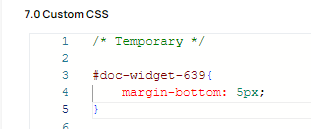
Hi Stephanie, this is actually a margin.
Enter your email address or username and password below to log in to Docebo Community. No account yet? Create an account
Enter your E-mail address. We'll send you an e-mail with instructions to reset your password.