Answer

Task Widget - Adjust names of lists

  • May 5, 2025
  • 8 replies
  • 98 views

dklinger
Hero III
Forum|alt.badge.img+11

Hi everyone,

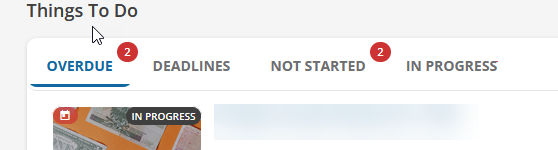
Where we cannot configure the names related to the task widget, I was wondering if there was a way via CSS to adjust the title of one.

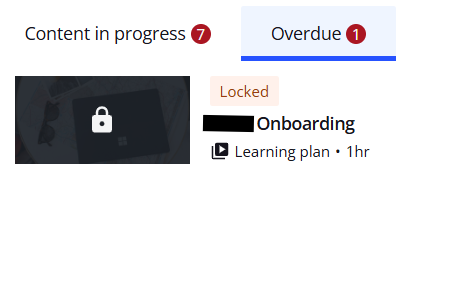
For example, there is a new overdue and expired list. We want to rename it to just overdue.

Is there a way to:

  1. adjust the title to something else via CSS (like do a replace)
  2. remove the titles all together from the widget.
  • We can use the “row title container” to name the tile a bit more appropriately.

So if you have gone down this rabbit hole in the past and have come back up with a rabbit, I would love to save a cycle of research on it. Let me/us know!
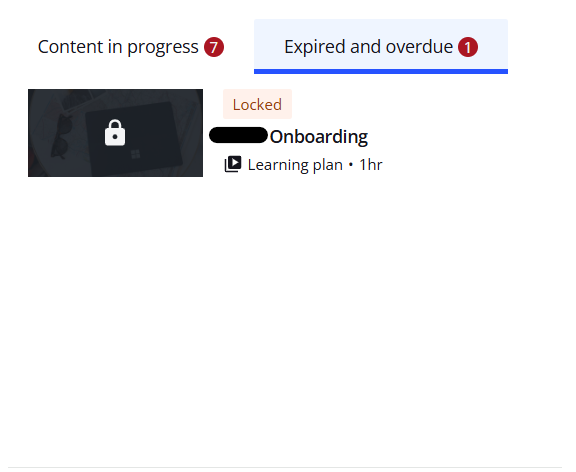

Best answer by mstrom

@dklinger sure thing…


Before Change

Widget


Localization


After Change

Widget


Localization


8 replies

dklinger
Hero III
Forum|alt.badge.img+11
  • Author
  • Hero III
  • May 5, 2025

A little more - when I read a little more out there on the etherwebs, it looks like you can attempt to do something with a pseudo element - but I do not if it gets “respected” by the style sheet.

https://www.geeksforgeeks.org/how-to-replace-text-with-css/


dklinger
Hero III
Forum|alt.badge.img+11
  • Author
  • Hero III
  • May 5, 2025

Purely an FYI - as part of my travel with this - in the localization tool, you can find the text Expired and Overdue….but it is configured for a page and not the widget.


KMallette
Hero II
Forum|alt.badge.img+9
  • Hero II
  • May 9, 2025

@dklinger … I thought I had been down this rabbit hole and found the rabbit, but I realized what I did was only to change the order of the tabs, not the names on the tabs. But I agree, there should be some latitude as to what it gets called. If for no other reason than the widget should fit into a 1/3 row, but you can’t if you tabs titles are a long.

… sorry, no 🐇🐰


Forum|alt.badge.img+1
  • May 12, 2025

Purely an FYI - as part of my travel with this - in the localization tool, you can find the text Expired and Overdue….but it is configured for a page and not the widget.


I changed the Expired and Overdue to Overdue in localization and it changed it in the task widget. Not sure why it’s listed as pages either but it works.


dklinger
Hero III
Forum|alt.badge.img+11
  • Author
  • Hero III
  • May 12, 2025

@mstrom - can you pop a screenshot? This will be awesome to see - it wasnt working for us.


Forum|alt.badge.img+1
  • Answer
  • May 12, 2025

@dklinger sure thing…


Before Change

Widget


Localization


After Change

Widget


Localization


dklinger
Hero III
Forum|alt.badge.img+11
  • Author
  • Hero III
  • May 12, 2025

@mstrom - you are making my day. I need to go back to the drawing board and test just a little more.

Thank you!!!!!


dklinger
Hero III
Forum|alt.badge.img+11
  • Author
  • Hero III
  • May 12, 2025

@mstrom - you are making my day. I need to go back to the drawing board and test just a little more.

Thank you!!!!!

And I got it without even going too much deeper. So the cause of my miss was because I edited in the English UK versus English (oopsy).

Woot woot ​@mstrom made my day!