
Best Answer

Use CSS to Hide Filters and Calendar in Catalog Search Bar

  • August 10, 2026
  • 4 replies
  • 90 views

Hi everyone -

I’ve seen some awesome posts about hiding the catalog search bar completely.  However, I want to keep the catalog search bar and hide the Filters and Calendar options from my catalog search bar.  Would there be a way to hide this using CSS?
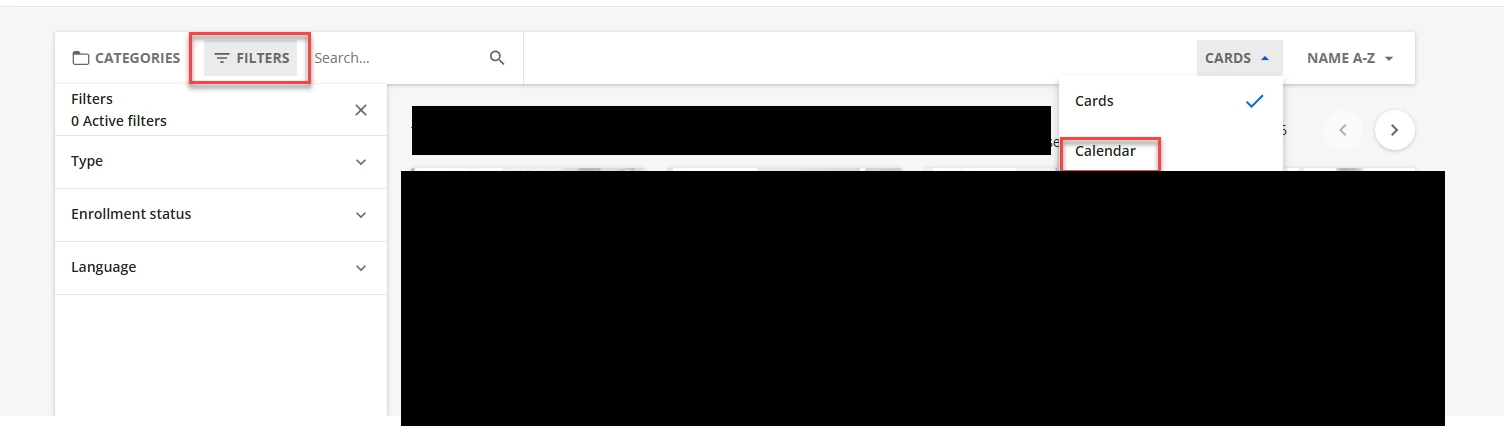
 

Any help would be greatly appreciated!


Thank you!


Liz

Best answer by ben.clark

Hi Liz! I found CSS to hide the “Filters” option from the catalog search bar. The below code works for the built-in catalog page. If you’re using a catalog widget, you’ll want to replace #doc-page-catalog with #doc-widget-123 (123 being the actual widget ID which you can get from the inspect tool).
 

/* Hide Filters but keep the catalog search bar */

#doc-page-catalog .ui-data-browser-panel-trigger:has([aria-label*="Filters"]) {

display: none !important;

}

I’m having trouble with the “Calendar” option, but if I can find code that works, I’ll post it here.

4 replies

erin.brisson
Docebian
Forum|alt.badge.img+3
  • Docebian
  • August 11, 2026

Hey Liz! I assume you’ve seen these two posts but they are not what you are looking for as you want to keep the catalog search bar, correct? 


  • Author
  • Contributor I
  • August 11, 2026

Hey Liz! I assume you’ve seen these two posts but they are not what you are looking for as you want to keep the catalog search bar, correct? 


Hi Erin -

Thanks for sharing! Yes, I want to keep the catalog search bar, I just want to hide the filter and calendar options.


Best,

Liz


ben.clark
Docebian
Forum|alt.badge.img
  • Docebian
  • Answer
  • August 11, 2026

Hi Liz! I found CSS to hide the “Filters” option from the catalog search bar. The below code works for the built-in catalog page. If you’re using a catalog widget, you’ll want to replace #doc-page-catalog with #doc-widget-123 (123 being the actual widget ID which you can get from the inspect tool).
 

/* Hide Filters but keep the catalog search bar */

#doc-page-catalog .ui-data-browser-panel-trigger:has([aria-label*="Filters"]) {

display: none !important;

}

I’m having trouble with the “Calendar” option, but if I can find code that works, I’ll post it here.


  • Author
  • Contributor I
  • August 12, 2026

Hi Liz! I found CSS to hide the “Filters” option from the catalog search bar. The below code works for the built-in catalog page. If you’re using a catalog widget, you’ll want to replace #doc-page-catalog with #doc-widget-123 (123 being the actual widget ID which you can get from the inspect tool).
 

/* Hide Filters but keep the catalog search bar */

#doc-page-catalog .ui-data-browser-panel-trigger:has([aria-label*="Filters"]) {

display: none !important;

}

I’m having trouble with the “Calendar” option, but if I can find code that works, I’ll post it here.

Hi Benton -


Thank you so much! I appreciate you looking into this and providing the CSS! 


Best,

Liz