
Best Answer

Use Custom CSS to Hide 'Enrolled' Status from Catalog Card

  • August 7, 2026
  • 4 replies
  • 75 views

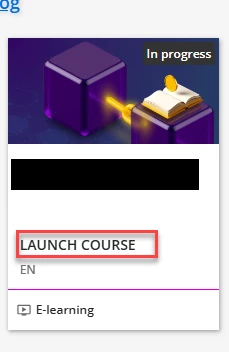
Recently, I saw this information show up on courses that are ‘Enrolled” or “Launched”.  How do I hide it on the card tile? I tried to hide the card details/different css, but I cannot identify how to hide the language from the Course Catalog. The language does not show up under My Learning only the course catalog.


Thank you for your help!

Best answer by INoahGuy_Lrnlab

Hi ​@eab00513, I agree with ​@JeanetteMcVeigh, someone has used localization to change typical language found there.


If you want it ‘removed’, try this CSS:

/* Hide Enrolled from Catalog */
.ui-card-content-colophon {
display: none !important;
}

Hope that helps!

4 replies

JeanetteMcVeigh
Hero II
Forum|alt.badge.img+10

Hi. I would check your localization settings. I think perhaps someone modified yours to say that...just a guess.


Hi ​@eab00513, I agree with ​@JeanetteMcVeigh, someone has used localization to change typical language found there.


If you want it ‘removed’, try this CSS:

/* Hide Enrolled from Catalog */
.ui-card-content-colophon {
display: none !important;
}

Hope that helps!


  • Author
  • Contributor I
  • August 10, 2026

Hi. I would check your localization settings. I think perhaps someone modified yours to say that...just a guess.

Ah, I did not even think of removing the word from a localization level and leaving it blank, thank you!


  • Author
  • Contributor I
  • August 10, 2026

Hi ​@eab00513, I agree with ​@JeanetteMcVeigh, someone has used localization to change typical language found there.


If you want it ‘removed’, try this CSS:

/* Hide Enrolled from Catalog */
.ui-card-content-colophon {
display: none !important;
}

Hope that helps!

This is perfect, thank you so much!