

Docebo Connect - Outlook

  • July 13, 2023
  • 18 replies
  • 425 views

ckujawski
Contributor III
Forum|alt.badge.img

Hi everyone, 


we are using Docebo Connect  - Outlook integration for a couple of last month but recently we are experiencing some sync delays. After setting up ILT and events invitations are send to learners with a huge delay even 12 hours. 

Does any of you have/had similar problem and know what  can be done with it? 

I contacted Help Desk and our Account Manager on this but unfortunately they didn’t provide us wit any helpful information. 

The error we are getting is, this is displayed on the event level: 

Thank you in advance for any help. 

18 replies

lrnlab
Hero III
Forum|alt.badge.img+10
  • Hero III
  • July 13, 2023

hmm...we are using but not that broadly...do you have a high volume of sessions and/or recent changes? In our set-up the sync does also go through elearning course updates too not that we ever noticed a slow down as a result of this.


ckujawski
Contributor III
Forum|alt.badge.img
  • Author
  • Contributor III
  • July 13, 2023

We don’t have many sessions, for example I set up an ILT yesterday evening (approx. 6:30pm) - with one session and one event in it, learners, very small number of 5, received the invite around 5:50am. The other example an ILT set up today morning, the invites are still not out. 

I wonder what can cause the problem that sync is taking so long. 


lrnlab
Hero III
Forum|alt.badge.img+10
  • Hero III
  • July 13, 2023

have you looked at all the jobs to see if you can plan down where the slowdown occurs? It’s a bit painstaking but might be worth a try.


Forum|alt.badge.img
  • Former Docebian
  • August 3, 2023

Hi @ckujawski, and thank you for bringing your issue to the community. May I ask if you’re still experiencing these delays?


  • Newcomer
  • August 17, 2023

@elliott.vickrey We have a similar delay, it takes about 35 minutes or longer for a calendar invite to appear on an invited users outlook calendar. Any ideas on what might be causing this? Or @ckujawski were you able to find a solution?


  • Novice III
  • August 17, 2023

Following as we have the same issue.


ckujawski
Contributor III
Forum|alt.badge.img
  • Author
  • Contributor III
  • August 31, 2023

hi @elliott.vickrey, @eva.perez, @lizaa - apologies for the delay in answering your questions. 

Unfortunately we still experience these delays.  It’s very annoying, for example we opened enrolment for a set of courses for our staff so they can enrol themselves, some people enrolled yesterday morning, around 11am and they still didn’t get the invite. I would understand delay is we are enrolling 300 people at once but if we have a single enrolment that should work in a matter of seconds. 

I tried to investigate recipes but I’m “speaking” their language :) at the same time recipes are not giving us any errors … 

Did any of you were able to figure something out?


Hi All,

We recently went live in May 2023 and are using Docebo Connect with Office 365.  We are also experiencing sync delays with our Outlook invites and seeing the errors as banners similar to your screen shot in our courses.  In some cases users aren’t added to the invite at all.  Docebo support is still working the case trying to determine what is causing the sync errors we are seeing.

One item of interest that also aligns with the original report above is that it’s taking MUCH LONGER for the invite to generate to users than it did when we went live May just as you noted.  When we first started the users typically received an invite within a 10 minute window.

I’ll definitely add updates as support continues to investigate if a solution is determined.  If you could do the same we would appreciate any feedback as to the solution.

Thanks!


ckujawski
Contributor III
Forum|alt.badge.img
  • Author
  • Contributor III
  • September 19, 2023

thank @kim.endrijaitis for the info. I spent hours with Docebo support and they weren’t able to explain me what is causing these delays. 

I have noticed same thing, when we onboard Docebo Connect in March, it was taking between 5 to 10 minutes - time for sync, now it’s taking hours. 


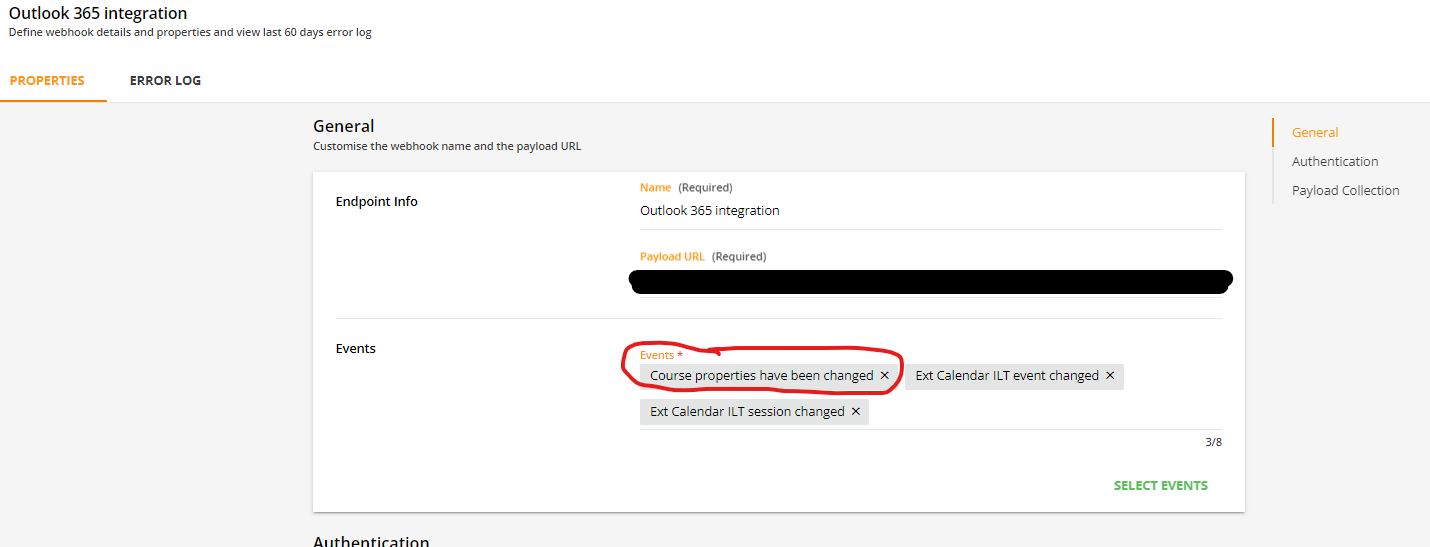
I have other question to you all. How is your webhooks set up, do you have Course Properties Have Been Changed added to your events? 


It seems to send a calendar invite to all enrolled, even when we change a course code or course thumbnail - things which seems doesn’t matter and are not included at all in the invite itself. I was checking with Docebo Connect if it’s necessary to have this event but didn’t get a proper response. Do you have this event in your webhooks setup? 


  • Novice I
  • January 5, 2024

@ckujawski 

We have been experiencing such sync delay errors as well. 

One possible explanation we have concluded is that the Course settings don't have the RSVP selected while at the session level it is and it could be true that the users are enrolled before this option is enabled at the session level. Is this the case with you set-up too.


Also there isnt any easy way of identifying which sessions have sync delays without going into each course and checking them individually.


orobinson
Novice III
  • Novice III
  • March 4, 2024

We see this fairly frequently. Can’t seem to find the rhyme or reason and just cross our fingers it clears up.


Hard to tell an end user “your invite should get there in a few minutes…. or...”


Forum|alt.badge.img+1

We are also experiencing same issues as well with the connector and it’s causing massive headache.
We have learning programs where we need to use ILTs but these sync errors & delays are constantly blocking us to have smooth learning experience. 

In our webhook we also have that “course properties have changed” and now that you @ckujawski mentioned it I started question is it necessary also as it trickers notifications when something unrelated is changed.

Support has mentioned that they have identified some issues with the connector and are trying to solve them but no ETA has been given even internally.


ckujawski
Contributor III
Forum|alt.badge.img
  • Author
  • Contributor III
  • April 24, 2024

Fortunately we don’t experience the sync problem anymore. We didn’t do anything specific, neither Help Desk, more like it cleared up by itself … Anyway seeing that many people having problem with the sync it’s alarming. 


In relation to the “Course Properties Have Changed” I had a couple of meeting with Docebo and this can be disabled. When that option is on any, even small change on a “course level”, let say course description will be changed or thumbnail updated, it would trigger a calendar update. So if you @Olli-Pekka Haataja  don’t want to bombard your learners with unnecessary calendar updates you can take this option off. 


Forum|alt.badge.img+1

@ckujawski Thank you for letting me know that change in the webhook!!! 🙇🏻
I’ve taken it off immediately to reduce calendar updates.

Regarding the sync problem, I have a support person looking into it so let’s hope we can come into same solution as you have. 🤞🏻


ckujawski
Contributor III
Forum|alt.badge.img
  • Author
  • Contributor III
  • April 24, 2024

I hope they will be able to help you @Olli-Pekka Haataja and found a global solution 🤞🏻


Jason Kocur
Helper I
Forum|alt.badge.img+1
  • Helper I
  • March 6, 2025

Hi All, 

Is anyone else experiencing this still? We recently had a 5 day delay for one of our courses. The job within the recipe did not process until 5 days after enrollments occurred into sessions. We had to check with our internal IT team to see if it was related to Outlook. They confirmed it wasn’t and upon further review of the recipe jobs we noticed the delayed process. There seems to be a hang up in the connection between the LMS and Connect that is driving this.

We’ve also seen specific sessions not sending any invites after creation. For example, in a course, we’ve seen session 3 work perfectly, but sessions 1,2, and 4, not working. They were all set up the same way and all of our other courses were functioning normally. 

Upon resaving the sessions, they immediately send session enrollment invites which may have been backed up for days or even weeks until we hear from clients. Since the jobs never run errors aren’t reported which makes the customized error reporting we built into the recipes useless. We created and launched our customized recipes with the help of a Docebo rep just before the October update, so while they included the updated recipe form,  we haven’t officially updated the recipes because there wasn’t a need to. That has become an impediment to receiving support. 


Forum|alt.badge.img+1

We haven’t had too many programs running lately which need the external invites to be sent but sounds somewhat familiar ​@Jason Kocur 😅

What we usually do is that when we create an ILT with external calendar invite needed as part of it is, that we enroll the session(s) to a dummy user we have in the system so we can see that everything is triggered as it should and tweak the settings if needed and only then enroll the actual attendees.

Definately not the ideal workflow but at least that way we have better understanding on what works and what doesn’t.

Hopefully, in somepoint the ILT engine will be updated and at least Docebo is collecting feedback on the usage of ILT’s to make it better.


Jason Kocur
Helper I
Forum|alt.badge.img+1
  • Helper I
  • March 10, 2025

@Olli-Pekka Haataja Yes, we typically do something similar to ensure our courses are working. This recent delay impacted a single course out of 4 we launched at the same time. We tested and pre-enrolled learners into the course, while they chose the specific session to attend. It was working fine until about a week after launch when we noticed the hiccup. The weird part is none of the other courses were impacted. You would kind of expect all of them to see the same issue. 

Hopefully, the ILT engine is updated soon, that would be nice