


Hi everyone,
Observation Checklists come up constantly in the community, and when you look across those threads, the same operational roadblocks tend to surface once organizations scale past basic peer or manager sign-offs:
-
No visibility before submission: Managers cannot see what the learner has entered until the entire checklist is submitted, eliminating opportunities for real-time coaching.
-
Single-approver binary flow: You get one approver, and the action is strictly Approve or Reject—with no step-level back-and-forth conversation.
-
Input and evidence constraints: Notes are capped at 250 characters, without built-in range validation or inline photo capture per step.
-
High-level reporting: Reporting stops at overall completion and a final score, making line-level auditing difficult.
For teams with straightforward compliance needs, Docebo's native Observation Checklists get the job done out of the box. But in enterprise environments where on-the-job training involves strict quality thresholds, multi-department sign-offs, and audit trails, we needed something more flexible.
So we built a custom architecture that runs a dynamic checklist interface inside a SCORM package in Docebo, powered by Docebo Connect as the backend.
Project status up front: The UI screens, dynamic rules, and scoring logic are fully built and tested against a SCORM runtime. We are currently wiring the full Docebo Connect backend in our sandbox, and I have marked the specific integration components we have already proven live in production tenants below. I will follow up on this thread once the end-to-end tenant run is complete.
The Use Case: "Bella Gelato"
To test every edge case, we modeled the build around Bella Gelato, a fictional ice cream shop onboarding Dana, a new scooper completing her Opening Shift Readiness checklist during her first five days.
Instead of a single reviewer, two people share responsibility:
-
Avi (Shift Manager): Reviews front-of-house setup and machinery.
-
Maya (Hygiene Officer): Reviews food safety and allergen protocols.
What This Unlocks Beyond Native Checklists
-
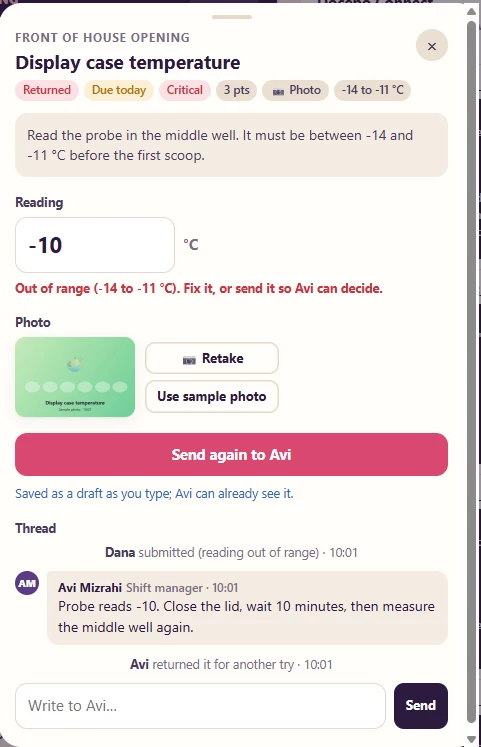
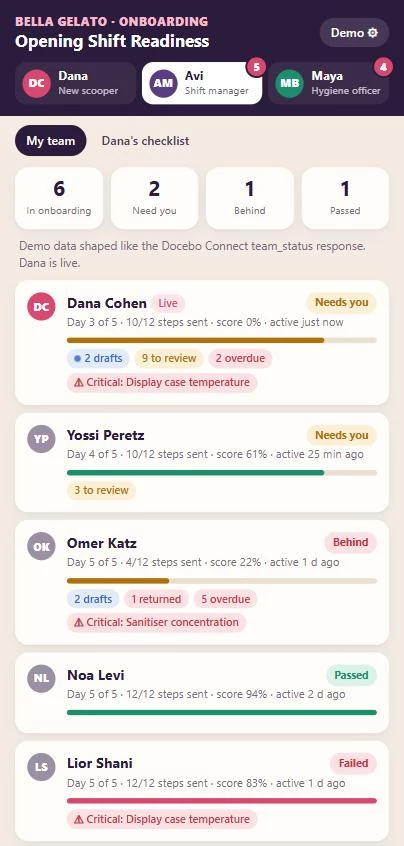
Live Draft Visibility for Coaching: Every field autosaves as a draft. Before Dana ever hits submit, Avi can open his team view, see "Draft, not submitted: −10 °C, photo attached," and jump into that step's comment thread to coach her before she submits an out-of-range reading.
-
Rich Evidence & Automated Range Checks: Each step supports phone camera uploads, notes, and numeric readings validated against strict ranges (e.g., display case between −14 °C and −11 °C; sanitizer between 200 and 400 ppm).
-
Step-Level Conversation Threads: Reviewers can return a single step with a specific reason. The learner fixes just that item and resubmits, with every message timestamped and attributed.
[
]
-
Parallel Approvers with Finger Signatures: Each approver owns their designated sections and signs off on mobile or desktop with a touch signature. Both signatures are required to trigger completion.
-
Smart Conditional Rules & Critical Fails: Steps carry weighted scores toward an 80% pass mark, but designated Critical Steps automatically fail the checklist if not approved—regardless of the total score. Conditional toggles (e.g., "Nut flavours on display today?") dynamically activate or hide allergen steps, and per-step due dates flag overdue items automatically.
-
Line-Level Reporting: Writes one
cmi.interactionsentry per step to the SCORM runtime alongside a complete decision audit log in Docebo Connect.
The Architecture: How It Works Under the Hood
When we deploy custom interactive tools like this in enterprise environments, the golden rule that holds up best is: Docebo stays the system of record, Docebo Connect holds the operational data, and the SCORM package is strictly the presentation layer.
1. Two Courses, One SCORM Package
Because a SCORM session runs inside an individual learner's player context, managers cannot natively open a learner's SCORM instance to grade it. We solved this with a two-course pattern using the exact same package uploaded via the Central Repository:
-
Learner Course: Launches in standard learner mode.
-
Manager Course (My Team Checklists): Assigned automatically via an Enrollment Rule on the managers' groups, launching the package in Observer Mode.
2. Data Tables in Docebo Connect
Storing the structure in Connect Data Tables means updating a temperature range, step weight, or question text requires zero SCORM re-uploads:
-
checklist_templates,checklist_sections,checklist_items: Treats content as data. -
checklist_assignments: Maps learners to their specific reviewers automatically. -
item_states: One row perlearner × step. Because Data Table upserts match on a single column, we use a composite key (assignment|step) so rapid autosaves never create duplicate rows. -
assignment_progress: One summary row per learner, updated on every write. Since Data Table queries don't support anINfilter, the manager's team dashboard reads this single summary table in one call rather than aggregating hundreds of step rows on the fly. -
item_comments&signoffs: Stores thread histories and signature payloads. -
event_log: Immutable audit trail of formal actions (submit, return, approve, sign-off), excluding draft saves to keep the log clean.
3. Five API Endpoints (Split Read/Write Collections)
To keep security tight, endpoints are split into separate Read and Write API collections with distinct tokens:
-
identify: Resolvescmi.core.student_id(username) to the numeric Docebo User ID once at launch. -
get_checklist: Pulls template structure plus current state so learners can switch between desktop and mobile seamlessly (suspend_dataacts only as a lightweight local cache). -
save_progress: Handles drafts, submissions, reviews, comments, and signatures. Crucial security rule: The recipe validates the actor's role server-side and never trusts a role parameter passed from the browser. -
team_status: Powers the manager's multi-learner dashboard. -
send_reminder: Triggers targeted nudges for overdue steps.
4. Event-Driven Automations & Server-Side Completion
-
Webhook Assignment: An enrollment webhook triggers the assignment recipe. Rather than relying solely on the webhook payload, the recipe queries the Docebo User API to pull the learner's
managers[]array—mapping both the Line Manager and Hygiene Officer manager types automatically. -
Notification Outbox & Daily Digest: Submit and review events queue into an outbox table processed by a dispatcher recipe with built-in retry logic, while a scheduled daily sweep sends each manager a single consolidated overdue digest.
-
Server-Side Course Completion: Because final sign-off happens inside the manager's session (not the learner's), the SCORM player cannot mark the learner's course complete directly. Instead, once both approvers sign off, Docebo Connect calls
PUT /learn/v1/enrollmentsserver-side to mark the learner's enrollment complete and reads it back to confirm (proven live in production).
Field Notes & Lessons Learned So Far
If you are thinking about building app-like experiences inside SCORM with Docebo Connect/Workato, keep these lessons from our live client builds in mind:
-
Resolve
cmi.core.student_idimmediately (Proven live): Docebo passes the username incmi.core.student_id, while almost every Docebo API endpoint requires the numericuser_id. Resolve and cache it on launch. -
Use the Central Repository (Proven live): Uploading the package through the Central Repository allows instant propagation across both the Learner and Manager courses.
-
Return flat lists from API recipes (Proven in client builds): Building deeply nested JSON arrays inside Workato response steps is slow and brittle. Return flat table rows from Connect and let your front-end JavaScript reconstruct the hierarchy in milliseconds.
-
Debounce autosaves to protect task usage (Proven in client builds): Every API call triggers a recipe run. Batching draft changes on a 2–3 second debounce keeps the UX feeling instantaneous without burning through Connect task quotas.
-
Keep
suspend_datatiny: Base64 photos and canvas signatures will blow past SCORM 1.2's 4,096-character limit immediately. Keep media and state in Connect, not the LMS runtime. -
Assume anything in the SCORM package is public: A savvy user can inspect network traffic from their browser. Scope your API collection tokens strictly and enforce all permission checks inside the Connect recipes.
-
Contract-first data design: We built the front end against mock JSON matching our exact endpoint schemas from day one. Wiring the live recipes now is just flipping a config URL, with zero UI refactoring.
What We Are Testing Next
Next up in our tenant test run:
-
Validating the two-course learner/manager experience inside the Go.Learn mobile app.
-
Stress-testing the enrollment webhook -> multi-manager assignment flow.
For those of you who have pushed Observation Checklists to their limits—or used Docebo Connect to build custom stateful workflows inside SCORM—how did you handle the manager review experience? Would love to hear what worked, what broke, and any questions you have in the comments!