Automated reports not being delivered despite successful email DNS validation

  • Oct 28, 2026 1:44 PM UTC
  • 5 replies
  • 24 views

Hi all,

We’re trying to set up automated reports as part of our onboarding process however are experiencing some issues.  

We’ve configured our email domain through Mimecast and added the required SPF, MX, and DKIM DNS records. The DNS configuration test reports: “The Email DNS configuration has been validated successfully.” 

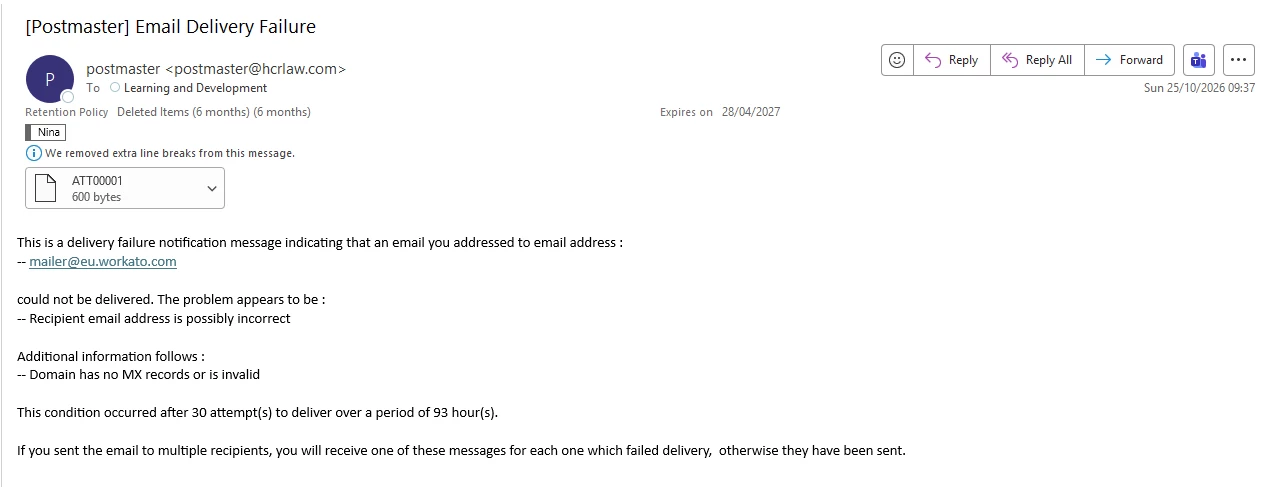
Despite everything having been set up our end and the background job indicating that each task has been completed, the automated reports generated from our custom-built reports are still not being delivered to the email addresses specified in the report settings. Instead, we keep getting email delivery failures stating that the MX records are invalid.

Has anyone encountered this issue before or found a way to troubleshoot it?

Many thanks.

5 replies

Noah
Docebian
  • Docebian
  • Oct 30, 2026 8:49 PM UTC

Hi Nina, The “MX records are invalid” wording is a useful clue, so we can start there. Could you share the full bounce message, including headers? Curious which domain it says has the invalid MX, and which server generated the rejection. (If there is sensitive information, might be best to use a support case! but happy to dig in here as well if it’s not sensitive information) 

If it’s the recipient’s domain: double-check the recipient addresses in the report settings for typos, and look up that domain’s MX publicly (e.g. MXToolbox). If the domain only resolves inside your network, Docebo won’t be able to deliver to it.

If it’s your sender domain: look up its public MX and compare it to the MX value shown in Docebo under Domain management > Email sender domains. A common cause is using a domain whose MX already points to Mimecast for your inbound mail, which conflicts with the MX Docebo’s built-in email service needs. If that’s the case, the usual fixes are a dedicated subdomain for platform email (e.g. learning.yourcompany.com) or, if you have the Custom SMTP app, relaying through Mimecast instead.

If the records all match and it still fails, I’d suggest opening a Support case with the bounce and the test time, and ask them to confirm what response Docebo received from the next mail server.

Happy to dig in further once you have the bounce details!

Noah


Hi Nina,

Ciaran here with Docebo Support! You can also open a ticket in your help centre where we can dig deeper directly on your platform. To open a ticket, a Superadmin can click the profile icon in the platform, select Help Center, then Help desk ticket. In the form, select Single Sign-On and describe the related SCIM or integration changes, your target date, and the guidance you need. Please share metadata, tenant identifiers, and other configuration details through the ticket rather than posting them publicly here. See Using the platform's Help center for details.


  • Author
  • Newcomer
  • Nov 2, 2026 10:22 AM UTC

Hi Noah, 


Thank you for your help. Unfortunately I don’t have the option to open a ticket on Docebo. This is the email I keep getting. I have checked for typos in the reporting area and that’s not the case. 


Regards,

Nina


Noah
Docebian
  • Docebian
  • Nov 4, 2026 5:47 PM UTC

Hi Nina, thanks for sharing details! Was mailer@eu.workato.com actually in the recipient list, or is it the From/Reply-to address on an automated message someone replied to? Is it expected to accept incoming mail? and did the message reach any other intended recipients, or did they bounce too?

Curious if you could you open the attached ATT00001 and check whether it includes the detailed SMTP status/error and the reporting or remote mail-server name? No need to share the full attachment as it might have sensitive information 


Noah


  • Author
  • Newcomer
  • Nov 6, 2026 9:06 AM UTC

Hi Noah, 


Thank you for your help! I fixed it :) I only had to change the email address in the advanced settings as that email address was invalid. 


Regards,

Nina