
Best Answer

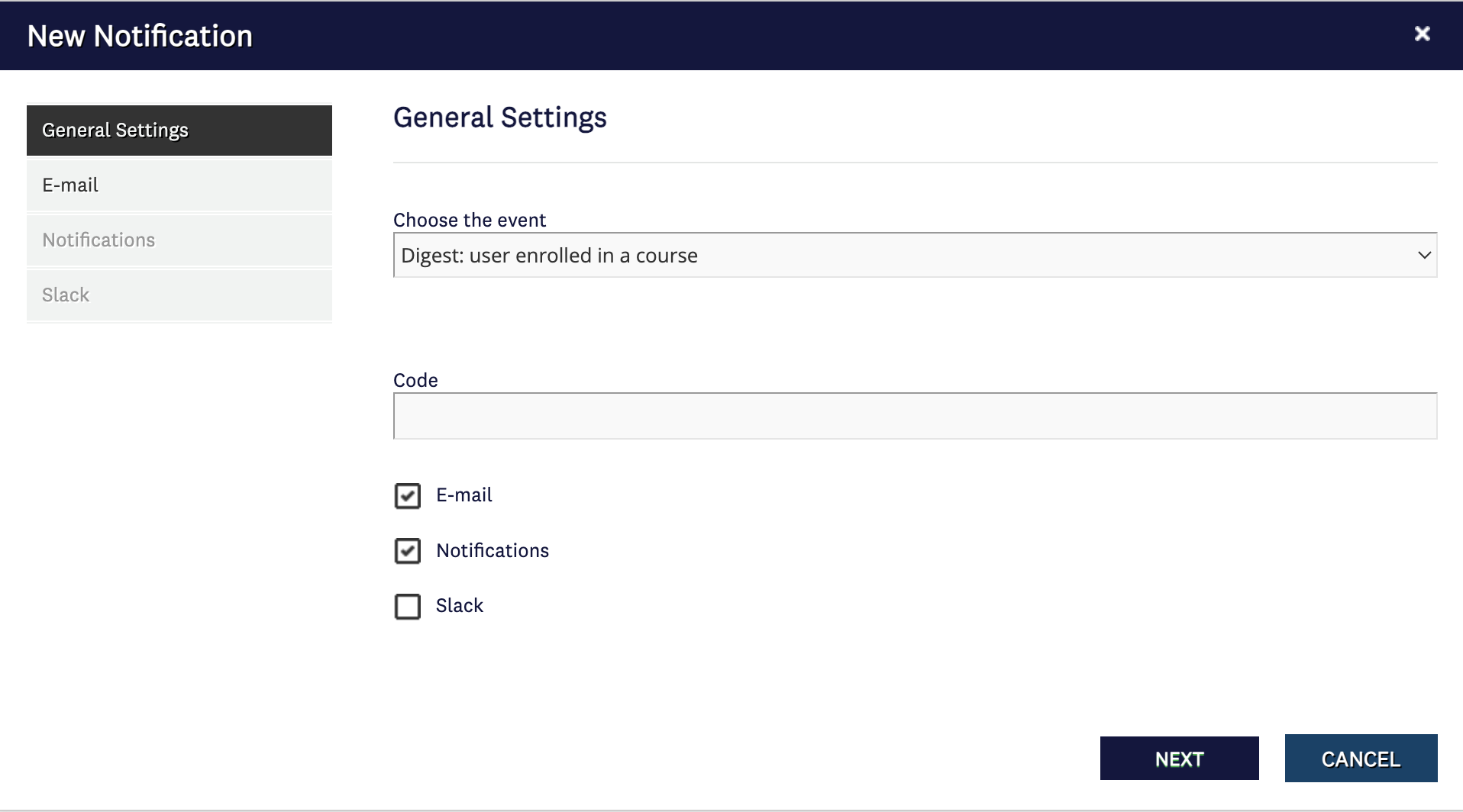
How do I schedule Notification "Digest user enrolled in a course"?

  • Oct 6, 2023 8:12 PM UTC
  • 8 replies
  • 326 views

Forum|alt.badge.img+4

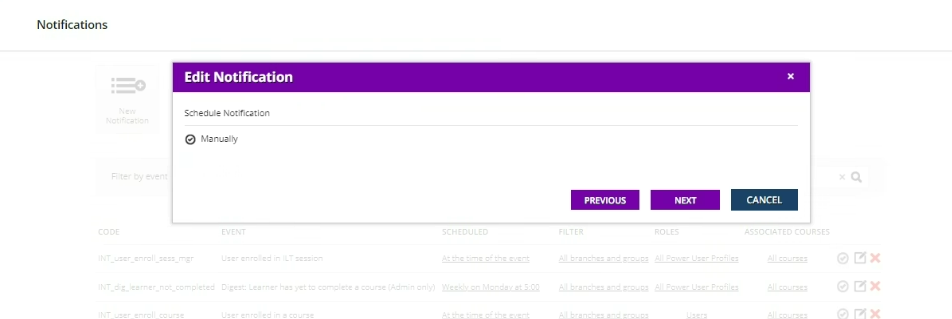
When I get to the schedule notification panel, I only see Manually no other options or configuration choices. I’m looking for frequency (day, week), time of day, etc. 


Best answer by diane.gomez

@alekwo I took your suggestion and opened a ticket with Docebo. Turns out it is impacted by an Advanced setting.


After inquiring with my Tier-2 team, we can confirm that this is intended behavior due to this particular setting under Advanced Settings (Accessed by going to Admin Gear > Advanced Settings > Advanced Options > Scroll down until you see, "Send immediate notification digest on massive enrollment action"):

If this is checked, you cannot schedule this notification. I unselected it and I am good to go. 

View original

8 replies

lrnlab
Hero III
Forum|alt.badge.img+10
  • Hero III
  • Oct 6, 2023 8:16 PM UTC

That’s what I see as well...strange that there is no option to schedule it...the other digest templates have those options...you found another gap!


alekwo
Helper III
Forum|alt.badge.img+2
  • Helper III
  • Oct 9, 2023 6:56 AM UTC

@dianex.gomez that’s very odd, we use that notification on our platform on an hourly schedule.

I just checked, when I’m configuring that notification


The only option I see is ‘Every’ - there is no ‘Manual’ option.


I’d suggest opening the support ticket and letting Docebo investigate this.


Bfarkas
Hero III
Forum|alt.badge.img+6
  • Hero III
  • Oct 10, 2023 12:25 AM UTC

Concur, I have Alek’s experience as well, seems glitchy.


Forum|alt.badge.img+4
  • Author
  • Guide II
  • Answer
  • Oct 17, 2023 3:05 PM UTC

@alekwo I took your suggestion and opened a ticket with Docebo. Turns out it is impacted by an Advanced setting.


After inquiring with my Tier-2 team, we can confirm that this is intended behavior due to this particular setting under Advanced Settings (Accessed by going to Admin Gear > Advanced Settings > Advanced Options > Scroll down until you see, "Send immediate notification digest on massive enrollment action"):

If this is checked, you cannot schedule this notification. I unselected it and I am good to go. 


alekwo
Helper III
Forum|alt.badge.img+2
  • Helper III
  • Oct 17, 2023 3:17 PM UTC

@dianex.gomez thanks for sharing the cause, good to know.


Bfarkas
Hero III
Forum|alt.badge.img+6
  • Hero III
  • Oct 17, 2023 3:18 PM UTC

Feels like when that is enabled, the box should basically have an explanation of that instead of just option gone.

Good to know though!


lrnlab
Hero III
Forum|alt.badge.img+10
  • Hero III
  • Oct 18, 2023 6:23 PM UTC

Good to know, thank you. I think that’s on by default.


JKolodner
Guide I
Forum|alt.badge.img+8
  • Guide I
  • Aug 14, 2024 6:59 PM UTC

OK, everyone, I understand what’s explained above. However, what am I NOT going to get if I uncheck that box? I want to make sure I’m not fouling anything else up.