
Question

Resending Notification

  • Feb 10, 2026 2:53 PM UTC
  • 6 replies
  • 169 views

We have specific direction in our “User created by Admin” notification that goes to users so they can log in and download the app. It has their credentials and such, but we just launched so it didn’t go perfect with importing users. We have a lot of email updates to make and such, so after we make them we wanted to resend that notification.


Is there any way to do so?


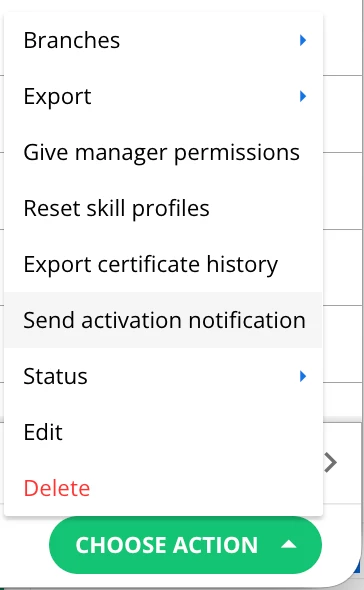
Nevermind! i just saw the activation notification option

6 replies

lrnlab
Hero III
Forum|alt.badge.img+10
  • Hero III
  • Feb 10, 2026 5:54 PM UTC

You can resend these manually from the user management page. Select the users to whom you wish to resend the email and then click Choose Action > Send activation notification 


  • Newcomer
  • Jun 10, 2026 1:45 PM UTC

This option isn’t populating for our Power Users. Is this only available for Super Admin, or what permission am I missing? Thanks!


lrnlab
Hero III
Forum|alt.badge.img+10
  • Hero III
  • Jun 10, 2026 3:08 PM UTC

Check for a permission under the Users section called, Activate users; not sure but think that may also control access to this option. If that’s not it, check that the PU gas access to ‘view” notifications. That might also be part of the issue.

https://help.docebo.com/hc/en-us/articles/360020084460-Creating-and-managing-users#01GE4MDPB8NBDAZ3C1W3PHB415

no mention of this specifically for PUs though.


  • Novice I
  • Jul 8, 2026 8:21 AM UTC

Check for a permission under the Users section called, Activate users; not sure but think that may also control access to this option. If that’s not it, check that the PU gas access to ‘view” notifications. That might also be part of the issue.

https://help.docebo.com/hc/en-us/articles/360020084460-Creating-and-managing-users#01GE4MDPB8NBDAZ3C1W3PHB415

no mention of this specifically for PUs though.

Hey ​@lrnlab we have activated both “Activate Users” and given complete access to notifications. It still doesn’t allow PU to send the activation notification. Any ideas? 


Forum|alt.badge.img+6
  • Guide I
  • Jul 8, 2026 1:39 PM UTC

Check for a permission under the Users section called, Activate users; not sure but think that may also control access to this option. If that’s not it, check that the PU gas access to ‘view” notifications. That might also be part of the issue.

https://help.docebo.com/hc/en-us/articles/360020084460-Creating-and-managing-users#01GE4MDPB8NBDAZ3C1W3PHB415

no mention of this specifically for PUs though.

Hey ​@lrnlab we have activated both “Activate Users” and given complete access to notifications. It still doesn’t allow PU to send the activation notification. Any ideas? 

i don’t believe there’s any way to give this access to Power Users today


lrnlab
Hero III
Forum|alt.badge.img+10
  • Hero III
  • Jul 8, 2026 9:21 PM UTC

​@DakiG I believe you need to add “edit” user and/or “activate users” permissions to allow this for your PU’s

https://help.docebo.com/hc/en-us/articles/6463399445394-Power-User-permissions