

Help us improve searching in Docebo

  • Oct 7, 2026 7:44 PM UTC
  • 20 replies
  • 242 views

jan-hendrik.meins
Docebian

Hi Search group members! 🔍👋


Search vs. Chat

You might have noticed that we renamed this group and dropped “Harmony”. In context of relaunching Harmony Copilot as the AI assistant we also want to create a clearer distinction between:

  • Search: You enter a search term and get relevant results to find what you're looking for.
  • AI chat: You have a conversation with an AI system to get an answer to a question or prompt.

These are two different jobs, and each deserves its own focus. We're already working on a few changes to the Docebo Search that we'll share here in the coming weeks. In addition we would already like to get your perspective on the current search experience in Docebo, 


We want your feedback

This is the perfect time for you to share your feedback and ideas! We would love to understand:

  • What problems do you run into when you search in Docebo?
  • What would help you find things faster and more easily?
  • What would you change about the search bar or the results list?

You don't need to propose solutions. We mostly want to understand what's frustrating today. Anything that gets in your way counts, not just whether the right result shows up. That could include how results are grouped into categories, which filters are available, and how results are displayed.


Share your thoughts in the comments below. We read every one. 🙌

20 replies

martiniwinski
Influencer I
Forum|alt.badge.img+1

I don’t like that my support questions aren’t answered well in the system. Being able to ground the AI feature with uploaded documents, links, etc. to provide support for our users. E.g. common support requests and answers. Almost like building an agent in addition to the standard AI features.


Dominik
Helper I
Forum|alt.badge.img+1
  • Helper I
  • Oct 8, 2026 9:19 AM UTC

We have the AI Assistant enabled, and one issue I’ve noticed is that users don’t really differentiate between the standard search and the AI Assistant. As a result, they often use the AI Assistant to search for course names or course codes.

This isn’t really a problem today, as we don’t mind whether users find content through standard search or the AI Assistant, as long as they find what they’re looking for.

My concern is what will happen once the AI Assistant starts consuming AI credits at the end of October. Users may unintentionally generate costs simply because they use the AI Assistant instead of the standard search.

I’d love to see a clearer distinction between the two experiences and a more obvious way to separate them. For power users this may not be an issue, but many learners won’t necessarily be aware of the difference.


  • being able to search on learning bite name 
  • being able to find terms if they’re not 100% correctly spelled. For example, finding ‘The Ritual of Hammam’, when you type ‘hamam’. 
  • Being able to search in-scorm content when using a remote scorm. 

JEntis
Helper I
Forum|alt.badge.img+7
  • Helper I
  • Oct 13, 2026 2:01 PM UTC

We have the AI Assistant enabled, and one issue I’ve noticed is that users don’t really differentiate between the standard search and the AI Assistant. As a result, they often use the AI Assistant to search for course names or course codes.

This isn’t really a problem today, as we don’t mind whether users find content through standard search or the AI Assistant, as long as they find what they’re looking for.

My concern is what will happen once the AI Assistant starts consuming AI credits at the end of October. Users may unintentionally generate costs simply because they use the AI Assistant instead of the standard search.

I’d love to see a clearer distinction between the two experiences and a more obvious way to separate them. For power users this may not be an issue, but many learners won’t necessarily be aware of the difference.

We have a similar concern. We’re about to launch the AI Assistant to our learner population and the AI credits are a concern since that is a brand new thing and therefore wasn’t planned for in our budget for this year. I think the two things are integrated a bit too closely. I created a video guide for our learners showing a) how the icon/side panel access to the AI works and b) showing how to get to it using the regular search bar. I feel that, despite my video, this will be confusing for our learners. I would almost rather there NOT be AI Assistant access from the global search. That would make for a cleaner separation between the two things, especially since they don’t use the same level of search criteria, which has created some frustration for us on the AI side of things.


Also similarly concerned about distinguishing between AI assistant and regular search, and about the system adjusting for common misspellings. We also have some other issues with regular search as well:
1. The algorithm weighting on tags being very close to the weight on titles has us playing very silly reindeer games. Some of this is us, we don’t tend to tag our courses with words that appear in the title - whereas channel assets might get repetitive words to help corrall. But given tags are clickable, or clear - the current algorithm weighting has us considering moving away from tags altogether.
2. The fact that searches aren’t the same throughout the system is really confusing to our learners - for example, the search bar in the course catalogue or channels is title only, while the global search is for everything. Most of our learners can’t be expected to no that, are often confused and it’s lead us to CSS hacks to make it clearer.
3. Assets as a category has been really challenging for us - learners don’t understand why items that appeared before the hit enter have disappeared from their full page search - and aren’t sure what “Assets” contains.
4. Smaller ask, and we’ve CSS’d our way around it - but the full page, opaque search upon selecting “Enter” is confusing to some of our learners - they don’t really understand that this is stacked OVER the page they were just on, the lack of their menu is startling - and overall they feel portaled somewhere else without expecting it.


  • Novice III
  • Oct 19, 2026 1:14 PM UTC

The search function is pretty rough. When I search a user for example, if there is an extra space, no results are shown. If I type in a wrong letter, no results are shown. Basically, you have to search for EXACTLY how it is in the system or no results will show up. You should be able to filter for similar results or not an exact match. 


AI assistant has largely not produced helpful results for me as an admin. I would say that on a widespread basis, our users are not using it either. Maybe it has improved drastically over the past month. If so, I would be willing to explore using it again. In the past, I largely just became frustrated and used Microsoft co-pilot for help. 


ntosto
Novice III
  • Novice III
  • Oct 19, 2026 3:13 PM UTC

I think the future of navigating an LMS looks more like the google homepage than a a dashboard. A search widget for pages to make it the central element of a page would be really helpful for moving to this approach.


dklinger
Hero III
Forum|alt.badge.img+13
  • Hero III
  • Oct 20, 2026 4:14 PM UTC

Hi - we really need the true granularity of being able to say when a course is to be excluded from the search. I know that there are “certain magics” and best practices that we can do to perform this, but it is not directly a measure on the course container. And the reason why it could be currently hidden could effectively hide itself as we curate content over time. Maybe it is a new search tab that allows for an override and gives insight into the current visibility of the course based on its availability in narrowed scoped catalogs.

We face the problem that courses do not age like a fine wine. But they should remain eligible to certain sectors of the workforce. And at one point should become hard excluded.

To currently make this happen (hide content from search) it is an effect of doing other things. That feels very inconsistent.

I hope what I am describing is clear.


JEntis
Helper I
Forum|alt.badge.img+7
  • Helper I
  • Oct 21, 2026 2:03 PM UTC

The search function is pretty rough. When I search a user for example, if there is an extra space, no results are shown. If I type in a wrong letter, no results are shown. Basically, you have to search for EXACTLY how it is in the system or no results will show up. You should be able to filter for similar results or not an exact match. 


AI assistant has largely not produced helpful results for me as an admin. I would say that on a widespread basis, our users are not using it either. Maybe it has improved drastically over the past month. If so, I would be willing to explore using it again. In the past, I largely just became frustrated and used Microsoft co-pilot for help. 

We struggle with this too, I wish the search in the admin areas was a little more forgiving.


JUJanet
Novice III
Forum|alt.badge.img+4
  • Novice III
  • Oct 29, 2026 10:39 PM UTC

My biggest pain points with search include:

  • Search does not show results for Pages - so if you have a lot of context about a course or program etc. that you want people to see before enrolling in a course, more than can reasonably be placed in a Description, or that links to other relevant places, you need a Page. The users have to find the page either through a series of clicks, or someone has to send them the direct URL. If I had a Page about “Chocolate Curriculum” that page might have links to a “Milk Chocolate” catalog, and “Dark Chocolate” catalog, and a “White Chocolate” catalog. That page then might have a brief history of chocolate, a link to a page “for people allergic to chocolate.” If they search “Chocolate” they might find the individual courses, but they may miss the “richness” of the “Chocolate Curriculum” page, a special coupon code, or an event that is happening related to Chocolate that is not a course. 
  • Search does not show results for Catalogs. Similar to above, there are some times when it would be helpful to serve up all the Catalogs that are relevant to a Search term. 
  • I also think a report on Search would be helpful, though we do now have access to Insights, which has been somewhat filling the gap. I want to be able to see every search term that was tried, what links the people were served based on their search term, etc. 

Sorry if any of these are repeat, and I would be happy if any of these do exist and I’m just not aware. 

Thanks so much!

Janet Wright, Johnstone University aka (JUJanet)


JEntis
Helper I
Forum|alt.badge.img+7
  • Helper I
  • Nov 3, 2026 2:52 PM UTC

We have another search issue we’re dealing with in our testing (we haven’t opened AI Assistant to our learners yet). The key instructions on the global search are not accurate. Typing in a phrase to search and hitting “Enter” on your keyboard is supposed to initiate the global search, but instead for us it ALWAYS opens the AI Assistant, which now consumes a credit every time it’s used. This will be a disaster for us if our learners are constantly opening that panel by accident because the keys aren’t working as advertised. How can we fix this??

Just Enter on the keyboard is supposed to start global search. It’s opening Harmony instead.


Dominik
Helper I
Forum|alt.badge.img+1
  • Helper I
  • Nov 3, 2026 3:10 PM UTC

Hi ​@JEntis, 

Maybe it is worth raising a support ticket. I tested it on our platform and for me it is working as intended. Enter opens the search and Shift+Enter opens the AI Assistant (We have the AI Assistant enabled). 

Looking at our search analytics I can see that some users use the AI Assistant to find courses instead of the regular search, which of course consumes credits.


JEntis
Helper I
Forum|alt.badge.img+7
  • Helper I
  • Nov 3, 2026 3:57 PM UTC

Hi ​@JEntis, 

Maybe it is worth raising a support ticket. I tested it on our platform and for me it is working as intended. Enter opens the search and Shift+Enter opens the AI Assistant (We have the AI Assistant enabled). 

Looking at our search analytics I can see that some users use the AI Assistant to find courses instead of the regular search, which of course consumes credits.

Yes, I'll open a ticket. Interestingly it’s working properly in our sandbox where we DO have the AI Assistant enabled, but I’m not sure that’s the issue. It should work correctly whether the AI Assistant is in preview mode or not.


jan-hendrik.meins
Docebian

Hello everyone! 


So first of all thank you all for the feedback, this is extremely valuable for us and exactly what I hoped for! 


Stay tuned for an update next week on what we are working on and what we have planned to address some of these topics. I might also follow up to some of your feedback individually to clarify or get more details.


Looking forward to continuing the discussion with you on our road to an exceptional search experience! 


jan-hendrik.meins
Docebian

Sorry for the delay in getting back to you guys! I’ll start with the biggest topic mentioned by multiple of you and create a separate post for every other one to make it easier to follow up.


Clearer separation between search and AI assistant ​

​@Dominik ​@JEntis ​@jasminekkochar 

We see this the same way and have been actively working on a clearer separation, especially with the introduction of the new AI credit system. The biggest issue we addressed was the routing mechanism that could automatically forward users from the search bar to the AI Assistant. This mostly triggered when entering a question instead of a keyword or search term.

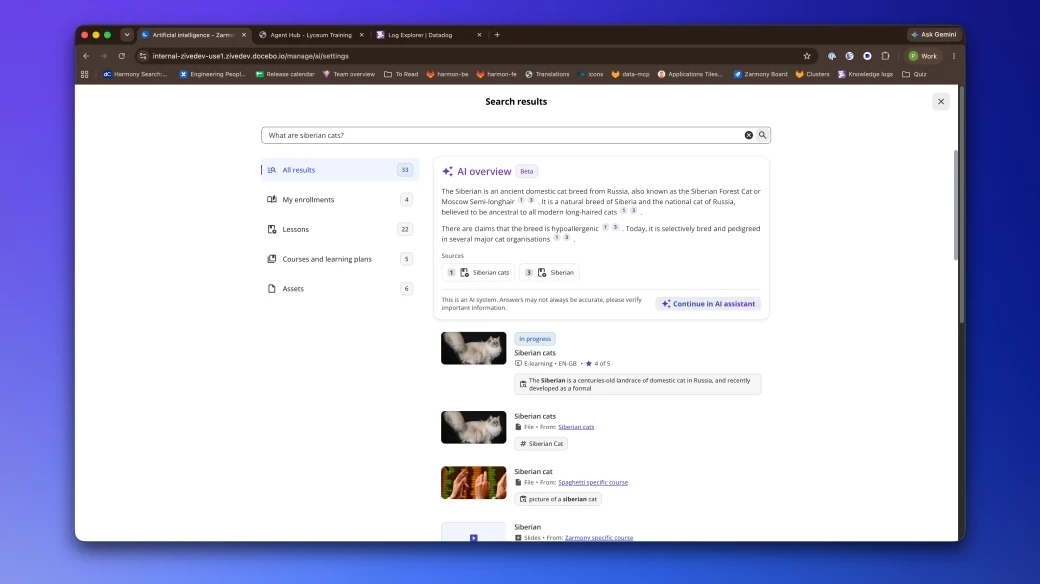
What's already available: AI overview in search. You can activate it in the AI control panel. It shows a short summary on the search results page, and creating that summary does not consume any credits. Activating it also removes the automatic routing from the search bar to the AI assistant. Users can still switch to the AI assistant to start a conversation, but only if they actively choose to.


What we'd like from you: please try out the AI overview and share your feedback.

  • Is anything not working well, or is there something you'd like improved?
  • Does this fully solve the problem? Is the distinction between search and assistant clear enough without automatic routing?
  • Are there other places where you or your learners confuse search and the AI assistant?

jan-hendrik.meins
Docebian

I don’t like that my support questions aren’t answered well in the system. Being able to ground the AI feature with uploaded documents, links, etc. to provide support for our users. E.g. common support requests and answers. Almost like building an agent in addition to the standard AI features.


​@martiniwinski  thank you for sharing this feedback! I want to comment on this specifically, because I think there is great solution for this with new product/features we released recently. So generally I would suggest to use the chat interface of the AI assistant for questions and the Search when looking for something. So if you have a specific question and want to get a clear answer a chat is the better way to get there than using the search bar. 


Regarding your specific problem: See the AI assistant as the generic, default AI support inside the platform. It’s not specialized on a specific topic or tasks, but has to cover a wide variety. This comes with the downside that it struggles at times with specific questions or tasks.

  • Docebo Agents for specific tasks or topics: With agents you have the advantage that you can set them up for a very specific use case, instruct them how they should behave and define a smaller, verified context they can use to get the information needed. 
  • Docebo Knowledge to build verified and trusted context: Missing or wrong context is the most common reason for bad AI results. Docebo Knowledge allows you to bring in information (e.g. documentation, policies, ...) from external systems like GDrive, SharePoint or others into Docebo to complement the learn content. Through the connector the data is always in sync with the source system, so you don’t need to manually update it in multiple places. After you published content from these systems inside of Docebo, it’s available for the AI assistant, but especially can be attached to an agent as context it should use. 

So to summarize what you can do with a combination of these two features:

  1. Connect external knowledge sources to add content that might does not life in courses.
  2. Create knowledge collections for specific topics or domains (e.g. product documentation). 
  3. Create dedicated agents that cover specific topics as experts that use the verified information from a knowledge collections.
  4. Publish these agents so that everyone can benefit from high-quality trusted answers.


Let me know if you have any questions about this or if I can support you further in setting this up. 


martiniwinski
Influencer I
Forum|alt.badge.img+1

 
​@jan-hendrik.meins Thanks for the follow-up! I think when I wrote that we didn’t have Agents set up yet since they just happen to launch during that time. I’m actually testing a support agent for the last few weeks and it’s been working really well in our sandbox. We’re still tweaking the instructions and settings, but so far so good.

One thing I don’t like is it’s hard to select an Agent if you don’t know where to look. They are in a hidden menu in the AI and it would be nice to be able to either link directly to launch a specific agent or pin agents you want to showcase for users, or something even cooler Docebo can come up with.


jan-hendrik.meins
Docebian

 
​@jan-hendrik.meins Thanks for the follow-up! I think when I wrote that we didn’t have Agents set up yet since they just happen to launch during that time. I’m actually testing a support agent for the last few weeks and it’s been working really well in our sandbox. We’re still tweaking the instructions and settings, but so far so good.

One thing I don’t like is it’s hard to select an Agent if you don’t know where to look. They are in a hidden menu in the AI and it would be nice to be able to either link directly to launch a specific agent or pin agents you want to showcase for users, or something even cooler Docebo can come up with.


​@martiniwinski happy to hear that it works well! 100% agree with your point about agent visibility. There are different options to make agents better accessible for learners we are currently evaluating. The first feature we will likely implement is an Agent widget, which will allow you to add any agent to pages. Let me know your thoughts about this. 


martiniwinski
Influencer I
Forum|alt.badge.img+1
  • Influencer I
  • Nov 25, 2026 2:35 PM UTC

An Agent widget would be very cool and a good start to make these powerful tools a little more accessible. For example, we have a user support page and adding a ‘support agent’ directly on that page would be great for people to interact there.


jan-hendrik.meins
Docebian

Search ranking, relevance and the results page

​@anouk.geurts ​@jasminekkochar ​@mewing ​@JUJanet 

Thanks for the feedback on results not matching expectations. Ranking is one of the hardest parts of any search solution, because the right answers to a few questions differ from customer to customer:

  • Which criterion matters most: title, tag or description? (Some of you tag with words that never appear in the title, others repeat them on purpose.)
  • Which content types (catalogs, learning plans, courses) should be surfaced first?
  • Which factors should count at all? Is an older course automatically less relevant?

A change that helps one use case can hurt another, so we're approaching this carefully instead of adjusting weights scenario by scenario.

What we're working on

  • A new search index. It lets us include content beyond Docebo Learn, such as Docebo Knowledge, and review which information we track for each result. Tracking more and better-structured data also gives us more options to improve ranking accuracy.
  • A reworked results page. Admins shouldn't have to use workarounds or manipulate content (like tags or titles) to boost or adjust ranking, and we want it to be easy for every user to find what they're looking for. One option we want to keep open is configuring on an object level what is surfaced in search, for example including catalogs or excluding assets.

What we plan to address with these initiatives

  1. Categories by type feel admin-focused. Can users really tell a lesson from an asset?
  2. Filters are too limited and too hard to apply. They only appear after you select a category, even though "All results" is where filtering is needed most, and there are few options.
  3. Each result shows a lot of information, which makes the list hard to scan.
  4. Typos and multi-language searches aren't well supported. We're aware of the gaps in specific scenarios and will explore options to improve this.

What we'd like from you

  • Which filters would be most valuable to you and are missing today?
  • If you could configure what is surfaced in search, what would you want to control? For example, which content types to include or exclude (such as catalogs, assets or pages), or individual courses.
  • Do you have an example where ranking surprised you? What you searched for, what you expected, and what you got?