Answer

Bulk Certification removal

  • October 23, 2024
  • 10 replies
  • 171 views

Jtischler
Helper II
Forum|alt.badge.img+1

I need to remove a high volume of users from the certification requirement.  Is there a CSV template that I am not finding to be able to do this?  Removing 1000+ users manually is not a valuable use of time.

Best answer by abutler

Not ideal, but would creating a new certification work?

  • create new certification (NEW)
  • download existing certification (OLD) information 
  • put OLD info into CSV template, removing any users you do not want to have the certification
  • Upload the template into NEW
  • Replicate any existing rules (notifications, course, etc) for NEW
  • Delete OLD 

10 replies

francesca.vaccarino
Novice II
Forum|alt.badge.img+1

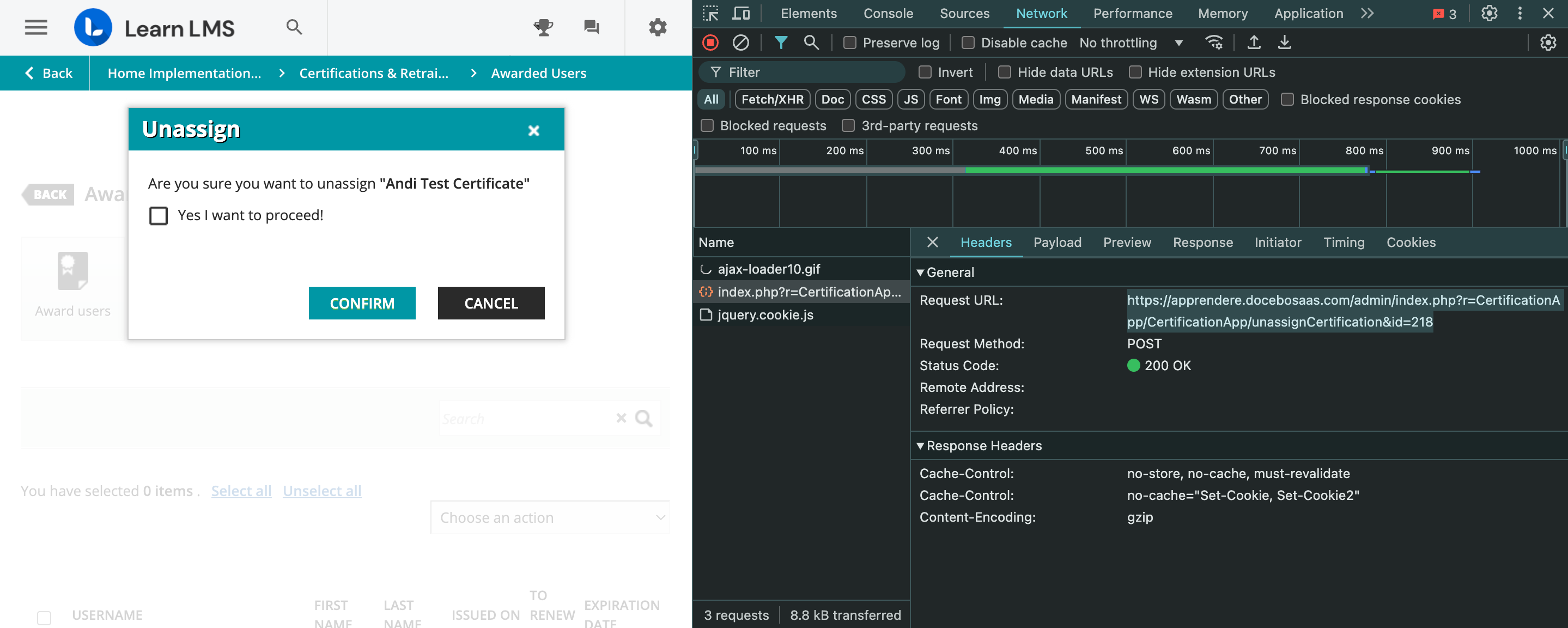
To my knowledge, there isn’t a way to do this through the GUI or the documented APIs. However, if you or someone in your organization can write a script to make API calls, it is indeed possible using the API highlighted in the screenshot. This is my best solution


lrnlab
Hero III
Forum|alt.badge.img+10
  • Hero III
  • October 24, 2024

If you are just trying to remove from everyone that was awarded, you can view all users on a page and then use “select all” then under the “choose action” dropdown, select “unassign”.


Jtischler
Helper II
Forum|alt.badge.img+1
  • Author
  • Helper II
  • October 24, 2024

@lrnlab if it was only that easy lol.  These are all users from just one department that is removing the requirement.  Others are still adhering to it.


dklinger
Hero III
Forum|alt.badge.img+11
  • Hero III
  • October 24, 2024

@Jtischler - are those folks identified in a group and are mapped to a course?

If they are - you can do what @lrnlab proposed - use the groups filter in Course Management to put just that department up in the tool. and then unenroll them in bulk.


lrnlab
Hero III
Forum|alt.badge.img+10
  • Hero III
  • October 24, 2024

@lrnlab if it was only that easy lol.  These are all users from just one department that is removing the requirement.  Others are still adhering to it.

ok got it...indeed that is quite the task to do manually


Jtischler
Helper II
Forum|alt.badge.img+1
  • Author
  • Helper II
  • October 25, 2024

@dklinger I need to keep the course enrollments, just remove the certifications from the users.  


  • Novice III
  • Answer
  • January 22, 2025

Not ideal, but would creating a new certification work?

  • create new certification (NEW)
  • download existing certification (OLD) information 
  • put OLD info into CSV template, removing any users you do not want to have the certification
  • Upload the template into NEW
  • Replicate any existing rules (notifications, course, etc) for NEW
  • Delete OLD 

Lisa C.
Contributor III
Forum|alt.badge.img+1
  • Contributor III
  • September 22, 2025

@Jtischler did you ever figure this out?  I thought archiving/unenrolling would stop the certification renewal emails, but it doesn’t.  I have about 250 users that need to be removed from a cert (and the cert is still valid for others).  If only the certifications screen had sorting and filtering!  😖


Jtischler
Helper II
Forum|alt.badge.img+1
  • Author
  • Helper II
  • September 23, 2025

@Lisa C. Best option was to create a new certification and grant that to the users that needed to retain it, and then removing the old certification. Not the most efficient, but did what needed to be done in the end!


Lisa C.
Contributor III
Forum|alt.badge.img+1
  • Contributor III
  • September 23, 2025

@Jtischler brutal haha ok thanks