Answer

Can we rename course widgets?

  • May 17, 2022
  • 8 replies
  • 116 views

AnneG
Contributor II

We’d love to be able to rename the File Repository Area to just plain ol’ Resources. Any ideas? Help is very much appreciated!

Best answer by dklinger
@AnneG - you may want to try the localization tool for that one…I think people would be surprised about the level of customization that comes from the tool in terms of adjusting “system terms”.

8 replies

dklinger
Hero III
Forum|alt.badge.img+11
  • Hero III
  • Answer
  • May 18, 2022

@AnneG - you may want to try the localization tool for that one…I think people would be surprised about the level of customization that comes from the tool in terms of adjusting “system terms”.


TaiSaxty
Helper I
Forum|alt.badge.img
  • Helper I
  • May 18, 2022

It was mentioned in the Birthday Bash that some names are not in the localization tool, so they may be working on a project so that some other areas of the site could also be able to be renamed. If its not in the localization tool yet, it might be in the future.


lrnlab
Hero III
Forum|alt.badge.img+10
  • Hero III
  • May 18, 2022

HI @AnneG of course you can...we did the same thing...you can do this in the localization app...there are  2 labels to change:


jbridges
Novice III
  • Novice III
  • May 18, 2022

@kferguson may be something to consider as we add more resources for the RHC courses. Makes the term more user-friendly.


AnneG
Contributor II
  • Author
  • Contributor II
  • May 18, 2022

Thank you all so much! Appreciate your help.


  • Novice II
  • February 9, 2023

HI @AnneG of course you can...we did the same thing...you can do this in the localization app...there are  2 labels to change:


Hi

When I select the localization tool, all I see are language options - and nothing else. What am I missing?


Annarose.Peterson
Hero III
Forum|alt.badge.img+7

HI @AnneG of course you can...we did the same thing...you can do this in the localization app...there are  2 labels to change:


Hi

When I select the localization tool, all I see are language options - and nothing else. What am I missing?

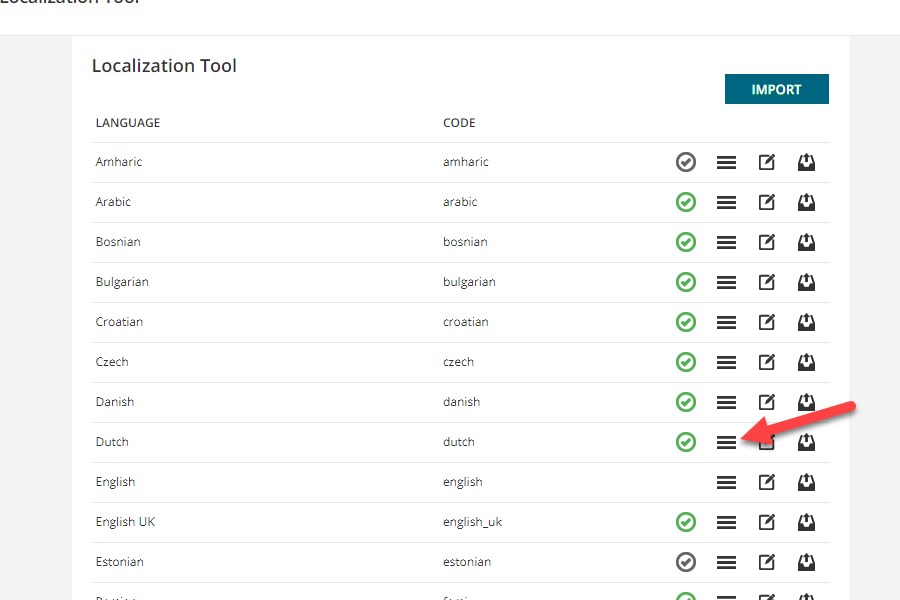
@DeclanETC , click on the hamburger icon next to the language and it will open to the module where you can change labels. 


  • Novice II
  • February 9, 2023

HI @AnneG of course you can...we did the same thing...you can do this in the localization app...there are  2 labels to change:


Hi

When I select the localization tool, all I see are language options - and nothing else. What am I missing?

@DeclanETC , click on the hamburger icon next to the language and it will open to the module where you can change labels. 


Thank you- no sooner than I posted this did I try that and fix the issue - it was the fact that it was labelled as “translate” that made me hesitant to click on it initially