


Answer

Certification csv upload

  • September 10, 2025
  • 4 replies
  • 80 views

Forum|alt.badge.img+2

We created an e-learning course which has had 2500 completions.  We have now made the decision for it to be renewed every 3 years.  I have created a refresher certification,  and tried to bulk upload a CSV of completions.

It works, except it hasn't calculated the renew/expiry date (even though that detail was in the CSV i uploaded).  

Any ideas why it has work.  I now have 2500 certifications but without a renewal date.


Best answer by mzirnhelt

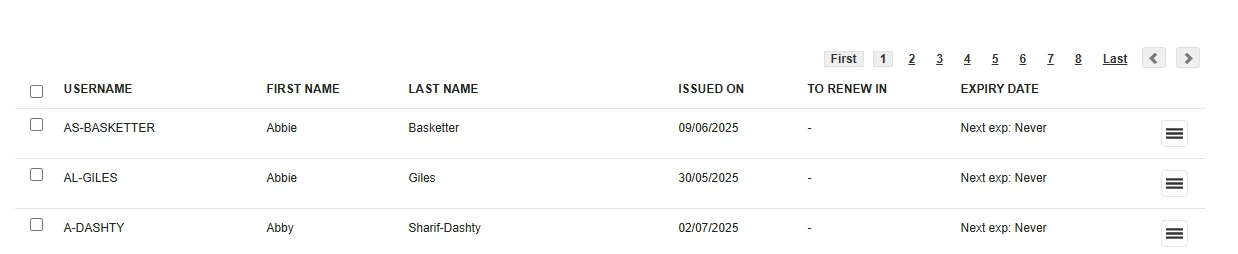
Looking at the screenshot it shows the Expiration Date as Never which implies that the “Always Valid” column in the import was set to Yes.  I’d double check that column to see if that was the cause of the issue.

4 replies

Forum|alt.badge.img+4
  • Helper II
  • September 10, 2025

It won’t calculate a renewal date from an upload, it would have needed to be in CSV file.  If the date was formatted incorrectly you would have gotten an error report, so if it processed without errors it’s possible it just wasn’t set as a field to import when you ran the process.

I’d try a small sample again to re-load the data to see if you get specific errors.


Forum|alt.badge.img+2
  • Author
  • Helper II
  • September 10, 2025

Hi,  the upload was a csv, and all rows had an expiry date (in the same format as the issue date).  No errors reported after upload, as all rows were uploaded, but silly without the expiry date 


Forum|alt.badge.img+4
  • Helper II
  • Answer
  • September 10, 2025

Looking at the screenshot it shows the Expiration Date as Never which implies that the “Always Valid” column in the import was set to Yes.  I’d double check that column to see if that was the cause of the issue.


Forum|alt.badge.img+2
  • Author
  • Helper II
  • September 11, 2025

Thanks.  That's exactly what it was.  Always valid was set to 1.  It has worked now.


Great to have the sample CSV but it wasn't entirely clear what the headings meant.

