Question

Changing the Default font in the Docebo platform.

  • September 24, 2021
  • 13 replies
  • 1550 views

Forum|alt.badge.img+1

Hello, Our company has a specific font they would like to use. Would it be possible to implement this font into the platform? If so, where is this done and are there any articles on it.

Thank you!

13 replies

Forum|alt.badge.img+3
  • Docebian
  • September 24, 2021

I’ve had success with the methods outlined in this resource: https://docs.google.com/document/d/1qIwPmsI1ih0_3ruZmkfQDbshN51nTl-_xd--GvZshHQ/edit?usp=sharing.


Hope this helps!


Forum|alt.badge.img+1
  • Author
  • Helper II
  • September 24, 2021

Hello Nick,

I entered the link and viewed the page to be added to the css. However I would like to use a different font than the one in the code (Coda Caption and Roboto). How would I obtain a script that has the font I want to implement? sofia-pro?. I noticed the script has (src=) to these fonts so I’ll need to obtain the proper src.

Thank you,


Forum|alt.badge.img+3
  • Docebian
  • September 24, 2021

@ncassella if you have the actual sofia-pro font file(s) (usually .otf,.ttf, or .woff2 format), I’d recommend the second method listed in that resource (scenario 2). Use an online font converter tool such as transfonter or fontsquirrel to upload your font file and make sure you select the option to convert it to base64.

The output should be a really long CSS declaration and the first property should be font-family: “sofia-pro” or something similar. This CSS is what imports the font and makes it available for use but it isn’t actually applying anywhere yet. You have to use another line of CSS to apply the fonts to the elements you want.

The CSS with that long list of elements at the end of that doc should be a good starting point to applying the new font globally but you’ll change {font-family: Roboto;} to {font-family: sofia-pro} or whatever the name of your font was.


  • Novice II
  • July 7, 2022

Hi! 

The first method in the document shared by nick.tosto here worked for me. I had to pull the font from Google Docs and following the steps did the trick. However, this piece of code covers all tags but one. 

/* Change font for entire platform */
a, abbr, acronym, address, applet, article, aside, audio, b, big, blockquote, body, canvas, caption, center, cite, code, dd, del, details, dfn, div, dl, dt, em, embed, fieldset, figcaption, figure, footer, form, h1, h2, h3, h4, h5, h6, header, hgroup, html, iframe, ins, kbd, label, legend, li, mark, menu, nav, object, ol, output, p, pre, q, ruby, s, samp, section, small, span, strike, strong, sub, summary, sup, table, tbody, td, tfoot, th, thead, time, tr, tt, u, ul,

Note that the tag input is not there, so the custom font will not show in boxes where you are expected to type input, such as the search box at the top of any screen. I've added the tag to the bit below, so you can just copy and paste it instead.

Thank you for posting this solution, though, as it was tremendously helpful! 

/* Change font for entire platform */
a, abbr, acronym, address, applet, article, aside, audio, b, big, blockquote, body, canvas, caption, center, cite, code, dd, del, details, dfn, div, dl, dt, em, embed, fieldset, figcaption, figure, footer, form, h1, h2, h3, h4, h5, h6, header, hgroup, html, iframe, input, ins, kbd, label, legend, li, mark, menu, nav, object, ol, output, p, pre, q, ruby, s, samp, section, small, span, strike, strong, sub, summary, sup, table, tbody, td, tfoot, th, thead, time, tr, tt, u, ul,

Annarose.Peterson
Hero III
Forum|alt.badge.img+7

I have tested the second method in an HTML widget and it works great!!  Thank you so much for sharing!!!

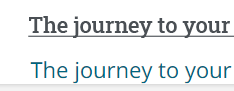
I did find, I try to create a link, the formatting gets all funky:

Top is normal without link, bottom is linked - is there a way to keep the original formatting even if it is linked (just within the html widget and not the entire platform)?


Bfarkas
Hero III
Forum|alt.badge.img+6
  • Hero III
  • October 11, 2022

Interesting, the block to cover the entire platform has the a element covered so it should update, unless the cascade is getting you and there is more custom CSS defined lower down for links?


Forum|alt.badge.img

Hi - this is great, thank you so much for sharing! 😎


A question, do you know why the font on the custom content box buttons has not updated? Having a look round my sandbox it looks like the rest has updated and I’ve used the updated CSS above. 


Thanks!

Jack


Bfarkas
Hero III
Forum|alt.badge.img+6
  • Hero III
  • January 30, 2023

Hi - this is great, thank you so much for sharing! 😎


A question, do you know why the font on the custom content box buttons has not updated? Having a look round my sandbox it looks like the rest has updated and I’ve used the updated CSS above. 


Thanks!

Jack


Probably missing the class for that one. I’ve actually got this configured in my CSS Wizard on Fark.Tools

Feel free to set up a free account and give it a try. You can also set it up to be for specific pages instead of system wide.

Alternatively, these tags cover the headings for all widget types:
 

/* Modify the Title block on all widgets. Includes border, background, padding, font, and connecting to full body. Also can hide the title depending on settings. */
.common-widget-title, task-list-widget widget-title {
font-family: 'Acme','sans-serif';
}


Forum|alt.badge.img

Hey @Bfarkas thanks for replying to this. Fark.Tools looks amazing - thanks so much for sharing this, I’ve just signed up and shared with my team :) 

I unfortunately still can’t get the font on the buttons to update to Poppins but I’ll keep playing around.


Bfarkas
Hero III
Forum|alt.badge.img+6
  • Hero III
  • January 30, 2023

Hey @Bfarkas thanks for replying to this. Fark.Tools looks amazing - thanks so much for sharing this, I’ve just signed up and shared with my team :) 

I unfortunately still can’t get the font on the buttons to update to Poppins but I’ll keep playing around.

Ah sorry, I only supported the titles of widgets for now, misread. 

.button-text {
font-family: Poppins;
}

That should update all the buttons for you.

I made a note to add this scenario to the wizard in the next update.


Forum|alt.badge.img

Thanks so much @Bfarkas 💪


  • Influencer I
  • June 29, 2023

Hi,

Did you guys managed to make the new font appear inside the certificates of completion as well?

Thanks!


Hi! 

The first method in the document shared by nick.tosto here worked for me. I had to pull the font from Google Docs and following the steps did the trick. However, this piece of code covers all tags but one. 

/* Change font for entire platform */
a, abbr, acronym, address, applet, article, aside, audio, b, big, blockquote, body, canvas, caption, center, cite, code, dd, del, details, dfn, div, dl, dt, em, embed, fieldset, figcaption, figure, footer, form, h1, h2, h3, h4, h5, h6, header, hgroup, html, iframe, ins, kbd, label, legend, li, mark, menu, nav, object, ol, output, p, pre, q, ruby, s, samp, section, small, span, strike, strong, sub, summary, sup, table, tbody, td, tfoot, th, thead, time, tr, tt, u, ul,

Note that the tag input is not there, so the custom font will not show in boxes where you are expected to type input, such as the search box at the top of any screen. I've added the tag to the bit below, so you can just copy and paste it instead.

Thank you for posting this solution, though, as it was tremendously helpful! 

/* Change font for entire platform */
a, abbr, acronym, address, applet, article, aside, audio, b, big, blockquote, body, canvas, caption, center, cite, code, dd, del, details, dfn, div, dl, dt, em, embed, fieldset, figcaption, figure, footer, form, h1, h2, h3, h4, h5, h6, header, hgroup, html, iframe, input, ins, kbd, label, legend, li, mark, menu, nav, object, ol, output, p, pre, q, ruby, s, samp, section, small, span, strike, strong, sub, summary, sup, table, tbody, td, tfoot, th, thead, time, tr, tt, u, ul,

Hello, could you help me with the custom font? 

I don’t want to change the font for the entire platform but only in the HTML training material. After adding the font, what should I add to change? 

I’ve tryed this, but is not working: 

*Modifying font*

/* latin */

@font-face {

  font-family: 'Abel';

  font-style: normal;

  font-weight: 400;

  font-display: swap;

  src: url(https://fonts.gstatic.com/s/abel/v18/MwQ5bhbm2POE2V9BPQ.woff2) format('woff2');

  unicode-range: U+0000-00FF, U+0131, U+0152-0153, U+02BB-02BC, U+02C6, U+02DA, U+02DC, U+0304, U+0308, U+0329, U+2000-206F, U+20AC, U+2122, U+2191, U+2193, U+2212, U+2215, U+FEFF, U+FFFD;

}

/* Change font for HTML training material*/

a:code,h1, h2, h3, h4, h5, h6, header, html,table, tbody, style, td, tr, p, li, ul {

font-family: Abel !important;

}