Best Answer

Course Report with associated catalogs

  • October 25, 2024
  • 3 replies
  • 69 views

Hi all,

Does anyone know of a way to pull a report that includes both courses and the catalogs associated to the courses? 

Best answer by lrnlab

Yes, you can export the data from Course Management.
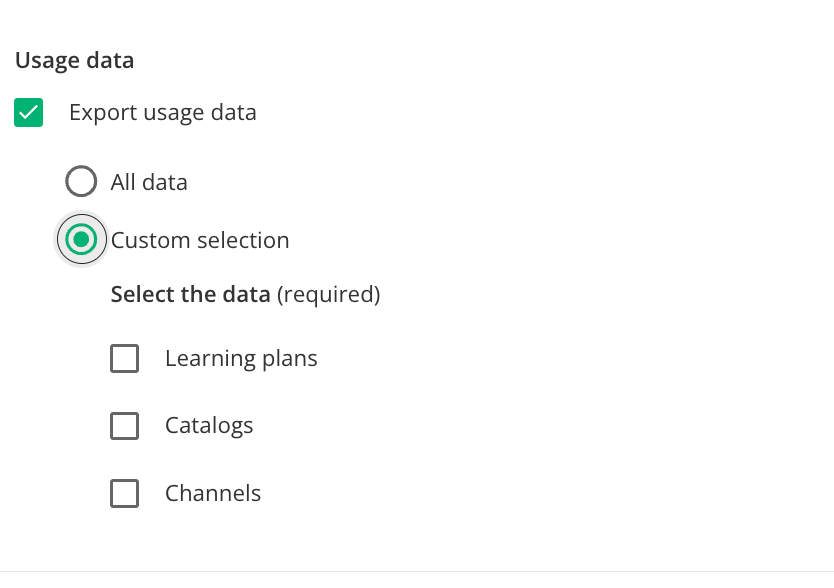
  1. Select the courses for which you want to report on
  2. On the bottom right of the screen, click Choose Action
  3. Then select, Export Courses Data
  4. Make sure to select the options you want to see in the report 
  5. To get the Catalogue information you must select Usage Data


3 replies

lrnlab
Hero III
Forum|alt.badge.img+10
  • Hero III
  • Answer
  • October 25, 2024

Yes, you can export the data from Course Management.

  1. Select the courses for which you want to report on
  2. On the bottom right of the screen, click Choose Action
  3. Then select, Export Courses Data
  4. Make sure to select the options you want to see in the report 
  5. To get the Catalogue information you must select Usage Data


  • Author
  • Newcomer
  • October 28, 2024

Amazing! Thank you. We have to do this with all of our courses. Do you know of an easier way to export all courses at once with the catalog option? 


lrnlab
Hero III
Forum|alt.badge.img+10
  • Hero III
  • October 28, 2024

Amazing! Thank you. We have to do this with all of our courses. Do you know of an easier way to export all courses at once with the catalog option? 

sure...just use the select all under Course Management


