Question

Courses not appearing in search bar for standard users

  • May 8, 2026
  • 3 replies
  • 22 views

Hello,

We have just uploaded a number of new courses in Docebo for users to self-enrol in for extra learning, however they are not appearing in the search bar for standard users:

 

However, anyone who is a SuperAdmin can see the courses via the search bar.

We have ensured the enrolment options have been set correctly:
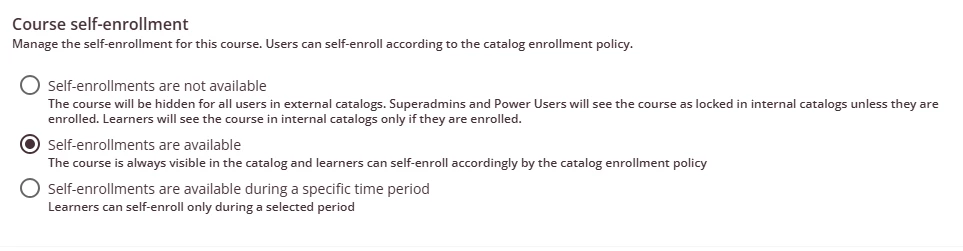
 

Is there any reason that these courses would not be appearing for all our users?


Thanks!

3 replies

JeanetteMcVeigh
Hero III
Forum|alt.badge.img+7

This is most likely due to visibility via catalogs for the users.

Are these courses in a catalog and did you allow those folks to see them via visibility of that catalog?


Forum|alt.badge.img

@Katie Cassidy, I would check that the courses are set to published and are not set to under maintenance.

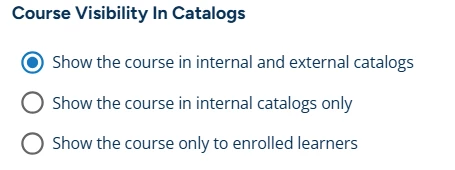
Then, as ​@JeanetteMcVeigh says, ensure that the course has been added to a catalogue that your standard users have visibility of (branch, group, custom field), as well as checking that the Course Visibility in Catalogs aligns with your standard user visibility. ,


Moshe.Machlav
Helper III
Forum|alt.badge.img+1

Hi Katie,

@JeanetteMcVeigh and ​@JimmDaniels are exactly right on this one. In Docebo, search results are directly tied to catalog permissions. Even if a course is published and has self-enrollment enabled, standard users will not see it in the global search unless they have explicitly been granted visibility to it via a catalog. SuperAdmins bypass this restriction entirely, which is why the courses appear perfectly fine for you.

It's also crucial to note that this catalog visibility acts as a master switch for downstream integrations like Harmony. If a standard user doesn't have visibility to the catalog natively in Docebo, those courses will not be pushed, displayed, or searchable for them in Harmony either.

To get these showing up in the search bar (and syncing correctly to Harmony) for your users:

  1. Go to Admin Menu > Course Catalogs and either select an existing catalog or create a new one.

  2. Add your newly uploaded courses to this catalog.

  3. Switch to the Visibility tab of the catalog and assign it to the specific users, groups, or branches that need access.

  4. Double-check the course properties (Course Management > Properties > Advanced Settings > Catalog Options) to ensure "Show the course in internal catalogs only" (or external, if applicable) is selected.

When I've deployed self-serve learning environments for organizations with similar integration requirements, a common best practice we implement is setting up a baseline "All Employees" catalog assigned directly to the root branch. We use this specifically as a catch-all for general self-enrollment courses so they are immediately searchable platform-wide, the moment they are published.

You can read the exact breakdown of how user roles affect search result visibility in the official documentation: Using the platform's global search – Docebo Help Center