



Question

Creating a group that does NOT contain an email extension?

  • April 28, 2026
  • 1 reply
  • 11 views

Scott Foster
Influencer III
Forum|alt.badge.img

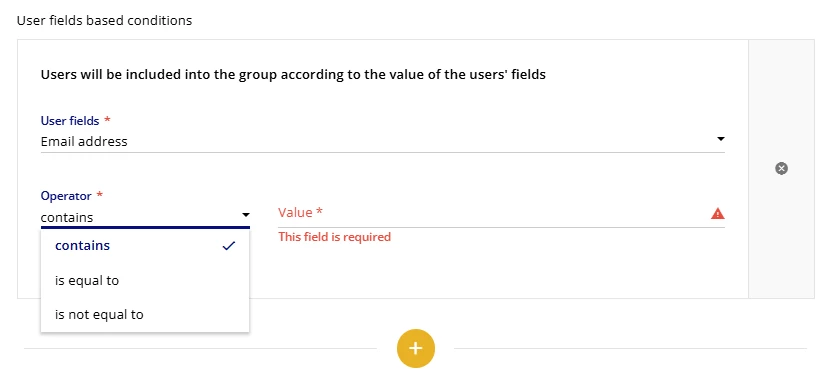
I’m trying to create a group that does not include users with a specific email address. Ideally that would be done with a “does not contain” operator, but that is not an option. Has anyone else need to create a group like this and did you come up with a work around? Any and All help appreciated! 
 

1 reply

Moshe.Machlav
Helper III
Forum|alt.badge.img+1

Hi ​@Scott Foster ,

You've hit one of the most common platform constraints in Docebo. The automatic group engine unfortunately doesn't natively support negative operators like "does not contain" or "is not equal to" for standard text fields. Trying to build a massive "contains A, or contains B, or contains C" logic tree to work around this usually becomes a maintenance nightmare.

When I deploy Docebo for organizations with these exact kinds of exclusion requirements, we almost always solve this at the data layer rather than trying to force the UI to do it.

The Best Practice Workaround: User Additional Fields Instead of trying to filter by the raw email string in the group settings, create a new User Additional Field (AUF), for example, a Yes/No field called "Exclude from Main Group" or a Dropdown called "User Domain Category".

  1. Populate the Field: Control this field during your standard user sync (via CSV import, HRIS integration, or SSO SAML mapping). Your HRIS or IdP can easily run the "email does not contain @domain.com" logic before passing the clean classification data to Docebo.

  2. Build the Group: Create your Automatic Group using the simple condition: User Additional Field [User Domain Category] = Internal.

If you aren't using an automated HRIS/SSO feed, you can still use a quick CSV import to mass-update this new additional field for your existing users.

If you absolutely must automate this inside Docebo without adjusting your user data feeds, you would need to use Docebo Connect. You could build a recipe that triggers on the User Created webhook, evaluates the email string for the specific extension, and drops the user into a Manual Group. However, the Additional Field method is much cleaner, scales better, and doesn't consume Connect tasks.

For reference on setting up these fields to build your groups, check out the official documentation here: Creating and managing user additional fields – Docebo Help Center

Hope this helps you map out a sustainable path forward!


