



Question

File Repository Widget Display Options

  • November 5, 2025
  • 4 replies
  • 42 views

dkraige
Helper I
Forum|alt.badge.img+1

I’m confused about the File Repository widget, under training materials on courses.  This article about the feature:

https://help.docebo.com/hc/en-us/articles/360020127779-Managing-the-File-repository-area-widget

explicitly says the widget is not paginated:



But when I implement it on a course and add more than 3 files to the file repository, I see this:
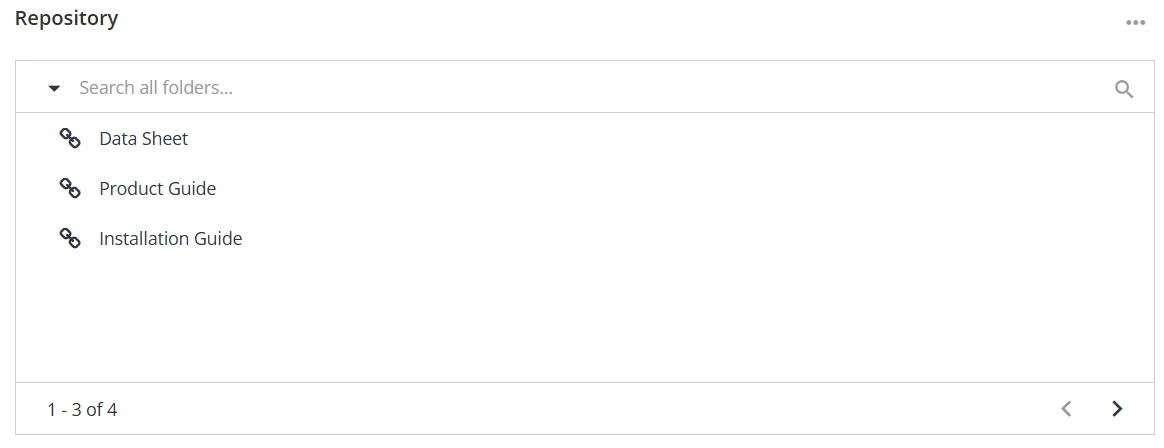
 

It is obviously paginated, and with only 3 files per page?  Is there a way I can get this to behave as advertised in the article about how it is supposed to work, so that my learners will not have to page through files 3 at a time?


4 replies

lrnlab
Hero III
Forum|alt.badge.img+10
  • Hero III
  • November 6, 2025

When you see this kind of disparity, it’s always a good idea to bring it up to support. Either it’s something they can fix or they will update the technical specs page if the functionality has indeed changed to paginated. I do agree however that this widget is best when not paginated.


dkraige
Helper I
Forum|alt.badge.img+1
  • Author
  • Helper I
  • November 6, 2025

Tried contacting Support, they just pointed me to the same article that I quoted in this post to learn how the widget works, as if I had not read it already.  No explanation of why it does not work the way the article claims.  Not very helpful!


dkraige
Helper I
Forum|alt.badge.img+1
  • Author
  • Helper I
  • November 6, 2025

Idea posted here, upvotes appreciated!


lrnlab
Hero III
Forum|alt.badge.img+10
  • Hero III
  • November 6, 2025

That’s a shame. You can challenge them to update the tech article though as it’s not correct.

I did vote on your idea thanks!
