


Question

Filter Task List widget

  • October 9, 2025
  • 6 replies
  • 36 views

EmilyW_Tacoma
Helper I
Forum|alt.badge.img+2

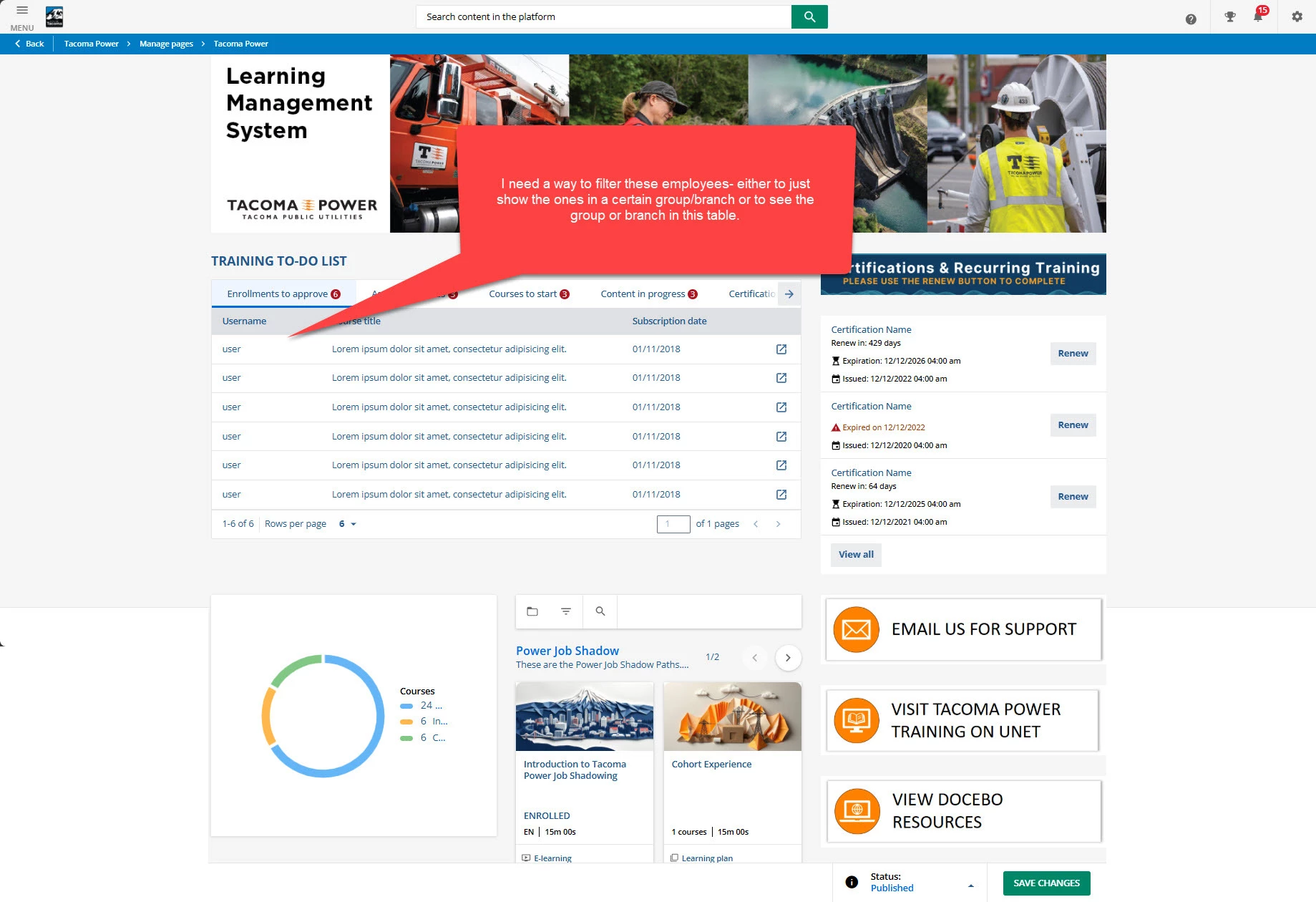
Hi, I have administrators who need to have access to more employees than their specific group because of their need to assign coursework to other groups. So, I’ve granted them access to numerous branches.

Unfortunately, that means on their page when they look at the task list widget for “Admins and Power Users only” they are seeing far more employees than they are directly responsible. Is there a way I can either set a permanent filter for them based on the specific page they use the widget on (one per branch) or give them a drop down of the groups or branches to allow them to select which employees they see?

If there’s a better way for me to offer my admins a way to manage their group of employees, I’m open to creating separate admin pages.

Thanks in advance for your advice.
 

6 replies

lrnlab
Hero III
Forum|alt.badge.img+10
  • Hero III
  • October 10, 2025

Can you create a group with only the users they need to see? Or add them individually to their PU resources?


kbrink1
Influencer II
Forum|alt.badge.img+1
  • Influencer II
  • October 23, 2025

Can you create a group with only the users they need to see? Or add them individually to their PU resources?

Hey Lrnlab, I work with EmilyW_Tacoma. The issue with the PU resources is that these people manage content that serves more than just their work group, requiring them to have expanded user visibility, which, as we know, we are unable to section off power user permissions for a single PU. Do you think it’s possible to manage this on the notification side based on triggers and branch or group assignment?


lrnlab
Hero III
Forum|alt.badge.img+10
  • Hero III
  • October 23, 2025

@kbrink1 short of creating separate PU profiles for your admins not sure would be able to accomplish this notificaitons a they would still see users they shouldn't. Are you able to use groups and enrolment rules instead to leave the admin out the assignments to users?


dklinger
Hero III
Forum|alt.badge.img+11
  • Hero III
  • October 23, 2025

@EmilyW_Tacoma and ​@kbrink1 - here is a novel idea - but it is only novel. Did you know that the system can support many different manager types that you can add? If you can assign those folks to them via a different manager level as part of a csv upload or as part of your user upload? I think you can pop this bubble some. Which means you can use My Team for those folks to monitor those others….

Here is the risk - out of the gate - and it is NOT pretty. By not using constructs that your HR system supports? You are gonna be in the space of mapping by hand or csv uploads with changes that occur- which is seriously not ideal. ​@lrnlab (Mark’s) approach at that point may just be a better sweetspot and he has been at this game alot longer and can tell you the caveats of what I just suggested.

I am trying to think out of the box for ya. Let us know where you land up landing at.


EmilyW_Tacoma
Helper I
Forum|alt.badge.img+2
  • Author
  • Helper I
  • October 23, 2025

For the moment, the solution we have was to give one account permissions to only see the individuals in the group where the approvals need to be done and logging into that account. 

The issue we’ve run into is a large number of individuals who are rightly on waiting lists, due to lack of space in the sessions they want to attend showing up on this task list. If they’re on the list and there’s nothing we can do until a new session opens, it’d be nice to filter them out. We’re investigating ways to either alter the widget or create another dashboard that shows actionable issues for us.


dklinger
Hero III
Forum|alt.badge.img+11
  • Hero III
  • October 24, 2025

For the moment, the solution we have was to give one account permissions to only see the individuals in the group where the approvals need to be done and logging into that account. 

The issue we’ve run into is a large number of individuals who are rightly on waiting lists, due to lack of space in the sessions they want to attend showing up on this task list. If they’re on the list and there’s nothing we can do until a new session opens, it’d be nice to filter them out. We’re investigating ways to either alter the widget or create another dashboard that shows actionable issues for us.

I get you better now. A bottle necking happening.