Question

Homepage design

  • July 8, 2025
  • 10 replies
  • 110 views

Forum|alt.badge.img

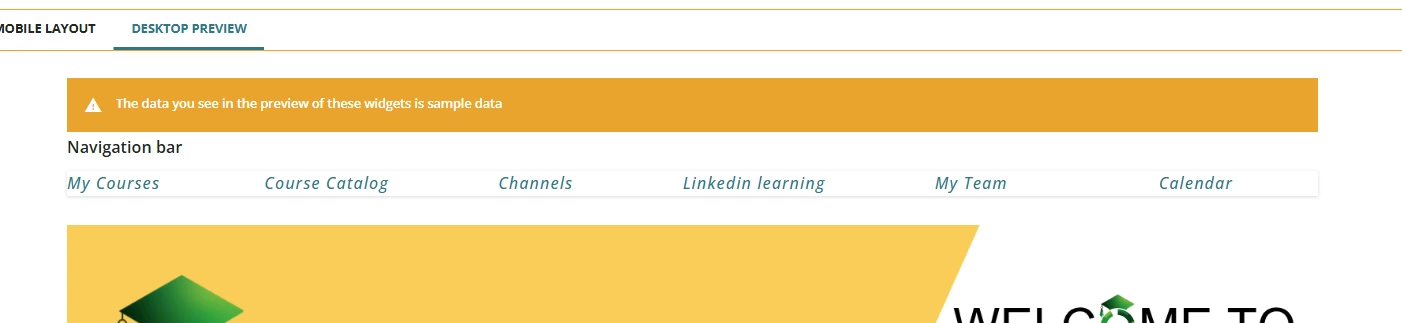
Does anyone know how to get the user menu across the top of your homepage, like the pic attached?

10 replies

JKolodner
Helper III
Forum|alt.badge.img+6
  • Helper III
  • July 10, 2025

Ooh, I’d like that too. Imagine how much space would be saved.


lrnlab
Hero III
Forum|alt.badge.img+10
  • Hero III
  • July 11, 2025

I would guess this is built using the HTML widget..??


Forum|alt.badge.img
  • Author
  • Novice III
  • July 17, 2025

@lrnlab  Yeah right, thank you for that. I got the code of chatGBT and then amended it to suit what i needed. 


lrnlab
Hero III
Forum|alt.badge.img+10
  • Hero III
  • July 17, 2025

@jakcanham  Can you share the code you used? I’d love to try it out. Thanks.


dklinger
Hero III
Forum|alt.badge.img+11
  • Hero III
  • July 17, 2025

@jakcanham - good morning from the East Coast - if you dont mind sharing a little more? I think it will bring that much more added value to your thread.

I know that implementing a file menu like that can involves a few different CSS ideas - one that will force the widget to go “high” or north on your page for it to look decent.


Forum|alt.badge.img
  • Author
  • Novice III
  • July 17, 2025

Happy to share the code. This is  the first time for me using a code.

this is the code chatGBT gave me: 

<div id="customTopNav">
    <a href="/learn">My Courses</a>
    <a href="/catalog">Course Catalog</a>
    <a href="/channels">Channels</a>
    <a href="/pages/12345/language-academy">Language Academy</a>
    <a href="/pages/23456/wfh">WFH</a>
    <a href="https://www.yammer.com" target="_blank">Yammer</a>
    <a href="/pages/34567/performance-management">Performance Management</a>
    <a href="/pages/45678/my-team">My Team</a>
    <a href="/pages/56789/internal-vacancy">Internal Vacancy</a>


I put that code in the HTML widget at the top of my page in composer and then i made the amendments to the code to suit my page. I just deleted the ones i didn't want and amended the lines i did.


Forum|alt.badge.img
  • Author
  • Novice III
  • July 17, 2025

@jakcanham - good morning from the East Coast - if you dont mind sharing a little more? I think it will bring that much more added value to your thread.

I know that implementing a file menu like that can involves a few different CSS ideas - one that will force the widget to go “high” or north on your page for it to look decent.

Yeah ChatGBT gave me some other codes but I'm not a code expert at all so i found using the code above in the widget and spacing out the titles under WYSIWYG worked for me.


dwilburn
Guide III
Forum|alt.badge.img+4
  • Guide III
  • July 17, 2025

@jakcanham - how did you “space out the titles” in the WYSIWYG?


dwilburn
Guide III
Forum|alt.badge.img+4
  • Guide III
  • July 17, 2025

I got this to work. We do not have access to Chat GPT, just Copilot, which sucks at HTML. I had better luck using the AI in Google search results.


<div id="customTopNav" style="background-color: #F5F5F5; text-align: center; padding: 5px;">	
<a href="/manage/users" style="margin-right: 60px;">Users</a>
<a href="/poweruser/manage" style="margin-right: 60px;">Power Users</a>
<a href="/manage/audiences" style="margin-right: 60px;">Groups</a>
<a href="/course/manage" style="margin-right: 60px;">Course Management</a>
<a href="/catalog/manage/catalogs" style="margin-right: 60px;">Catalog Management</a>
<a href="/learningplan/manage/learning-plans" style="margin-right: 60px;">Learning Plans</a>
<a href="/report;tab=custom" style="margin-right: 60px;">New Reports</a>
<a href="/manage/jobs" style="margin-right: 60px;">Background Jobs</a>
<a href="/insights/list">Insights</a>
</div>


dklinger
Hero III
Forum|alt.badge.img+11
  • Hero III
  • July 18, 2025

@gstager - happy Friday. I feel like we should get you to weigh in if you get a moment. I feel like there are always solutions and then there are better solutions based on what we can push Docebo to do.

A question - even though what was done above seems to be working well. Is it a better idea to use a flex grid for a “text/filemenu toolbar” approach? My thought is a flex grid should adjust based on the spacing available to the browser window dimensions/layout at the time.