

Question

How do we see what groups a user belongs to?

  • October 7, 2025
  • 6 replies
  • 72 views

NateC
Helper I
Forum|alt.badge.img+2

Hi. I’m trying to troubleshoot why a user is seeing a page that they should not be assigned to, but first I have to troubleshoot why I can’t figure out what groups anyone belongs to.

I’m just about positive that I used to be able to look up a user’s groups on the User management page. It was on the first page of the User Personal Summary. But that’s no loner the case, apparently. It doesn’t appear to be anywhere on the User management page. Now I have to do some additional legwork.

I know there are other options - like the Group menu - but should I not be able to look at one user & determine all of the groups that they belong to w/o opening all 200 or whatever Groups that all of my Power Users created & looking for them manually?


6 replies

dwilburn
Guide III
Forum|alt.badge.img+4
  • Guide III
  • October 7, 2025

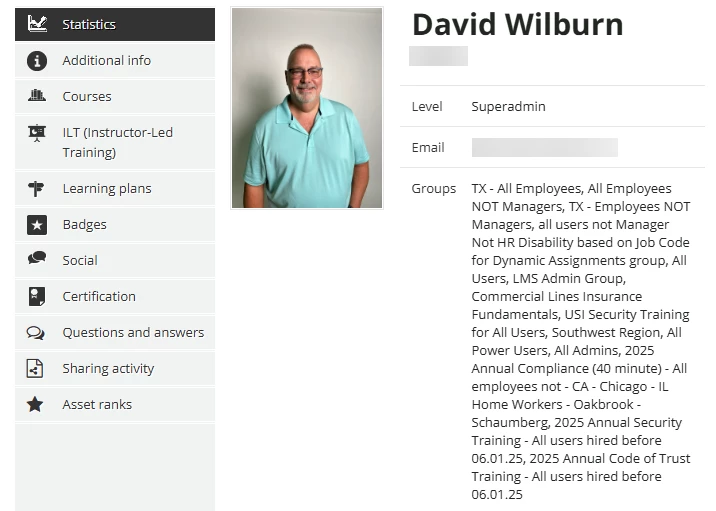
Hi ​@NateC - if you pulll a User Personal Summary (left click on the ellipses of a User) or if a user goes to their My Activities page, there below a users profile is their groups.


NateC
Helper I
Forum|alt.badge.img+2
  • Author
  • Helper I
  • October 7, 2025

Hi David. thanks for reaching out.

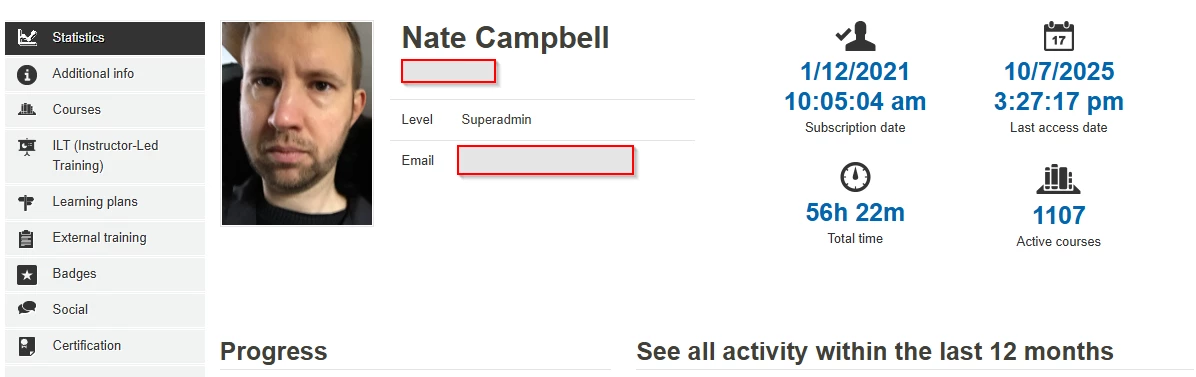
This is what I expected to see. When I saw that you could access it, I thought maybe I just needed to clear my cache. But unfortunately I’m still not seeing it:


But the fact that you can see it & I cannot suggests I should create a ticket for this, b/c clearly I’m not losing my mind & it really should be there.

Thanks again!


dwilburn
Guide III
Forum|alt.badge.img+4
  • Guide III
  • October 7, 2025

Hi Nate, I wandered about a bit in the advanced settings / options to see if there was something in there that might have turned it off / on. Is it possible someone applied a CSS solution?

But yea, the ticket is a good choice.


NateC
Helper I
Forum|alt.badge.img+2
  • Author
  • Helper I
  • October 7, 2025

Hm, I hadn’t thought of the css...hopefully that’s not the culprit, we don’t really have a css expert left on the team. I mean, technically I guess that’s me now, but ‘expert’ is far too flattering a description here…

Anyway, I submitted a ticket. Hopefully I get resolution soon enough to resolve the original issue in a timely manner.


dwilburn
Guide III
Forum|alt.badge.img+4
  • Guide III
  • October 8, 2025

I completely understand. If you go to Configure Branding and Look > Custom Styles you can scroll through the CSS and see if anything looks like the culprit. 

Do you have a sandbox? See if it is setup the same, and there you can scroll through and use /** -- **/ to comment out CSS for testing.


dwilburn
Guide III
Forum|alt.badge.img+4
  • Guide III
  • October 21, 2025

Hi ​@NateC - did you figure out what was causing it? Now you have me thinking about hiding mine. 😎