Answer

Is there a way to find out how many "assets" I have in my Docebo platform?

  • April 27, 2021
  • 10 replies
  • 264 views

Cindy McElhinney
Helper II
Forum|alt.badge.img+4

I am looking to quantify how many pieces of content I have in my Docebo platform. Obviously I know how many courses I have but I want to quantify other types of assets that have been uploaded. Just a number would be great but a count broken down by type (videos, shared links, # of docs/pdfs, etc.) would be ideal. 

Best answer by abartunek

Hi Cindy!

For assets on channels, I think it’s quite easy to just generate a report for Assets - Statistics. When it comes to Training Materials inside of courses, it’s a bit more tricky.

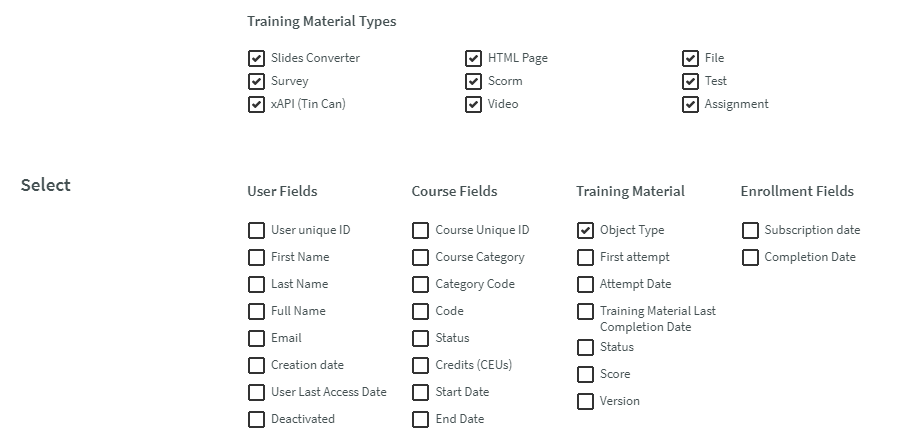
The only thing I can think of is assigning one user to every single course (it has to be the same user) and then generating a Custom Report for Users - Learning Objects for exactly that one user; otherwise, you might be overwhelmed by data. See below:


10 replies

abartunek
Guide I
Forum|alt.badge.img+4
  • Guide I
  • Answer
  • April 27, 2021

Hi Cindy!

For assets on channels, I think it’s quite easy to just generate a report for Assets - Statistics. When it comes to Training Materials inside of courses, it’s a bit more tricky.

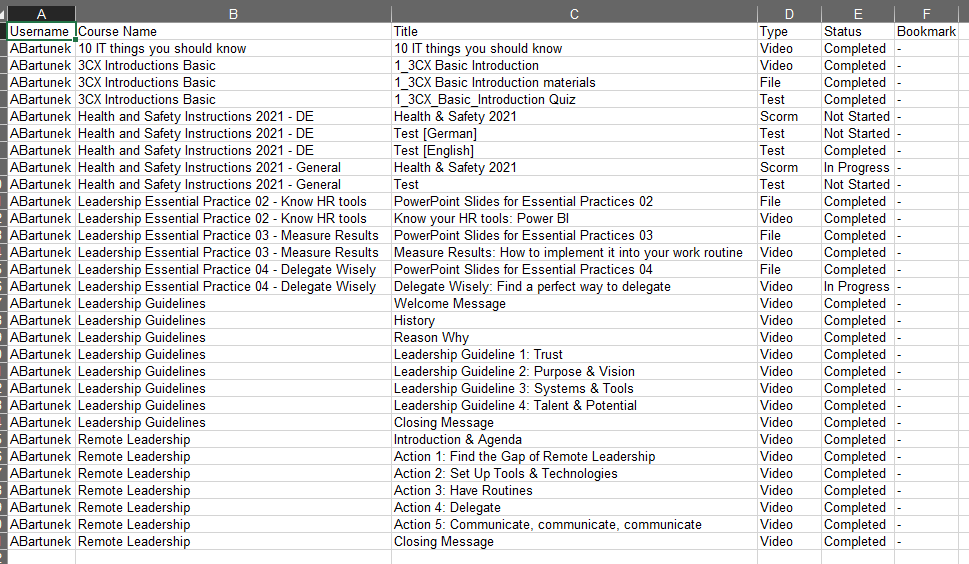
The only thing I can think of is assigning one user to every single course (it has to be the same user) and then generating a Custom Report for Users - Learning Objects for exactly that one user; otherwise, you might be overwhelmed by data. See below:


shanmcgin
Novice III
Forum|alt.badge.img
  • Novice III
  • April 27, 2021

Hi @Cindy McElhinney,

I believe @danwinter on my team recently pulled all of the training material in our system through an API call so that could be another option. I don’t know the details but I’ve tagged him in this so he can help if you’re interested.


danwinter
Contributor I
Forum|alt.badge.img+1
  • Contributor I
  • April 27, 2021

Hi @Cindy McElhinney! I’ve attached here the API call we ran to pull this info (no worries, nothing about this is proprietary or confidential). You can update the URL to reflect your domain, and enter the token generated from the API to pull all data related to training material (learning objects). I’ve found the API KB articles helpful in getting started here! I know APIs can be scary for some but if you’ve got a bit of patience and Google at the ready, this could be quite helpful.


Cindy McElhinney
Helper II
Forum|alt.badge.img+4

Hi Cindy!

For assets on channels, I think it’s quite easy to just generate a report for Assets - Statistics. When it comes to Training Materials inside of courses, it’s a bit more tricky.

The only thing I can think of is assigning one user to every single course (it has to be the same user) and then generating a Custom Report for Users - Learning Objects for exactly that one user; otherwise, you might be overwhelmed by data.


Thanks @abartunek. These reports certainly get me part of the way there and the learning object report for one user is a great workaround to get a list of learning objects. Since I am enrolled into every course, that makes it super easy! 


Cindy McElhinney
Helper II
Forum|alt.badge.img+4

Hi @Cindy McElhinney! I’ve attached here the API call we ran to pull this info (no worries, nothing about this is proprietary or confidential). You can update the URL to reflect your domain, and enter the token generated from the API to pull all data related to training material (learning objects). I’ve found the API KB articles helpful in getting started here! I know APIs can be scary for some but if you’ve got a bit of patience and Google at the ready, this could be quite helpful.

@danwinter This is great. Thanks. I haven’t done anything with the API yet, but this has sparked my interest in exploring further. I’m not a techy so thanks for the encouragement to give it a go! 


Allie
Docebian
Forum|alt.badge.img
  • Docebian
  • April 28, 2021

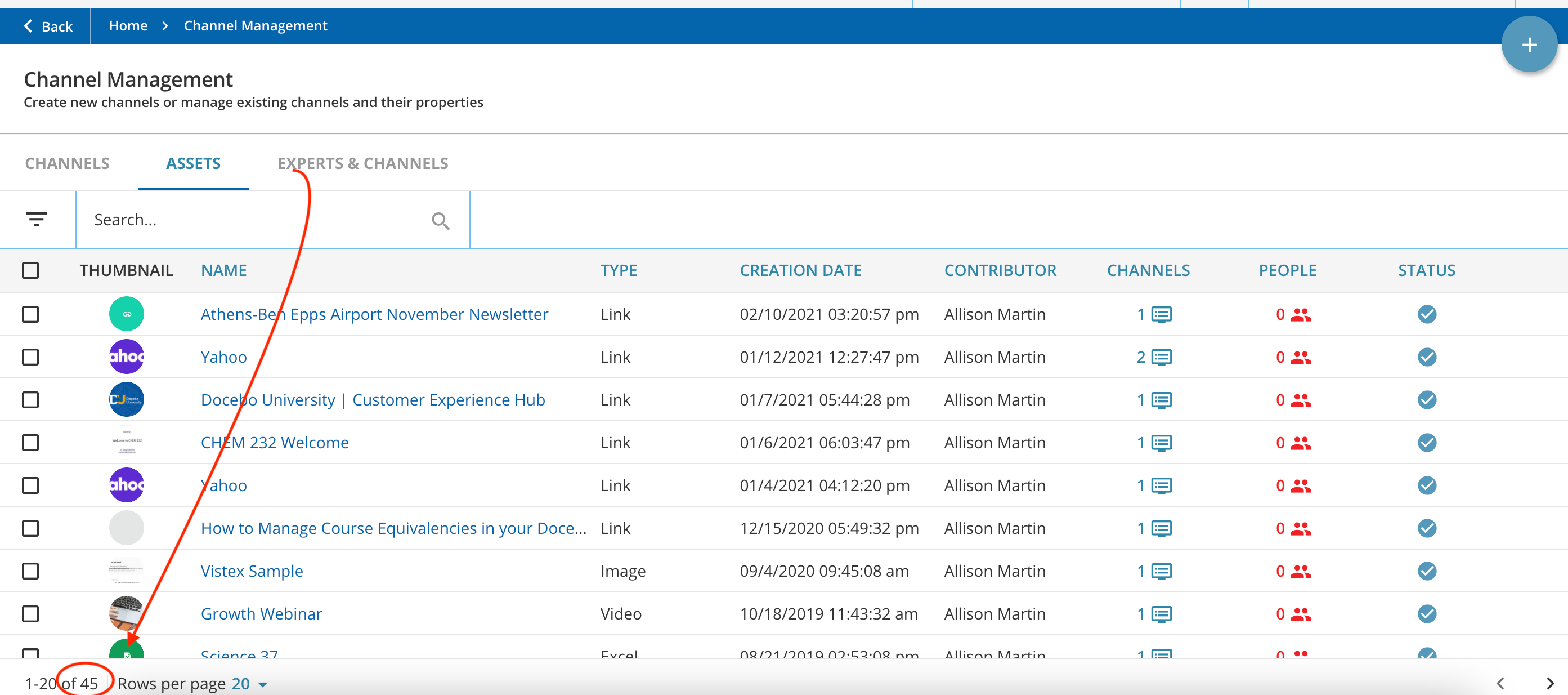
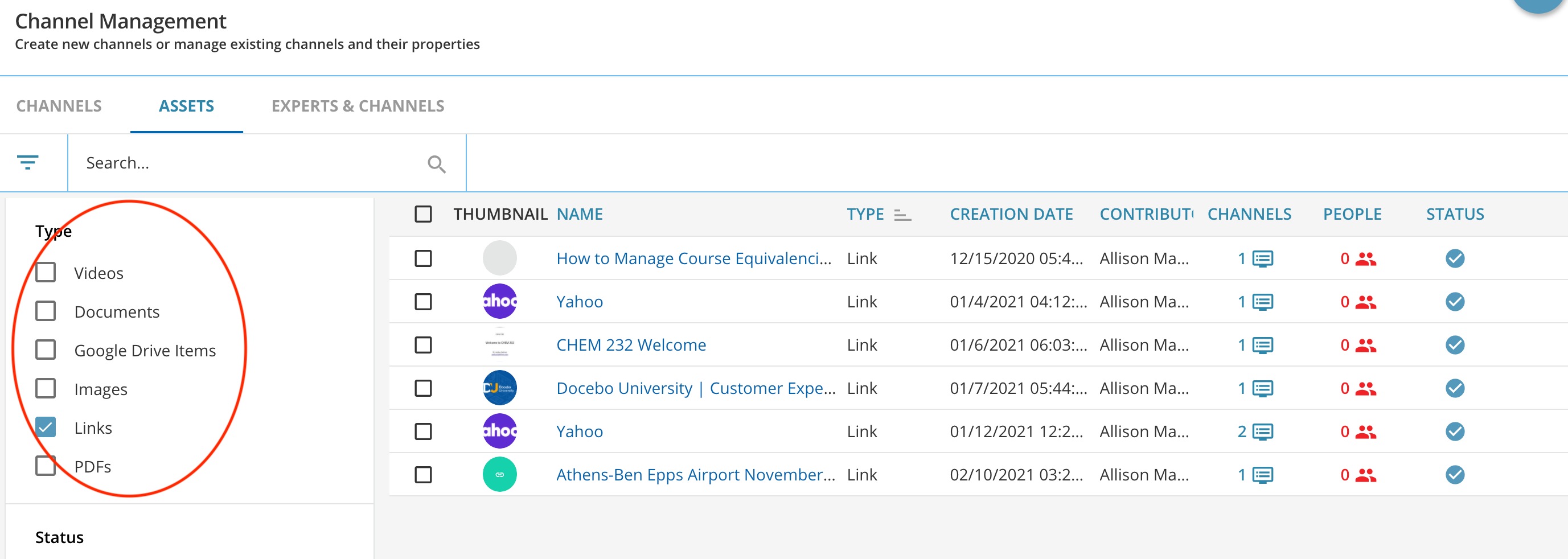
Hi Cindy, Docebo released a new Asset page. At the bottom of the page you can see how many assets you have. You can also filter by type and see how many of each type you have. The columns can also be sorted. It might be a quick way to find the information you need.


Cindy McElhinney
Helper II
Forum|alt.badge.img+4

Hi Cindy, Docebo released a new Asset page. At the bottom of the page you can see how many assets you have. You can also filter by type and see how many of each type you have. The columns can also be sorted. It might be a quick way to find the information you need.


@Allie Well this is perfect but how can I export it? Am I missing something?


Allie
Docebian
Forum|alt.badge.img
  • Docebian
  • April 28, 2021

There isn’t a way to export right now...you can only see how many at the bottom. 


Adam Ballhaussen
Guide III
Forum|alt.badge.img+7

Hey @Cindy McElhinney! I love this question and there was so much value here that I decided to make a guide to highlight some of the ideas shared. I’ll be sure to update this guide if anyone else chimes in with their ideas on this thread!


jckemv
Helper I
Forum|alt.badge.img+2
  • Helper I
  • August 5, 2021

Hi Cindy, Docebo released a new Asset page. At the bottom of the page you can see how many assets you have. You can also filter by type and see how many of each type you have. The columns can also be sorted. It might be a quick way to find the information you need.


Hi Allie, is that Assets tab available to everyone, or only people with certain features activated in the LMS? I don’t see it that is all.