Answer

Learning Plan Notification -- Adding a CC

  • June 3, 2025
  • 4 replies
  • 137 views

MichelleW
Novice II
Forum|alt.badge.img

Is there a way to CC someone on Docebo notifications? For example, when a customer is enrolled in an Onboarding Learning Plan, I’d like to notify them and copy the account manager, customer success manager, or project manager (whichever is applicable). Is this possible? I thought I heard that this was a new feature when I attended the Inspire event. Thanks in advance for your help. 😊

Best answer by lrnlab

Havent seen any such options within the Notifications app. Only way to send a copy to a manager is to use the recipient options in the notificaitons and not all have an option to send to managers. Sadly the Feature roadmap hasn't been updated in a while so we cannot be sure if this is on their radar.


4 replies

lrnlab
Hero III
Forum|alt.badge.img+10
  • Hero III
  • Answer
  • June 3, 2025

Havent seen any such options within the Notifications app. Only way to send a copy to a manager is to use the recipient options in the notificaitons and not all have an option to send to managers. Sadly the Feature roadmap hasn't been updated in a while so we cannot be sure if this is on their radar.



bgardner
Novice III
  • Novice III
  • June 9, 2025

we asked for this functionality and they said no but I think it would really help drive adoption


Forum|alt.badge.img+1

Hi Michelle,


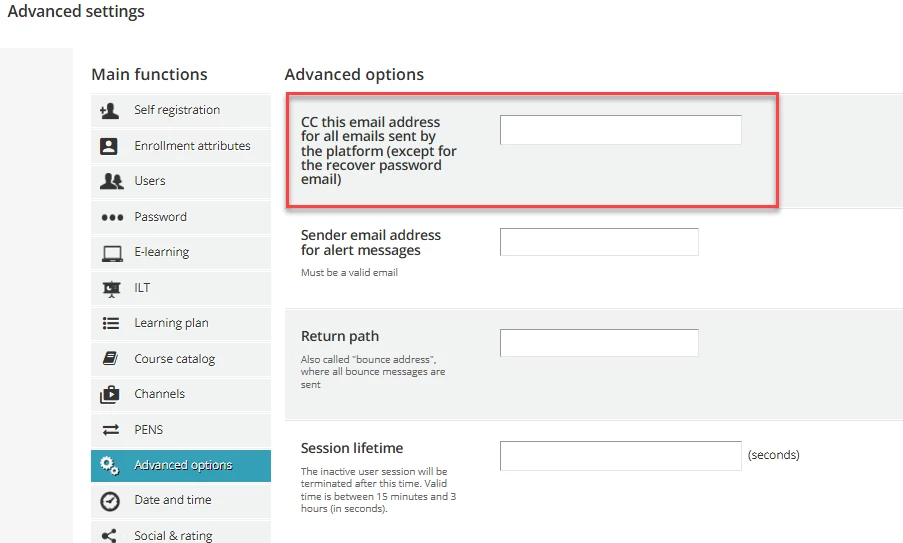
Please see if the below option available in Settings → Advance Settings → Advance Options helps. I understand you are looking at customise based on the user branch and notify the respective account manager. I don't think this level of custom mail trigger is available currently.

CC this email address for all emails sent by the platform (except for the recover password email)


~PS


  • Contributor II
  • June 30, 2025

There is also no way to schedule the notification for a Learning Plan.

All of this in addition to the fact that Learning Plans don’t have soft validity and an odd UI for end user experience despite updates, and I’d say that Learning Plans are just not a focus functionality at all.


What you ‘could’ do, as a work-around for the lacking functionality that exists for other notifications is:

  1. Identify a course, or make a course, that would only apply to the Onboarding Plan. This course must be in the Onboarding Plan and not available elsewhere.
  2. Create a ‘user is enrolled in a course’ notification email for that course
  3. Write the email as if it applies to the whole Learning Plan
  4. Configure your other email notifications to send a message to the manager (as noted in the system). It won’t be a CC though. Note: You can’t use the manager’s name, the ‘first_name’ and ‘last_name’ refer to the person being assigned the course.

As for the other roles, you may be able to configure something using Power User profiles that have limited user/group/branch constraints to identify if the email should fire. This could be much trickier to figure out.


However, the emails are tied to a course enrollment (not just by an admin, or enrollment rule, but even if somehow a person self-enrolls).  You’d want it locked down and even then, accidents could happen.

You’d want to be sure that that course would not be manually assigned.


We moved to using a ‘course’ as a stand in for ‘learning plan’ notifications because we need to delay the email to send a few days after the new hire learning plan enrollments happen.  However, we just encountered our first issue. It was requested that we assign the trigger course to a current employee, who then received the email about being assigned the whole learning plan, and it caused a bit of confusion. I forgot it was the email trigger course. So this solution works, but instead of the controls being engineered into the platform, they are dependent on human memory.


Good luck!