Question

Need to figure out how to collect Storyline Survey Data

  • May 14, 2026
  • 3 replies
  • 18 views

I’ve created and published my Storyline Survey as different versions of:

  • SCORM 2004 2nd edition
  • SCORM 2004 3rd edition
  • SCORM 2004 4th edition

I’ve attached my question results to a results slide.

I’ve published the Rise course package as all versions of SCORM 2004.

But I’m still struggling collecting answer data in Docebo when I go to:
Courses > Reports > Training Material Statistics > Downloading the Answers Breakdown report.

Are there specific directions I need to follow in order to collect that data?

3 replies

KMallette
Hero II
Forum|alt.badge.img+9
  • Hero II
  • May 14, 2026

Hi, Solj

You’ll want to stick with 2004_3rd edition.  That’s the one that works best. 

I don’t think a Storyline Survey will work however. I think you need to create a question pool and then make sure your question is in the question field on the page where you add the answers.

Also it would be super helpful to know what itsn’t showing up in the Answers Breakdown report. 

Regards,

Karen Mallette, formerly with Viasat, Inc.


Moshe.Machlav
Guide I
Forum|alt.badge.img+1

Hey ​@solj_admin27 ,

Welcome to the community! What you're experiencing is a very common roadblock when dealing with SCORM data.

The short answer is that the Answers Breakdown report you are trying to run is explicitly designed for Docebo's native learning objects, and it cannot extract question-level data from inside SCORM, AICC, or xAPI packages using the standard Custom Report Builder.

To see the survey answers submitted via your Storyline SCORM package natively, you have to look at the individual CMI data. You can find this by navigating to:

  1. The Course Report > User Statistics tab.

  2. Click on a specific learner's username.

  3. Select your SCORM training material from the list.

  4. Look under the Attempt Details section, this is where the platform shows the specific questions and the learner's answers. (Here is the official documentation: Checking the course report - Docebo Help Center)

A piece of advice from the field: Getting aggregate, easily exportable data out of SCORM CMI is notoriously difficult because Docebo natively displays it user-by-user rather than in a single bulk CSV. In fact, this exact limitation was discussed just a few days ago! I highly recommend checking out this discussion right here, where ​@joymiegarcia  breaks down the API and xAPI alternatives if you absolutely must extract interaction data in bulk.

If you want a native workaround without going down the API/scripting rabbit hole, the easiest approach is to pull the survey out of the Storyline/Rise package entirely. However, do not use the native Docebo Survey tool, as those responses are strictly anonymous in the reports!

When I've deployed this for organizations needing identifiable survey data at scale, we use Docebo's native Test learning object instead. You can configure a Test to act just like a survey (using ungraded or text-entry questions). This allows you to use the standard reports to export an aggregate spreadsheet that includes both the specific answers and the usernames.

(One quick technical note: if you do decide to stick with the SCORM package, make sure you publish strictly to SCORM 2004 3rd edition. Docebo officially supports 3rd edition, but 4th edition is not fully supported and can sometimes cause tracking anomalies).

Hope this helps save you some time!


  • Author
  • Newcomer
  • May 15, 2026

Hi, Solj

You’ll want to stick with 2004_3rd edition.  That’s the one that works best. 

I don’t think a Storyline Survey will work however. I think you need to create a question pool and then make sure your question is in the question field on the page where you add the answers.

Also it would be super helpful to know what itsn’t showing up in the Answers Breakdown report. 

Regards,

Karen Mallette, formerly with Viasat, Inc.

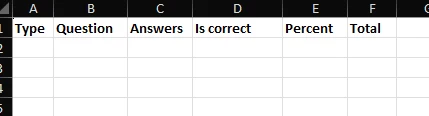
So far, it only shows the screenshot below: