Question

New navigation - background colour

  • April 29, 2026
  • 5 replies
  • 135 views

Has anyone figured out how to / whether it’s possible to customise the background colour of the new user menu and top banner in the new navigation mode? As you can (hopefully) see from the comparison images below (new navigation mode at top, legacy version below) we previously had the whole page including top banner all one colour, now it’s defaulting to white and I can’t see how to adjust this. 



5 replies

JeanetteMcVeigh
Hero I
Forum|alt.badge.img+10

Following - losing that colored bar across the top has been an ‘issue’, not horrible, but ugh…

I use colors to distinguish easily between our production system and the sandbox...


Forum|alt.badge.img+3
  • Helper III
  • July 9, 2026

Same issue here, but, what it looks like is they took away the breadcrumbs bar that used to have color, and now what we are seeing is the page header.

Anyone know how to format the page header?


Dominik
Helper I
Forum|alt.badge.img+1
  • Helper I
  • July 10, 2026

Hi all,

not sure if it helps, but I was testing a couple of options and found this one. It seems to work for me. It is still rough and needs more refinement.

.app-layout-title-bar-container,
.app-layout-title-bar-container > div,
.app-layout-title-bar-container * {
background-color: #0A4EA1 !important;
}

.app-layout-title-bar-container,
.app-layout-title-bar-container h1,
.app-layout-title-bar-container h2,
.app-layout-title-bar-container h3,
.app-layout-title-bar-container span,
.app-layout-title-bar-container div {
color: white !important;
}


Forum|alt.badge.img+3
  • Helper III
  • July 10, 2026

Hi all,

not sure if it helps, but I was testing a couple of options and found this one. It seems to work for me. It is still rough and needs more refinement.

.app-layout-title-bar-container,
.app-layout-title-bar-container > div,
.app-layout-title-bar-container * {
background-color: #0A4EA1 !important;
}

.app-layout-title-bar-container,
.app-layout-title-bar-container h1,
.app-layout-title-bar-container h2,
.app-layout-title-bar-container h3,
.app-layout-title-bar-container span,
.app-layout-title-bar-container div {
color: white !important;
}


So it is the title bar? How do I test this? I don’t have a sandbox and I have not enabled the new navigation, only in preview mode.


TaiSaxty
Helper I
Forum|alt.badge.img
  • Helper I
  • July 10, 2026

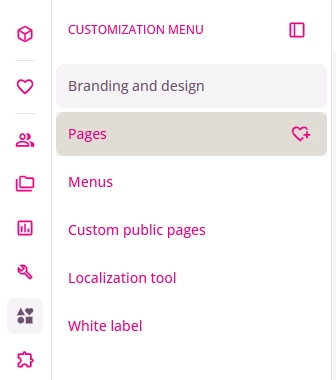
If you want to change the background colour of the user/admin menu on the left of your screen, here is the CSS:
 

/* Hover state for left learner menu items */
.lmn-list-item-root:hover {
background-color: #ECE9E1 !important;
}

just change the background Hex code to the colour you want. 
In this image I am hovered over the Pages option