Question

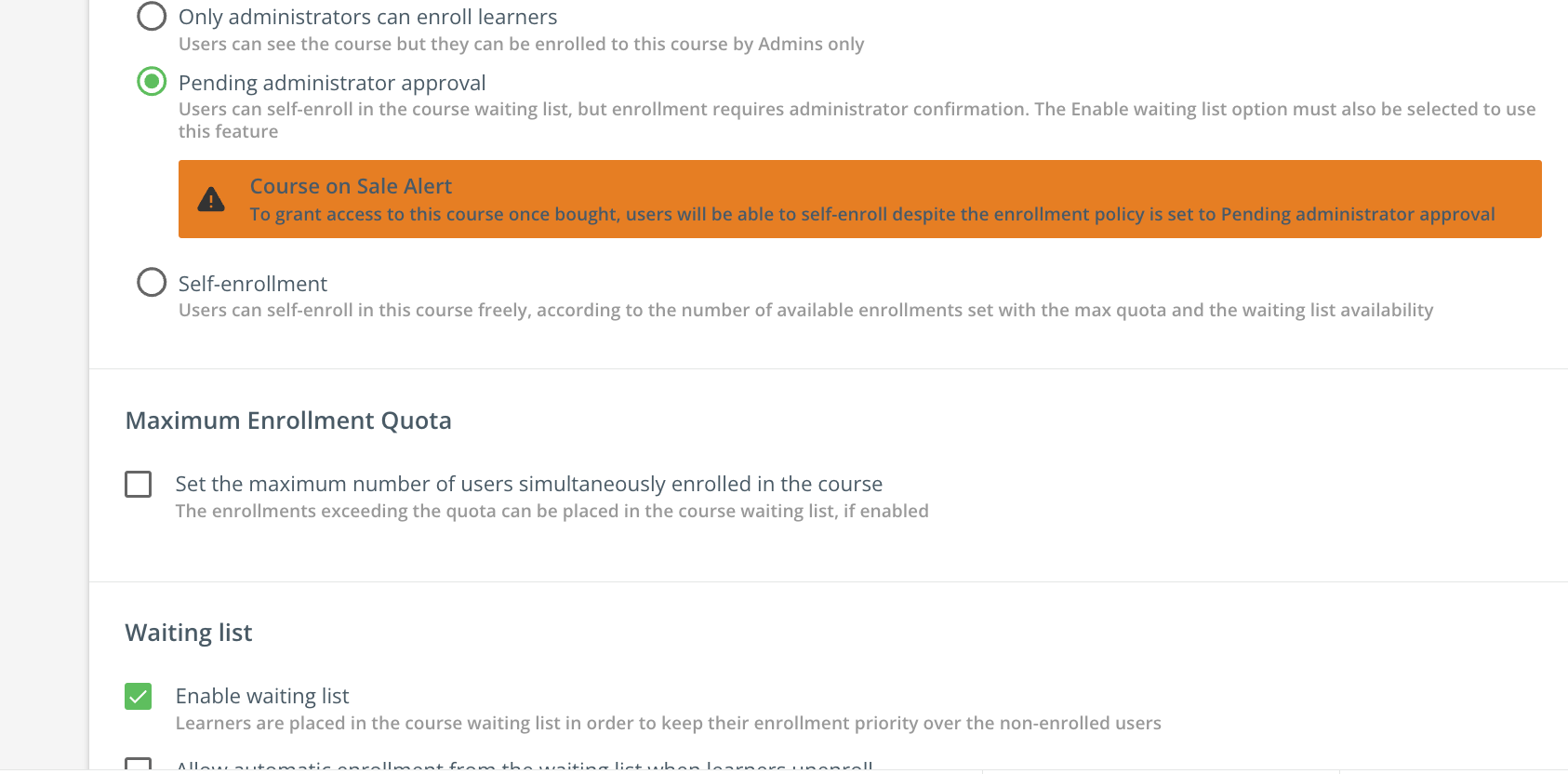
New Waiting list dependency for "Pending Admin Approval"

  • September 11, 2024
  • 10 replies
  • 142 views

Forum|alt.badge.img

Hi 


We’ve noticed that now if we want to mark the Course Enrollment Policy as “Pending Admin Approval” we are forced to select the “Enable Waiting list” option.



This must be a recent change because we have courses created un July that didn't require this option. 

The enrollment now remains active even after the maximum enrollment number has been reached. We don’t use waiting lists and need the ability to hide a session once it has reached its maximum enrollment quota.


Any idea why this setting was changed? 


Thanks

10 replies

lrnlab
Hero III
Forum|alt.badge.img+10
  • Hero III
  • September 11, 2024

Oh wow...that is odd...agree, we never had to use that before and most of our courses require approval.

Are you planning to open a ticket? If yes, please keep this post updated. Thank you.


lrnlab
Hero III
Forum|alt.badge.img+10
  • Hero III
  • September 11, 2024

Just tested and it doesn't seem to be a hard stop although the warning is a bit ominous...When I actually turn ON the waitlist, the organ warning still shows and I dont see any difference…

Guess I’ll need to test from the user end to see if the approval request actually gets logged without using the waitlist...very odd...


Forum|alt.badge.img
  • Author
  • Contributor III
  • September 11, 2024

Thank you, in our case it’s a hard stop and we can’t select the “Pending Admin Approval” option without checking the Waiting list option first


lrnlab
Hero III
Forum|alt.badge.img+10
  • Hero III
  • September 12, 2024

OH that’s odd that behaves differently...I will test it again to be sure. Thx


lrnlab
Hero III
Forum|alt.badge.img+10
  • Hero III
  • September 12, 2024

So, tested again and found that it’s a bit misleading...you can try to leave the page wiht only the “pending approval” selected...You will get the red warning message and when you navigate away from the properties page, it will ask you save or discard changes but what it doesn't show is that the selection of “opening approval” was actually reset to self-enrol and you dont know it unless you go back and check...not a great flow by any means…

So in the end it DOES force you to enable the waitlist.


Forum|alt.badge.img
  • Author
  • Contributor III
  • October 4, 2024

Thank you @lrnlab, yes that’s exactly what’s happening. I’ve opened a case with Docebo to understand the reason behind this change and why we weren't notified. We don’t use Waiting Lists, and this is actually causing a conflict with one of our integrations. Now we have to manually hide the sessions once they reach the maximum enrollment quota (via Self enrollment deadline).


lrnlab
Hero III
Forum|alt.badge.img+10
  • Hero III
  • October 7, 2024

Am still awaiting on an answer as to whether all our pre-existing courses need to be updated with this new setting but no one seems to know...thankfully most of what we have is for sale so it has no real impact.


Forum|alt.badge.img
  • Influencer II
  • October 28, 2024

Am still awaiting on an answer as to whether all our pre-existing courses need to be updated with this new setting but no one seems to know...thankfully most of what we have is for sale so it has no real impact.

I have received an reply from the Docebo Support. This update is not retrospective so the old courses will stay as they are. It affects only the courses that are new or need to be updated. We were not using the waitlisting and now we are in the situation that some courses will be waitlisted and the old not. I have not seen any announcement to this change. According to the Docebo Support it was announced with the new course player...


lrnlab
Hero III
Forum|alt.badge.img+10
  • Hero III
  • October 28, 2024

Thanks @nawc6m1 good to know.


Forum|alt.badge.img+1
  • Influencer III
  • December 10, 2024

Can I add to this too - when accessing the ILT approval required courses through the mobile app it seems to bypass the whole process.