Answer

Notification to a specific user, that is not the learner, power user, or a super admin?

  • September 13, 2023
  • 14 replies
  • 140 views

Forum|alt.badge.img

Hi,

Is there a way to have a notification sent to a specific user (this user is not the learner, a power user or a super admin), when users complete a specific course?


What I am trying to accomplish is: 

A user will complete a “getting started w/ xyz system” course that I made, and once the user completes it, the notification will go to our IT representative, and they will know to create the users “xyz’s system credentials”.


Any help would be appreciated. Thanks! 

Best answer by lrnlab

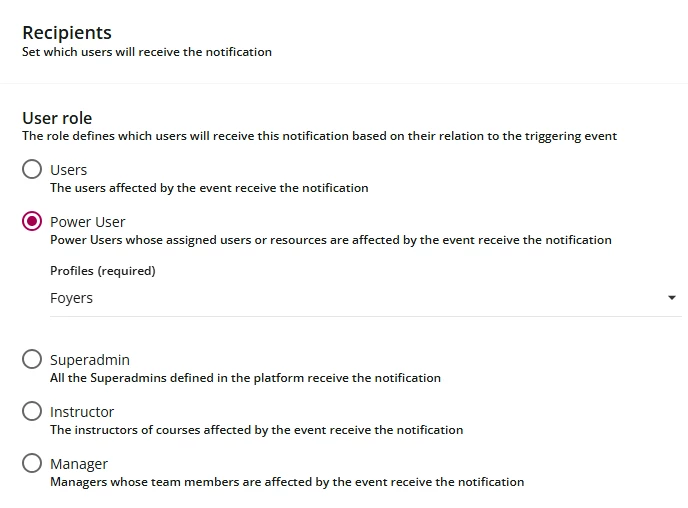
@KLevensky you cannot single out just one user unless you place them in a group or branch by themselves. With the option, you could single them out.

If you create a PU role just for that person, you can choose the role (see image) from the dropdown. This is from the template called, Learner has completed a course.


14 replies

lrnlab
Hero III
Forum|alt.badge.img+10
  • Hero III
  • September 13, 2023

the only way to send notifications using the notification app is to actual users...you cannot send it to an external email address. 

You can build a profile for your IT rep and give them a special PU role so they can be singled out when sending notifications (some actually allow to select the PU role you want to send the notification to)


Forum|alt.badge.img
  • Author
  • Novice II
  • September 13, 2023

@lrnlab Thanks for responding. So, the IT rep is in Docebo but we are strongly limiting who we allow to be Power Users. They are in there as just a regular user. Is there a way to have this type of notification sent to a regular user in Docebo? 

Also, let’s say we make the person a PU, I noticed when I looked at making the notification, that it said it would send the notification to all PU and Super Users. Is that correct or is there a way around that? 


IanMonk
Helper III
Forum|alt.badge.img+2
  • Helper III
  • September 13, 2023

Another solution would be to use reports. You could schedule a custom course report to be sent to your IT representative daily. The representative would need to download the report and check for newly completed users. You could come up with some SLA that users will get system access within 24-48 hours after completing the getting started course. 


lrnlab
Hero III
Forum|alt.badge.img+10
  • Hero III
  • Answer
  • September 13, 2023

@KLevensky you cannot single out just one user unless you place them in a group or branch by themselves. With the option, you could single them out.

If you create a PU role just for that person, you can choose the role (see image) from the dropdown. This is from the template called, Learner has completed a course.


Annarose.Peterson
Hero III
Forum|alt.badge.img+7

Echoing @lrnlab ‘s solution.  You can even create the PU profile, and not assign any permissions to it.  So the user will still only have the same user access, but this will allow the system to send a notification to just that user.


admin_mhshomes
Influencer I
Forum|alt.badge.img

I’ve tried to do the above, but the notifications still aren’t going through. I’ve created a PU profile and assigned one person to it.


Any suggestions for what I’m missing?


Forum|alt.badge.img+4
  • Helper II
  • November 17, 2025

Can you see in the notification log if the notifications are triggering, so you can narrow down if it’s a creation or delivery issue?


  • Newcomer
  • November 17, 2025

@mzirnhelt Where can you find the notification log?


Forum|alt.badge.img+4
  • Helper II
  • November 17, 2025

@coachdeb 

If you go to Admin>Notifications


There’s a Logs tab on the left that will let you see what notificaitons were generated by Docebo.


  • Newcomer
  • November 17, 2025

Thanks for sharing. Mine doesn’t have that feature. I’ll speak with our rep to see how we might get it!


lrnlab
Hero III
Forum|alt.badge.img+10
  • Hero III
  • November 17, 2025

When you test, the user you use must be visible by the PU and the PU also needs to be able to see the same course the use hasn't yet completed. Remember this is not sending a direct email to the PU; it’s based off the user and the course *(and the course status being either “not started” or “in progress” only)


admin_mhshomes
Influencer I
Forum|alt.badge.img

@mzirnhelt  I deleted the branches used as triggers and re-added them. Seemed to work!


dklinger
Hero III
Forum|alt.badge.img+11
  • Hero III
  • November 18, 2025

Hiya - i am way late to the game. A method we have been using with good success with the requirement is leveraging the role of instructor and mapping an “office email user” to an instructor role. Thw instructor does need to be mapped to the enrollment. But beyond that? There is no need to give a PU or Superadmin permission to receive a notification…and thwy can receive notification upon completion nicely.


lrnlab
Hero III
Forum|alt.badge.img+10
  • Hero III
  • November 18, 2025

Glad you found the issue ​@admin_mhshomes