

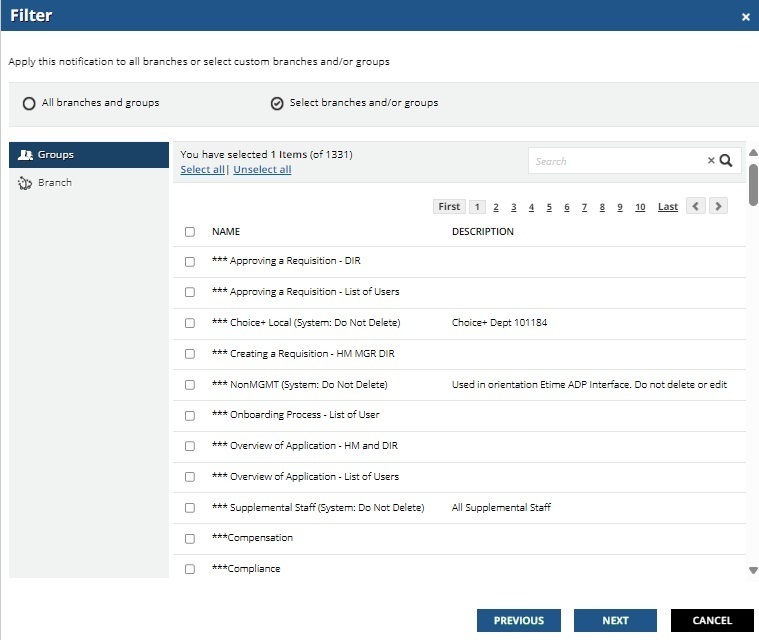
Notifications filters - which group or branch is selected

  • September 16, 2024
  • 5 replies
  • 59 views


This enhancement request may already exist, but I didn’t see it.

Under Notifications, once you select your desired group and/or branch, when you need to circle back to it, you can’t easily tell the name of your selection without search guessing or clicking through the pages to find your selections.  It should be setup to allow the admin can see the selection on the main page with an option to add / select others to the list.


 

5 replies

lrnlab
Hero III
Forum|alt.badge.img+10
  • Hero III
  • September 16, 2024

sadly this is pain point we are all living with...hopefully this will be addressed since we see an update to the notifications app (date unknown).


  • Author
  • Novice II
  • September 17, 2024

Irnlab, thank you for acknowledging and agreeing with the pain point mentioned.


erin.brisson
Docebian
Forum|alt.badge.img+3
  • Docebian
  • October 10, 2024

@Shunya thank you! Would you be able to submit this as an Idea using the new Idea Submission Template please?


  • Contributor II
  • December 13, 2024

Yeah - I agree with you too. This is just so un-usable.  Can any of the API endpoints show this information, does anyone know?     


For my use case, I think I am going to end up creating groups starting with ‘Notifications: ’ and then re-associating those groups with the notifications we have enabled.

I already utilize the practice of putting a numerical ‘code’ of some sort in the notification CODE and a general description of what the notification is for.  We generally utilize notifications specific to courses, and I want to find all courses related to the course.  And example is Code field : INT_Enrolled_in_a_LP 8638432NHE - NEW EMPLOYEE BASICS

I then put the numerical part of the code in the email body at the bottom.  We have a box that is CCed for all emails out the system. When someone forwards me an email they got by mistake, I can quickly pull up that exact email in the notifications search.  Or if I need to see if a person did receive an email, I can search the inbox of the CCed account for the person’s email address and the numerical code.

This works for our use case.  Putting this here in case it helps someone else manage this more easily.


gstager
Hero III
Forum|alt.badge.img+8
  • Hero III
  • December 16, 2024

I’d settle for just being able to target the recipient(s) I want.






