

Question

NPS - Course Surveys - Likert Scale

  • February 6, 2025
  • 4 replies
  • 107 views

msantos
Helper II
Forum|alt.badge.img+2

Hi all,

Last December, an update was made to the survey, and the Likert scale was changed, impacting the client NPS.

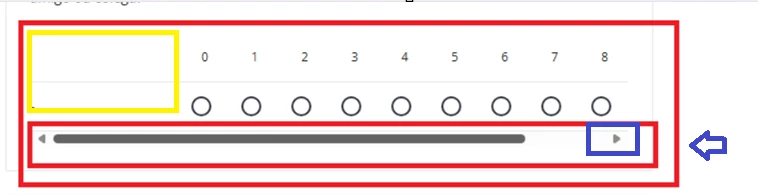
In the figure below, you can see that for the user to give a score of 10 (maximum), they have to click on a small arrow, to show the numbers 9 and 10.
There is a huge space on the left, where the numbers can be moved, and all the numbers from 0 to 10 appear.
 

I opened a ticket and the response I got was that it is "expected behavior".

*************************

“ After the new course player implementation, there were many changes to how things look and interact on the platform. In this case, I can say that this behavior is expected and that in order to see this change, you would have to create an idea in our ideas portal, which is found in our Community Portal here. “

***********************

It is unbelievable that a company with more than 3,800 customers and more than 30 million users would make an update like this without going through a quality process.

Were you also impacted by this update?



4 replies

lrnlab
Hero III
Forum|alt.badge.img+10
  • Hero III
  • February 6, 2025

Yes we had the same issue...it was worse just after we enabled the NCP. We opened a ticket and that’s what the fix was...so not perfect at all. The issue seems to be with the restricted survey window size; not sure they didn't make that space dynamic instead of fixed. It may be something you can fix with CSS - I haven't tried that yet.


msantos
Helper II
Forum|alt.badge.img+2
  • Author
  • Helper II
  • February 7, 2025

Hi ​@lrnlab ,thank you for your comments.

Any tips to how I do that?

I did not know that is possible to change a survey using a CSS.


lrnlab
Hero III
Forum|alt.badge.img+10
  • Hero III
  • February 7, 2025

Sorry I do not...If I do find some time to explore if it’s possible, I’ll let you know.


msantos
Helper II
Forum|alt.badge.img+2
  • Author
  • Helper II
  • February 12, 2025

Hi ​@lrnlab , thank you for your tip.

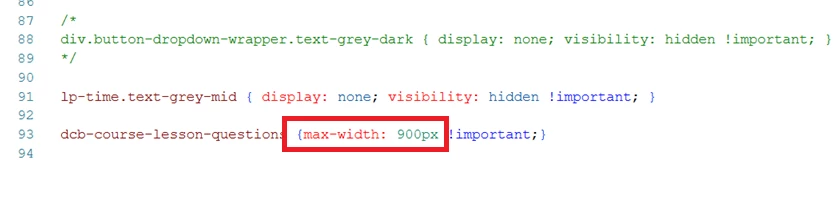
We fixed it using a CSS programming.