


Question

Resources Widget (Training Material) - Visibility Settings not working

  • November 14, 2024
  • 3 replies
  • 38 views

Forum|alt.badge.img+2

Good Day All - 

Before I rush out to submit a ticket, I wanted to check if anyone else has noticed this behavior. My organization has a few courses wherein we’re utilizing a Course Resources widget. Of the 2-3 resources we’ve added in the widget, one has the file visibility set to Instructor. The ability to limit visibility of the file worked about a year ago, but today while doing some testing, I discovered that the file is visible to any enrollment level. Adding a screenshot here of the settings (albeit with pertinent file title and URL erased):
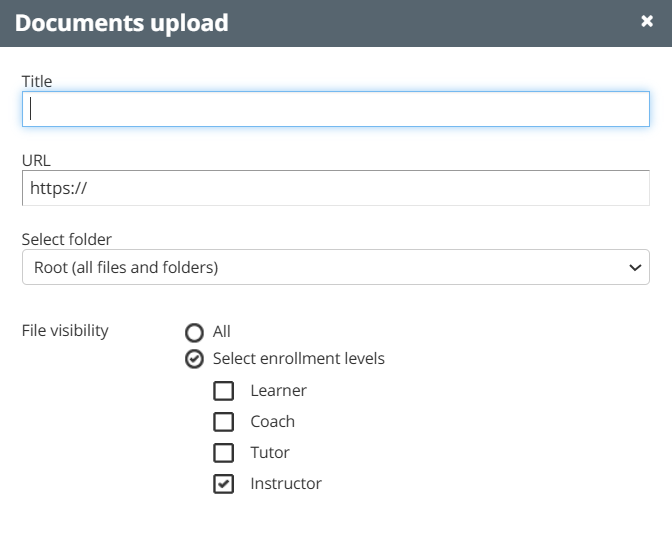
Has anyone else experienced an issue with the file visibility not working as it should?

Many thanks for your insight.

3 replies

KMallette
Hero II
Forum|alt.badge.img+9
  • Hero II
  • November 14, 2024

@LNew Hello … the way that I’ve understood this visibility is that it is ONLY in the ILT where the course is assigned, to the instructor assigned to the ILT session. Now, if you happen to be looking at it as a SuperAdmin, you’ll see it.

Love to hear back...


Forum|alt.badge.img+2
  • Author
  • Guide I
  • November 14, 2024

Hi ​@KMallette - I was noticing the behavior with a Power User who had not been assigned, or enrolled, as an instructor for a particular eLearning course, and also on a test user with just learner permissions. I’m still doing a bit of testing to see if there is something amiss on my end of things.

I appreciate the response - thanks!


lrnlab
Hero III
Forum|alt.badge.img+10
  • Hero III
  • November 14, 2024

Just tested again and it seems to be working fine...make sure to test with a user or instructor and not as a super admin (as mentioned above)




