Updating new HTML versions in Central Repository

  • April 10, 2024
  • 2 replies
  • 67 views

monica.cheek
Helper I
Forum|alt.badge.img+3

I’ve seached KB articles and in Community.  We are in the process of updating a lot of HTML files within the Central Repository.  We don’t have an option for those files to “update versions” like we do with Scorm files so….what is the best practice to get a new version without retiring and basically starting all over?  Anyone? :)  Of course, I may be doing something wrong.

April 10, 2024

I wanted to let you all know what I found out in case someone else has the same question - 

Per Nikitha in Chat - “So, yes you can change the link in the HTML page, but if you want to track the old version of the link of who accessed it, it is better to create a new HTML page with the link and update to the new courses.”

So, it’s just better to retire the other versions and create a new asset.

2 replies

monica.cheek
Helper I
Forum|alt.badge.img+3
  • Author
  • Helper I
  • April 10, 2024

I wanted to let you all know what I found out in case someone else has the same question - 

Per Nikitha in Chat - “So, yes you can change the link in the HTML page, but if you want to track the old version of the link of who accessed it, it is better to create a new HTML page with the link and update to the new courses.”

So, it’s just better to retire the other versions and create a new asset.


siyang
Novice III
  • Novice III
  • April 10, 2024

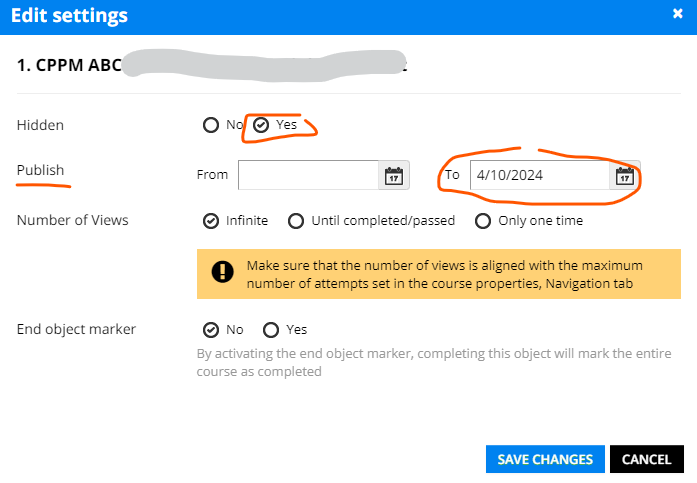
I don’t know if there’s a way in the central repository to update the versions for non-SCORMs. However, in our team, we hide the old version of a training material under the settings (in course level), and then push the new version to the courses. You may also want to put an end publish date for the training material to indicate when it is retired, or change the file name in the central repository to help you control the versions.