Question

Where can I find the QR codes for ILT sessions

  • March 4, 2026
  • 3 replies
  • 17 views

JulesH
Novice II

On Docebo Help it guides me to the Admin menu and then says there is “Learning Evaluation” in the Apps and Features part of the menu - I dont seem to have that option (yes I am a SuperAdmin!)

3 replies

rodel.lacaba
Novice I

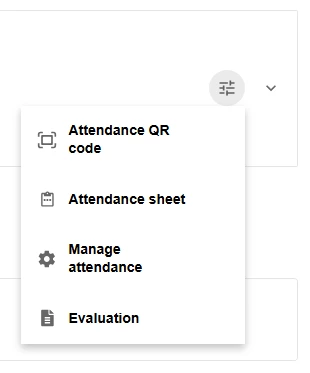
You can view the QR Code through the Instructor Action button within the session event.

Go to the ILT Course, click Learner View. In the Session Event, click the Instructor Action button. From the dropdown menu, you will see the Attendance QR Code option.


JulesH
Novice II
  • Author
  • Novice II
  • March 10, 2026

You can view the QR Code through the Instructor Action button within the session event.

Go to the ILT Course, click Learner View. In the Session Event, click the Instructor Action button. From the dropdown menu, you will see the Attendance QR Code option.


You are a superstar - thank you!!!


Moshe.Machlav
Novice III
Forum|alt.badge.img

The QR code for ILT attendance lives inside the Learning Evaluation module — that's why the docs are pointing you there. If you don't see it under Admin Menu → Apps & Features, the module likely isn't activated on your plan. Worth a quick check with your CSM to confirm.

One practical thing worth knowing before you roll this out: learners will need the Go.Learn mobile app (or your branded app) installed on their phone to scan the QR code. No app = no scan. In organizations I've worked with, this is the detail that surprises people most — admins assume learners can scan with a regular camera app, but it has to go through the Docebo mobile app to register attendance properly.

So if you're planning to use QR codes as your main check-in method, it's worth communicating to learners in advance that they'll need the app ready on the day of the session.

More details here: Using QR codes to access learning evaluation questionnaires and mark attendance