Certificates: Audit & Process Build w/Accreditations

  • October 9, 2025
  • 5 replies
  • 33 views

Forum|alt.badge.img+1

Docebo Community,

Looking for any L&D group, tech, person that might have experience with cleaning up certificates in Docebo. What challenges you faced and any best practices.  Lone wolf on this project, (No IT support, only one on the team with the experience: 20+ in L&D, Tech and Biotech). 

Challenging part is incorporating the external accreditations, that is new for me.  But I do need to include all the watch outs, and I would appreciate any insights if you’re willing to share. 

Taking a shot in the dark with Domebo’s community tool.

5 replies

elamast
Hero I
Forum|alt.badge.img+7
  • Hero I
  • October 9, 2025

When you say “cleaning up” the certificates, can we assume you want to modify the existing certificate templates, or were you thinking of exporting existing certificates to make manual edits to them?  

The built-in way of handling changes to certificates is to edit the templates, revoke the existing certificates, and reissue them.  The process of editing the templates is tedious as you will need to make your edits in the (sort of) WYSIWYG editor, save, export a sample, make adjustments, repeat…   You may find it slightly easier to use an old-school HTML editor to create a table-based template, and then copy/paste the resulting HTML code into the code view in Docebo.

With external accreditations, it depends a bit on what you want to accomplish.  If it’s just adding a logo to every certificate, then you would put that in the background of the template.  If you want to include specific accreditations that apply to only some individuals, I would create a “user additional field” that contains the accreditation info, and then use that field in the certificates.  If you were thinking of importing an accreditation certificate from outside of your company, then I would use the “additional training records” functionality to bring that in.

If you were thinking of making edits to existing certificates outside of the LMS, that’s a whole different game.  You can do it by unprotecting the certificates (the password is blank), and then editing them with something like LibreOffice Draw or Adobe Acrobat Pro.

Let me know if I can be of more help.


Forum|alt.badge.img+1
  • Author
  • Contributor I
  • October 9, 2025

@elamast 

Here are so of my prelim goals now that the cert feature was released:

  • I have to audit the templates, review what’s being used and remove what’s not.
  • I have to review the user report, so I can provide data (brownie points for me)
  • I need to introduce an archival type of process, so that we update certs templates
  • I have to minimize & standardize cert templates even more, reduce the amount templates…We do have templates & have standard branding.
    •  You mentioned adding an additional user field, I’m familiar with how to do that & set those up; but not sure how that integrates with certs? I wasn’t aware that could be a short code?  Please tell me more. 


elamast
Hero I
Forum|alt.badge.img+7
  • Hero I
  • October 9, 2025

@elamast 

  •  You mentioned adding an additional user field, I’m familiar with how to do that & set those up; but not sure how that integrates with certs? I wasn’t aware that could be a short code?  Please tell me more. 


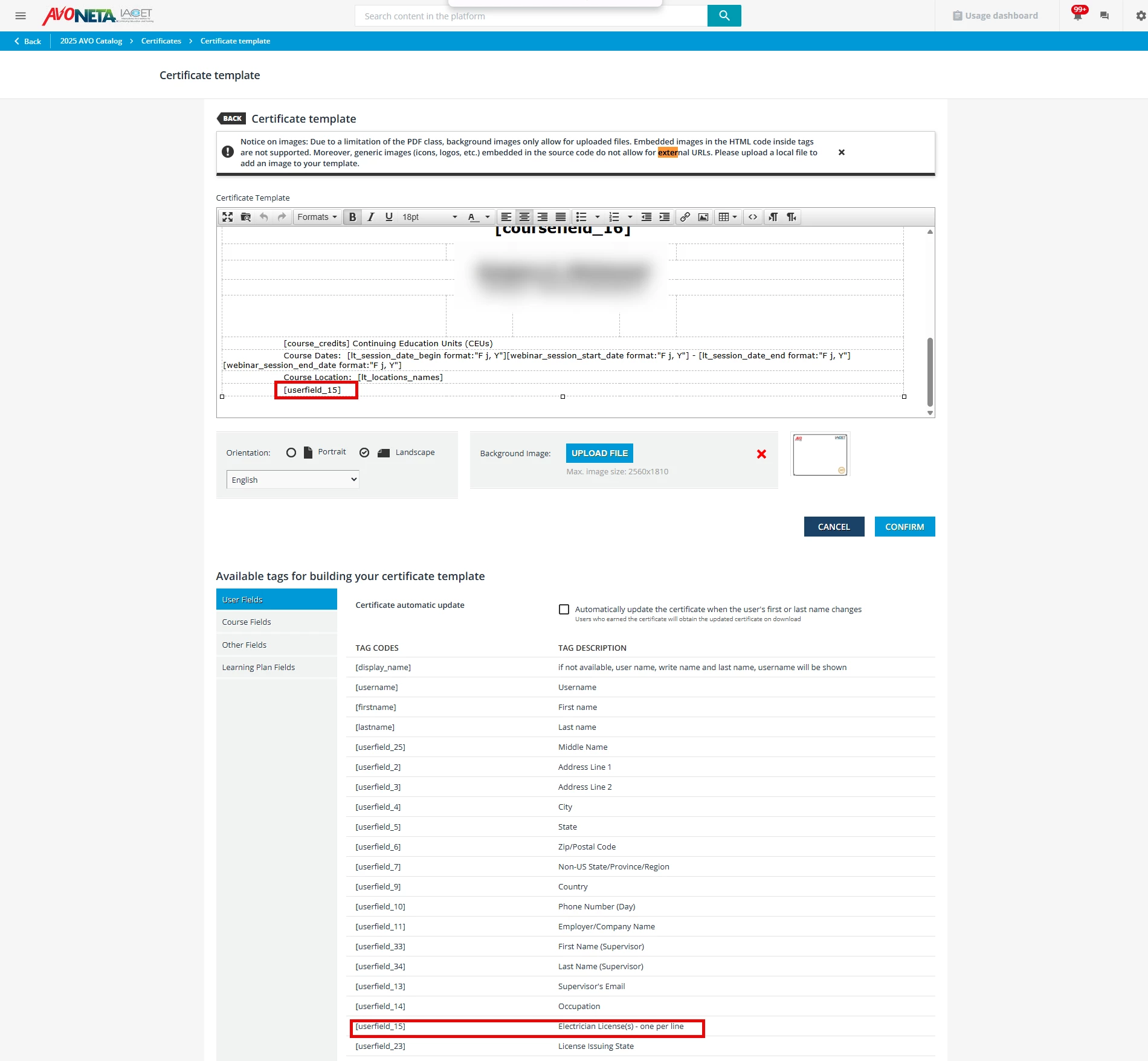
Yes.  Here’s an example of how you can use “user additional fields” as shortcodes in your certificates.  In this case we’re using [userfield_16] toward the bottom of the certificate to show the person’s electrical license number.


Forum|alt.badge.img+1
  • Author
  • Contributor I
  • October 10, 2025

Yes!  I found that yesterday after I read your response.  Not sure why that wasn’t used?!  

Worth the post, thanks for your help.  Best way to start this is just dive in and see what we have.  Then I can make these type of improvements.


elamast
Hero I
Forum|alt.badge.img+7
  • Hero I
  • October 10, 2025

Yes!  I found that yesterday after I read your response.  Not sure why that wasn’t used?!  

Worth the post, thanks for your help.  Best way to start this is just dive in and see what we have.  Then I can make these type of improvements.

Glad to help.  Let me know if I can be of further assistance.