Daylight Savings applied to Automation Rule Schedule

  • Mar 14, 2022 4:16 PM UTC
  • 17 replies
  • 556 views

Hey all! Its that time of year again! for anyone new here for this timeframe, Daylight Savings time is not applied automatically to the Automation App. So, if any agent gets tickets about Automation Rule not triggering at the correct time, the SA or agent can access the rule and resave it entirely and then it will apply the Daylight Savings time to the rule.


 

17 replies

gstager
Hero III
Forum|alt.badge.img+10
  • Hero III
  • Mar 14, 2022 5:27 PM UTC

Can Docebo just make daylight savings go away for everyone in the world?

var t;

function fixTime(problem) {
t = new Date();
t = t.toLocaleTimeString();
t.remove(problem);
}

fixTime(daylightSavings);


Bfarkas
Hero III
Forum|alt.badge.img+6
  • Hero III
  • Mar 14, 2022 11:01 PM UTC

Ah time. I hate time…


jordandb
Contributor II
Forum|alt.badge.img+1
  • Contributor II
  • Oct 27, 2022 9:22 PM UTC

@candace.forbes Could this impact Outlook calendar invites? We are seeing the sessions scheduled for after DSL are not updating to the correct time on Outlook calendars. 


Bfarkas
Hero III
Forum|alt.badge.img+6
  • Hero III
  • Oct 28, 2022 12:28 AM UTC

@candace.forbes Could this impact Outlook calendar invites? We are seeing the sessions scheduled for after DSL are not updating to the correct time on Outlook calendars. 

How are your invites working, ICS attachments or through Docebo Connect?


jordandb
Contributor II
Forum|alt.badge.img+1
  • Contributor II
  • Oct 28, 2022 12:42 AM UTC

@candace.forbes Could this impact Outlook calendar invites? We are seeing the sessions scheduled for after DSL are not updating to the correct time on Outlook calendars. 

How are your invites working, ICS attachments or through Docebo Connect?

@Bfarkas ICS attachments at the moment. 


  • Newcomer
  • Nov 1, 2022 1:58 PM UTC

@jordandb We’re having this same issue with Outlook invites. Did you find a solution yet?


Bfarkas
Hero III
Forum|alt.badge.img+6
  • Hero III
  • Nov 1, 2022 7:51 PM UTC

Can you attach a ics example that has the issue?


jordandb
Contributor II
Forum|alt.badge.img+1
  • Contributor II
  • Nov 2, 2022 4:26 PM UTC

Can you attach a ics example that has the issue?

Sure thing. I had to zip the ics file to add it here because it won’t let me add an .ics file.

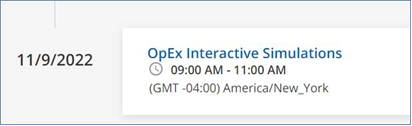
I’ve also included an image of the session in Docebo. 


jordandb
Contributor II
Forum|alt.badge.img+1
  • Contributor II
  • Nov 2, 2022 4:27 PM UTC

@jordandb We’re having this same issue with Outlook invites. Did you find a solution yet?

Not yet, we are still researching the issue. 


lrodman
Guide II
Forum|alt.badge.img+6
  • Guide II
  • Nov 2, 2022 9:01 PM UTC

Wait - so all events need to be fixed when daylight savings starts and ends (if people created January’s events in August for example)?


This is fine for now but going to be a big time issue in March. 


lrnlab
Hero III
Forum|alt.badge.img+10
  • Hero III
  • Mar 12, 2024 9:16 PM UTC

In 2024, we are still seeing this issue... so I re-saved all automation rules to get them back in line...Docebo should look at getting this done automatically instead of us having to remember to do this.


gordon.cooke
Contributor II
Forum|alt.badge.img+1
  • Contributor II
  • Mar 14, 2024 2:35 PM UTC

OK I have a notification issue that may be partially caused by this.

My head is exploding trying to articulate this and apologies for any others I may be consigning to the same fate in reading this.

Enrollment Date: March 3 2024 @ 3:11 PM
Notification rule : 11 days after the event @ 2:00 AM

Given the stated notification logic adding 11 days to the enrollment date would place me at March 14 3:11 PM.
This is past the 2AM required send time so the notification should be sent the following day - March 15 at 2:00AM.  The message was sent today at 2:00 AM.

Here is the rabbit hole:
 

I propose that we have a two factors creating the error here:

Following the logic that all notification times will be calculated based on a single time zone (CET perhaps) with modifiers, the DST effect has the notification triggering one hour later in the single time zone to ensure 2AM EST - send time would now equate to 3AM.

For the second part I propose that the determination to send calculation is based upon a straight number comparison - enrollment time for this example is viewed in the admin UI as 03:11:12. 

So 3 in the enrollment with 3 on the send time (my assumption extends to ignoring minutes and seconds) gives an "equal" result with the send decision being made on the send time being less than or equal to the enrollment time.

This is one potential explanation for why the calculation is ignoring the clear 12 hour shortfall in completing a day.

This issue is definitely bigger on the inside :-)


  • Novice III
  • Mar 11, 2025 2:13 PM UTC

Howdy folks. Do we know if this impacts notifications too? I currently have a notification that started sending an hour later, lining up with daylight savings time, but support doesn’t think it’s the case. I’m fairly confident it was configured for 9 am in our system, and now shows 10 am. I’m assuming this is because they technically tie it to GMT/UTC. Do we need to adjust our notification timing twice a year to combat the change? I’m still on the legacy notification system. 


Forum|alt.badge.img+6
  • Guide I
  • Mar 11, 2025 2:41 PM UTC

​@caitlin I definitely have notifications that didn’t adjust for DST.  We have one for unfinished courses to managers that is scheduled for 6, but now is going out at 7.  I can just look back at e-mails in my inbox from last week to see the time change.


lrnlab
Hero III
Forum|alt.badge.img+10
  • Hero III
  • Mar 11, 2025 3:07 PM UTC

Think you just need to re-save the rule to get it working and aligned properly.


  • Novice III
  • Mar 11, 2025 3:09 PM UTC

Think you just need to re-save the rule to get it working and aligned properly.

thankfully I only have one this impacts. This wouldn’t be feasible if I were managing a large number of scheduled notifications. 


I submitted an idea on this if anyone else wants to upvote it. It’s tied to notifications specifically. 


JKolodner
Guide I
Forum|alt.badge.img+8
  • Guide I
  • Nov 3, 2025 5:15 PM UTC

Ahh… seems like we’re still experiencing this problem. I had to reset one of my automations today. 

Does anyone know if notifications are still affected by this now that we’re on the NEW notification engine?