I would seriously love to know what is stopping Docebo from making this happen, like the real reason. All I’ve read are posts with people saying “...because SCORM” - which I find unacceptable.
Anyway let’s have some fun! Storyline sends each answer to the LMS the moment that question is submitted (SetValue cmi.interactions.N.learner_response) and this can be tricky to catch, Learner’s can press Enter instead of clicking the Submit button that has the triggers on it, ect.
The reliable centralized fix is to talk to the LMS directly at the end and rewrite the interactions it already stored!
SCORM 2004 only. On SCORM 1.2 this won't work — interactions there are write-only, so you can't read them to append.
Step 1 — Capture the Learner’s Name
- In Storyline create a text variable - “LearnerName”
- Slide 1 > Execute JavaScript > When the timeline starts on this slide
function findLMSAPI(win) {
  if (win.hasOwnProperty("API")) return win.API;                     // SCORM 1.2
  else if (win.hasOwnProperty("API_1484_11")) return win.API_1484_11; // SCORM 2004
  else if (win.parent == win) return null;
  else return findLMSAPI(win.parent);
}
var lms = findLMSAPI(window);
var name = "";
if (lms) {
  if (lms.LMSGetValue)   name = lms.LMSGetValue("cmi.core.student_name"); // SCORM 1.2
  else if (lms.GetValue) name = lms.GetValue("cmi.learner_name");         // SCORM 2004
}
if (name.indexOf(",") > -1) {           // LMS returns "Last, First" — flip it
  var p = name.split(",");
  name = p[1].trim() + " " + p[0].trim();
}
GetPlayer().SetVar("LearnerName", name);
Step 2 — Insert a Blank Slide before the Results Slide
- Slide > Execute JavaScript > When the timeline starts on this slide
function findLMSAPI(w){
  if (w.hasOwnProperty("API_1484_11")) return w.API_1484_11; // SCORM 2004
  if (w.parent == w) return null;
  return findLMSAPI(w.parent);
}
var lms = findLMSAPI(window);
if (lms) {
  var name = GetPlayer().GetVar("LearnerName");
  var count = parseInt(lms.GetValue("cmi.interactions._count"), 10) || 0;
  for (var i = 0; i < count; i++) {
    var key = "cmi.interactions." + i + ".learner_response";
    var resp = lms.GetValue(key);
    if (resp && name && resp.indexOf(name) === -1) {   // self-guard: no double-append
      lms.SetValue(key, resp + " — " + name);
    }
  }
  lms.Commit("");
}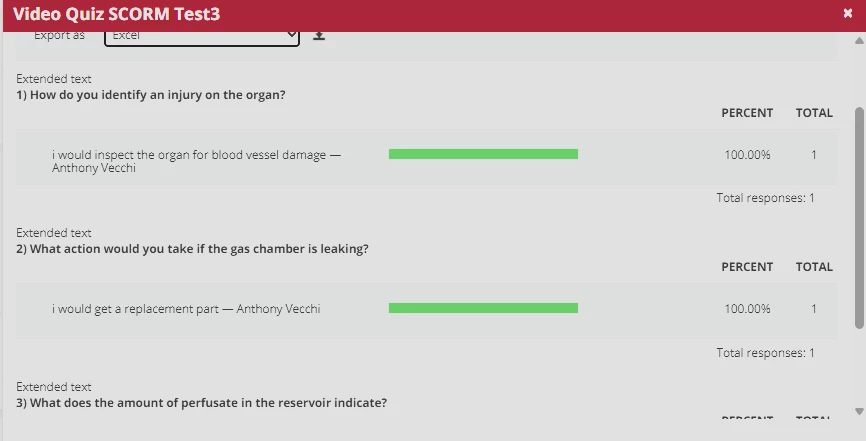
And now you have a SCORM interactions report! (sorta)