



Answer

How to access the Catalogs Widget to Create a Master Calendar

  • January 5, 2022
  • 2 replies
  • 276 views

Brody40
Novice II
Forum|alt.badge.img

I saw an earlier post about setting the display mode on the catalogs widget to calendar view in order to create a calendar with all possible courses built into it. Could someone please give me a more detailed explanation on how to get to this editing menu for the widget?

I keep coming back to the Manage Pages section but am only able to edit the title and description of pages. 

Thanks in advance!
Best answer by lrnlab

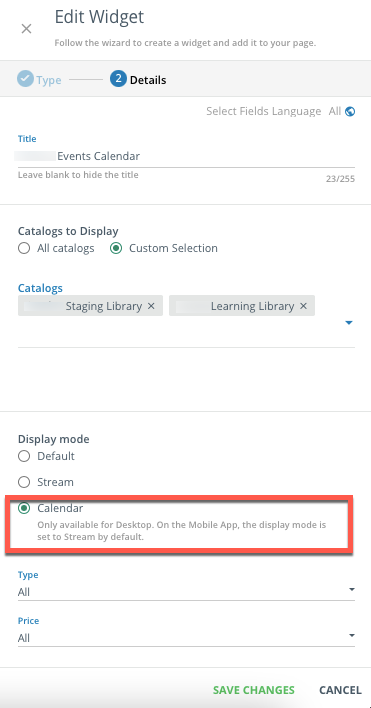
HI @Brody40 In order to display the catalogue as a Calendar, you need to add the Catalogue widget and select the “calendar” display option. You can also choose what catalogues you want to include in the display.


2 replies

lrnlab
Hero III
Forum|alt.badge.img+10
  • Hero III
  • Answer
  • January 5, 2022

HI @Brody40 In order to display the catalogue as a Calendar, you need to add the Catalogue widget and select the “calendar” display option. You can also choose what catalogues you want to include in the display.


Brody40
Novice II
Forum|alt.badge.img
  • Author
  • Novice II
  • January 5, 2022

Thank you for the speedy response! I just got it created


