



Question

Managing timezones for ILT sessions.

  • February 3, 2025
  • 1 reply
  • 35 views

IanMonk
Helper III
Forum|alt.badge.img+2

We are expanding our ILT sessions across multiple timezones.

Our default setting is currently America/Toronto and we do not allow users to change their settings.

When creating sessions in different timezones, it seems that users see two timezones: local time and America/Toronto. Unfortunately, it displays America/Toronto first, and users need to click on the session/event to see the local time. For example, this session takes place in Winnipeg, MB, but the system is displaying America/Toronto. I have to click into the session to see the session time in America/Winnipeg, which is 1:00 PM - 3:00 PM.
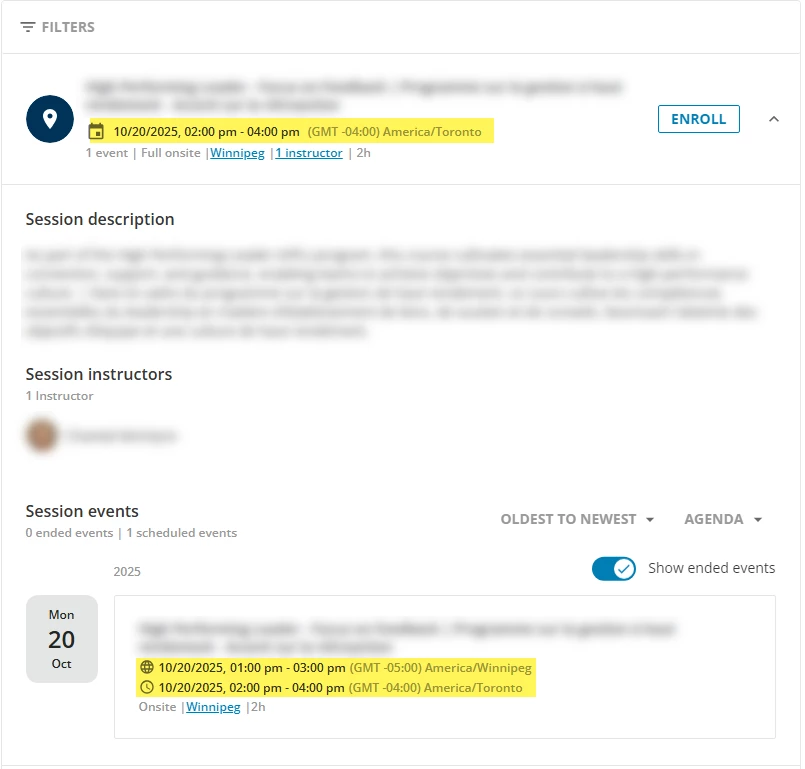
Is there a way to change this so that it 1) only displays only the local time or 2) that it displays the local time first?


1 reply

lrnlab
Hero III
Forum|alt.badge.img+10
  • Hero III
  • February 3, 2025

Agree it’s a bit annoying...could not find any way to change this. Surprisingly when you look in up (before enrolling) in the catalogue, the proper user’s time zone is displayed. The dual timezones appear only after enrolment and only when the user’s time zone doesn't match that of the session.

You can always ask your admins to book the session in the local time zone for your in-person deliveries but that only solves part of the issue. For virtual it would be the same issue.

I guess it needs to come done to user education.
