Question

Insights: Learning Plan sorting/filtering options

  • May 19, 2025
  • 8 replies
  • 173 views

Hello,

We have powerusers with very large learning plans (many courses). They are asking if they could sort/filter learning plan visuals by mandatory vs optional courses. Is there a way to do this today? Or is there possibly an upcoming update that would solve for this?

Seems mandatory/optional is not a field that’s available today. Also, they only way to sort in Insights is alphabetically.

Appreciate any ideas or information on this!

8 replies

Sara Tindall
Novice III
Forum|alt.badge.img
  • Novice III
  • May 20, 2025

Hi Vanessa, there isn’t a way to group by mandatory/optional. However, you could do clever things with the course code as you can sort by this. For example, all mandatory courses begin 1_ and all optional begin 2_.

Hope this helps :-)

Sara


smallc
Helper I
Forum|alt.badge.img+3
  • Helper I
  • May 20, 2025

Hi Vanessa,

It’s possible to sort the courses in LPs by mandatory and optional, as described in this article. The article also discusses using the code like ​@Sara Tindall suggested. 

Code: The learning plan code can be up to 255 characters long. Although optional and hidden from learners, it serves as a valuable tool for administrative tasks. You can edit the learning plan code at any time.


  • Author
  • Contributor I
  • May 20, 2025

Thanks so much ​@smallc and ​@Sara Tindall for the quick replies! I’m sorry, I may have not been clear enough…

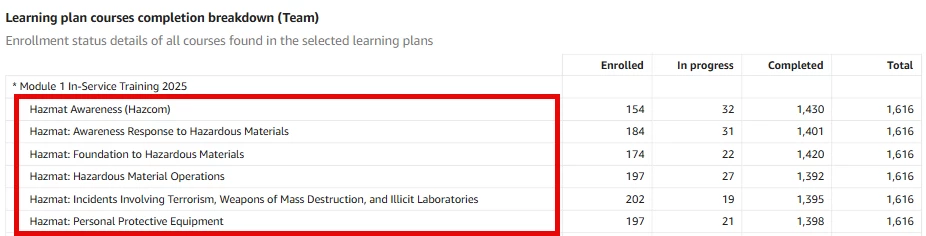
I’m trying to sort/filter the courses in Learning plan visuals in Insights. For example, let’s imagine this “Module 1” learning plan has 100 courses and I want to see the mandatory courses at the top, or hide optional courses altogether.


Keep in mind:

  • Learning plans are created and owned by the poweruser. From my testing, the sorting used in the learning plan feature will not persist in Insights, and the only sorting option I see is ascending/descending alphabetically. Putting the mandatory courses at the top of the learning plan will have no impact on how the courses are displayed in Insights.
  • The majority of the courses are created by my company and powerusers may not edit the title. So they can’t use numbers or characters to sort the courses. 

Thank you!


smallc
Helper I
Forum|alt.badge.img+3
  • Helper I
  • May 20, 2025

Hi ​@vanessaleon Thanks for the clarification. One helpful tool for reporting is the category feature. By adding a category filter in Insights, you can easily compare different types of courses. For example, if you have both mandatory and non-mandatory courses, you can assign each to the appropriate category, potentially using the API to streamline this process. Once categorized, apply the category filter in Insights to generate reports specific to either group.


hwolfehall
Helper I
Forum|alt.badge.img+2
  • Helper I
  • May 20, 2025

Hi ​@vanessaleon Thanks for the clarification. One helpful tool for reporting is the category feature. By adding a category filter in Insights, you can easily compare different types of courses. For example, if you have both mandatory and non-mandatory courses, you can assign each to the appropriate category, potentially using the API to streamline this process. Once categorized, apply the category filter in Insights to generate reports specific to either group.

Hi ​@smallc My understanding is that courses can only belong to one category.  So, if we’re using categories for a different purpose (for us, they are used to designate program tracks), we couldn’t use to flag mandatory/optional, correct?  Or are you referring to a different “category” in your recommendation?  

Thanks! 


smallc
Helper I
Forum|alt.badge.img+3
  • Helper I
  • May 20, 2025

@hwolfehall that’s a great point. Have you considered using course hidden additional fields? It could be another way to differentiate in reporting.


Forum|alt.badge.img+4
  • Guide II
  • May 21, 2025

Ideally, there should be a way in Insights (default view in my opinion) for the courses to appear in the order they are in the learning plan. This would make the most sense as it would be easy to visualize where users are dropping of especially in a long learning plan. 


gerrodhudson
Docebian
Forum|alt.badge.img+1

Hi All- 

I think that product is considering adding this option very soon into the applicable datasets!


I should clarify this expected field would be available for Advanced Insights, but it would seem from this thread, this might be a good filter to have as a Docebo Filter as well (noted!)