


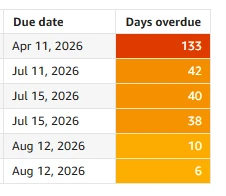
We deploy deadlines on our mandatory courses, and make them soft deadlines to accommodate extenuating circumstances such as vacations, leaves of absence or illness. Combined with regular digest notification reminders, this works in almost all cases. A problem happens when a people leader examines their My Team dashboard.
At the bottom of the display in the Courses tab is an area with the title Overdue Details. This includes the user’s name, username, the course name, due date and days overdue. The fact that the Days Overdue column is highlighted in reds and oranges immediately draws attention as something to be considered urgent. (see screen capture above)
Our people leaders see this and understandably assume this means a course has not been completed and is late. Because our people leaders have a responsibility to ensure timely completion of training by their team, they then reach out to those individuals, who may respond that they have, in fact, completed the training. We get pushback from the users and managers who say the reporting engine is faulty. If they can’t trust this, then maybe they can’t trust anything in the report. This has also generated an uncomfortable conversation between manager and team member.
Raising this with Docebo technical support, I was told this information display is by design. In a follow up email, here is what Docebo had to say: “To explain what you’re seeing: when a learner completes a course after its due date, the enrollment may still appear as overdue even though the completion has been recorded. The overdue-day count stops at the date of completion and doesn’t keep increasing. This is how the platform currently handles these scenarios.”
So, in short, I complete a course past the deadline, for whatever reason, and my manager will see me redlined for that course indefinitely.
This is completely counterintuitive, and I cannot see how this would be valuable information as currently labelled. Overdue means overdue. If this must remain, the table should include columns that indicate whether the course was completed, on what date, the original deadline date and the delta between them. The area should be renamed Information on Courses with Deadlines. And use the reds and oranges only if a course is still outstanding.