

Question

Group User Limitation

  • Nov 25, 2026 6:06 PM UTC
  • 2 replies
  • 9 views

Is there a way to limit the number of users that can be included in a group? Our learning platform is used by all of our customers, but we’re thinking of a way to limit how many of their users may be able to access certain content. I know we can use groups to limit visibility/access to content, but I’m not able to see if there’s a way to limit their count.


(For example, if a customer group of ours has 200 learners, we want only 50 of those users to be able to see the expanded content. I can put those 50 users into their own group, but how can we lock it to 50 max?) 

2 replies

Moshe.Machlav
Guide I
Forum|alt.badge.img+2

Hi Meaghan,

There is no native setting in Docebo to cap the maximum number of users in a Group (or Branch).

Before building a custom workaround to police group size, have you looked at License-based Subscription Plans? In customer-training environments I've worked with, that is the cleanest native way to enforce a hard user cap on expanded content—without any manual counting or integration overhead.

Here are the three best ways to handle this, depending on how you manage customer access:

1. License-Based Subscription Plans (Best for hard caps)

If you have the E-Commerce / Subscriptions functionality available, you can put the expanded content into a catalog, tie it to a License-based bundle, and assign a 50-license plan to that customer's branch or group.

  • How it locks the count: In the plan configuration, set Enforce limit to Yes (or set Enforce licenses limit globally in your subscription settings). Once 50 users are associated with the plan, Docebo automatically blocks any additional users from being granted access.

  • Bonus: If your customers have Power Users managing their own teams, they can distribute and track those 50 licenses themselves up to the hard cap.

  • Documentation: Creating and managing subscription plans

2. Single-Use Enrollment Code Sets (Lighter-weight alternative)

If you don't use Subscriptions and just want a fixed number of learners to unlock specific courses:

  • Go to the Enrollment codes menu and create a New set with exactly 50 randomly generated codes.

  • Assign your expanded courses to that set and give the 50 codes to the customer.

  • Codes generated from the Enrollment codes menu are single-use—once all 50 are redeemed via the Enrollment codes widget, no one else can use them to self-enroll. (Note: Make sure to generate them from the Enrollment codes menu, not inside Course properties, as course-level codes are reusable.)

  • Documentation: Managing enrollment codes

3. Stick with Groups + Docebo Connect (If visibility must stay group-driven)

If your catalog and page visibility architecture is strictly tied to Groups, you can use a Docebo Connect recipe to monitor group membership (either on a schedule or via webhook/user-update triggers) and either alert an admin or automatically remove/flag the 51st user when the count exceeds your threshold.

Are your customers managing their own user assignments via Power Users, or is your internal team handling the 50-user selection? That usually determines which of the above fits best.


lrnlab
Hero III
Forum|alt.badge.img+10
  • Hero III
  • Nov 25, 2026 7:02 PM UTC

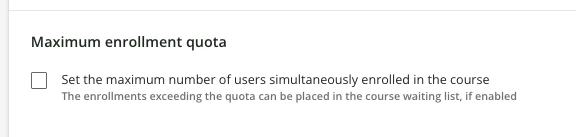
Hi ​@MeaghanW if you only want to limit enrolments to a course, you can use the Max enrolment quota option under the Catalog options tab. I find this to be the quickest and easiest was to limit enrolments