

Question

Is there a way to change the Enrollment Priority Verbiage?

  • Nov 20, 2025 4:26 PM UTC
  • 6 replies
  • 169 views

truffino
Novice III
Forum|alt.badge.img+1

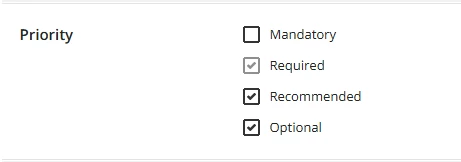
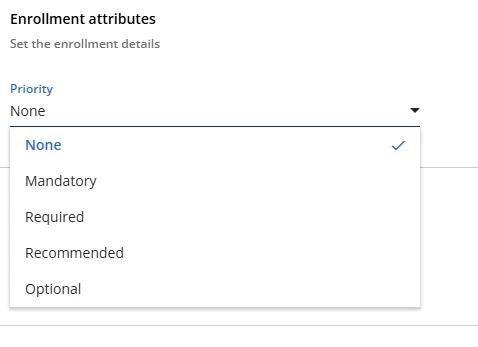
We would like to start using the Enrollment Priorities to highlight our compliance training (and make it easier to find). The current options under enrollment priorities are Mandatory, Required, Recommended, and Optional. 


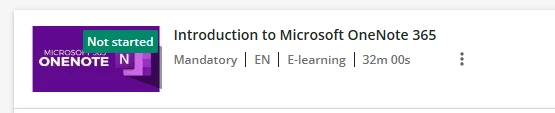
The problem with using Mandatory is that with the new learning plan structure (mandatory vs optional), any required course in an assigned learning plan already lists the word as Mandatory on their courses. This has led to an influx of panicked employees coming to me worried that they won’t complete their “Mandatory” training in time (which is mandatory to complete the learning plan, but not mandatory in terms of our compliance training). This also makes me hesitant to use the word mandatory as an enrollment priority option. 


I’m looking for a way to change the Enrollment Priority verbiage from Mandatory to Compliance (or something similar), to both avoid confusion and to make it clear which courses need to be completed. While we are already using due dates, a lot of assigned courses use due dates that aren’t compliance. I have already tried to change it in the localization tool; however it was still showing up as Mandatory when I tested it. We would like to utilize a separate field away from required, since we also have some required training that’s not compliance training, but mandatory won’t work.


Anyone else running into this issue? How did you fix it? 

6 replies

lrnlab
Hero III
Forum|alt.badge.img+10
  • Hero III
  • Nov 20, 2025 7:17 PM UTC

you should be able to do that with the Localization app.

https://help.docebo.com/hc/en-us/articles/360020084500-Managing-the-localization-tool-and-platform-languages

if you do make changes, please be sure to test thoroughly to make sure they only apply to those areas you want to see things changed and I suggest you keep a log of the label changes.


truffino
Novice III
Forum|alt.badge.img+1
  • Author
  • Novice III
  • Nov 20, 2025 8:21 PM UTC

you should be able to do that with the Localization app.

https://help.docebo.com/hc/en-us/articles/360020084500-Managing-the-localization-tool-and-platform-languages

if you do make changes, please be sure to test thoroughly to make sure they only apply to those areas you want to see things changed and I suggest you keep a log of the label changes.


The localization tool isn’t working for this. Even after I changed the verbiage to Compliance, it still shows up as Mandatory both in the Advanced Settings and in the Enrollment options.


I double checked the assignment verbiage just to see if it changes to Compliance, but it still comes up as Mandatory.


lrnlab
Hero III
Forum|alt.badge.img+10
  • Hero III
  • Nov 21, 2025 3:55 PM UTC

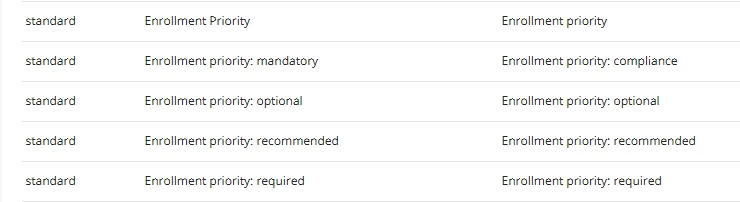
​@truffino you likely haven't found the correct label. Found the correct one for “Mandatory”. there are a few so make sure to search and test all places where the word “Mandatory” appears to be sure you caught them all.

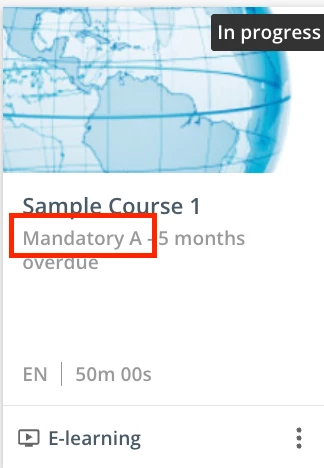
I usually add a letter or number to test and confirm I have the correct label - see below (added an “A” to the text to se where it appears)


make sure to search for the others you’d like to change under the “standard” module group


Forum|alt.badge.img

So happy I discovered this thread. I have a similar work around I am hoping to do with repurposing the Mandatory Enrollment priority field. Curious if ​@truffino you implemented Irnlab’s suggestion and if you had any issues with the word “Mandatory” being replaced in other areas of the platform following this approach.


Forum|alt.badge.img

I did a couple of quick checks and it seems like the word Mandatory is still showing as normal in other areas (like Learning Plan Mandatory vs. Optional courses - see attached screenshot) but curious if anyone has found other areas where it’s also replaced. Found it interesting that the specific “Enrollment Priority” localization category didn’t impact it.


Forum|alt.badge.img

Nevermind… found some other areas it does replace… when I went into the back end of Learning Plans it shows as the replaced text when I look at the area where you assign mandatory vs. optional courses in the Learning Plan. Back to the drawing board...