Do y'all use h264 or h265?

  • December 7, 2022
  • 20 replies
  • 148 views

lrodman
Guide II
Forum|alt.badge.img+6

I’ve been using h264 but figured I should probably in fact be using h265.

20 replies

Daniel
Hero III
Forum|alt.badge.img+3
  • Hero III
  • December 7, 2022

We use H.264 and I hadn’t really considered it before reading your post. It looks like H.265 has better compression, results in much smaller file sizes, and is better for streaming. I wonder what happens when Docebo converts the video though. Does it retain the settings of the source file or convert it to something else?


lrodman
Guide II
Forum|alt.badge.img+6
  • Author
  • Guide II
  • December 7, 2022

I would think that an mp4-wrapped h264 or h265 would be left as-is, but who knows! It is definitely better for streaming afaik.


lrodman
Guide II
Forum|alt.badge.img+6
  • Author
  • Guide II
  • December 7, 2022

We’ve been using h264 part 10.


lrodman
Guide II
Forum|alt.badge.img+6
  • Author
  • Guide II
  • December 7, 2022


@elliott.vickrey Do you know who Stefano R is, and might they be able to weigh in (or someone else) on the best codec?


BTW regarding the “blurring” at the start, I’ve found that using a MBPS rate around 2 is much better than a MBPS rate of 10-20 to reduce - but not eliminate - this problem. Sadly, our intro to all videos has sound in it that sounds not amazing when “blurred” (compressed) within the first 1 second.


Bfarkas
Hero III
Forum|alt.badge.img+6
  • Hero III
  • December 8, 2022

I use both for different things, don’t do much direct docebo uploads so can’t advise much there. In general I do h264 unless I know the platform/service fully supports h265 without issues. I run into occasional enough issues in various places that it feels like it’s not quite there to be my always go to get. 


lrodman
Guide II
Forum|alt.badge.img+6
  • Author
  • Guide II
  • December 8, 2022

Supposedly 265 is about 30% smaller file size with comparable quality - according to Google. 
 

Also what MBPS do people here use for native Docebo video player? Most of our trainings are someone standing in front of a static greenscreened background, so they compress REALLY well. The lower the MBPS the better resolution most users will get, and the faster the preloading/live loading at the start of the video - that “blurring”/artifacting. 1mbps even looks pretty good. 


Daniel
Hero III
Forum|alt.badge.img+3
  • Hero III
  • December 8, 2022

I had to check this as we generally just use the default settings in our video editor. The settings are as follows:

Size: 1920 x 1080

Frame rate: 30 fps

Video bitrate: About 7500 kbps

Audio bitrate: 128 kbps

Codec: H.264

Color mode: NTSC


Gary Jarvis
Helper I
Forum|alt.badge.img+1
  • Helper I
  • December 16, 2022

@Bfarkas  Stefano R is one of the  Docebo support team 


Cheers, Gary


Bfarkas
Hero III
Forum|alt.badge.img+6
  • Hero III
  • December 16, 2022

@Bfarkas  Stefano R is one of the  Docebo support team 


Cheers, Gary

Thanks Gary, I think @lrodman was asking though, I know Stefano well.


lrodman
Guide II
Forum|alt.badge.img+6
  • Author
  • Guide II
  • December 16, 2022

I’m just honored to be mistaken for Bfarkas!


@stefano.rotunno are you the right Stefano?


Forum|alt.badge.img

Hi guys, sorry to be late, I’ve just been in holiday for a couple of days, yes Stefano R it’s me, stefano.rotunno :).


Please let me know if i can help you guys with anything :)


lrodman
Guide II
Forum|alt.badge.img+6
  • Author
  • Guide II
  • December 19, 2022

 Hi guys, sorry to be late, I’ve just been in holiday for a couple of days, yes Stefano R it’s me, stefano.rotunno :).


Please let me know if i can help you guys with anything :)

Happy holiday! 

We’re trying to figure out the best codec for the default native docebo video player please.


h264 or h265?


Forum|alt.badge.img

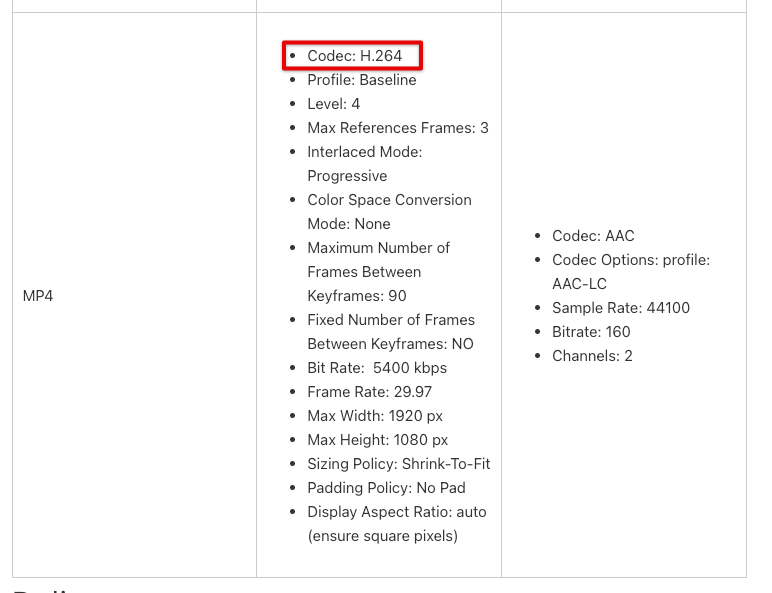
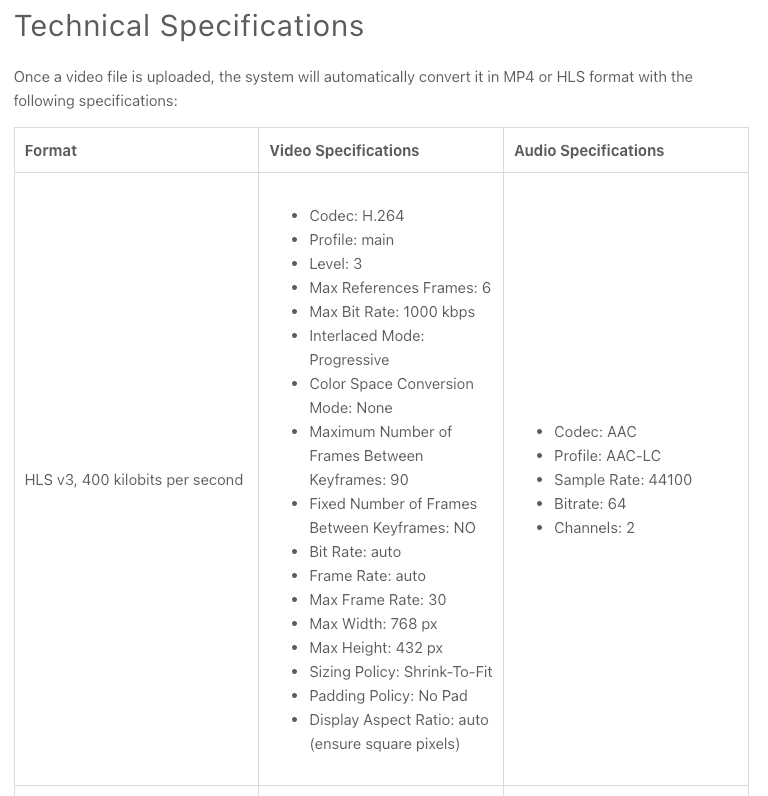
According with our knowledge base https://help.docebo.com/hc/en-us/articles/360020128359-Uploading-and-Converting-Video-Training-Material, under Technical specifications, Once a video file is uploaded, the system will automatically convert it in MP4 or HLS format with the following specifications:


I hope this can be helpful :)


Daniel
Hero III
Forum|alt.badge.img+3
  • Hero III
  • December 20, 2022

Thanks @stefano.rotunno

We all should have checked the knowledge base!


Forum|alt.badge.img

Anytime 😉 @Daniel


lrodman
Guide II
Forum|alt.badge.img+6
  • Author
  • Guide II
  • December 20, 2022

That’s weird then… what’s up with that one person who’s having issues with h265?


In any case, thanks Stefano!


Any plans to add 265 in the future?


Daniel
Hero III
Forum|alt.badge.img+3
  • Hero III
  • December 20, 2022

That’s weird then… what’s up with that one person who’s having issues with h265?


In any case, thanks Stefano!


Any plans to add 265 in the future?

 @lrodman Maybe the conversion process from 265 to 264 is causing the issues.


Forum|alt.badge.img

Hi Guys, sorry to let you wait, I had a talk with the product manager involved in this topic and at the moment I cannot tell you more since i didn’t get any useful info, my apologies.


I tried 🤷🏽.


Daniel
Hero III
Forum|alt.badge.img+3
  • Hero III
  • December 23, 2022

Thanks for trying!


Bfarkas
Hero III
Forum|alt.badge.img+6
  • Hero III
  • December 24, 2022

Hi Guys, sorry to let you wait, I had a talk with the product manager involved in this topic and at the moment I cannot tell you more since i didn’t get any useful info, my apologies.


I tried 🤷🏽.

All we can do is try 😀