Question

Completed course showing as expired certification

  • May 5, 2026
  • 7 replies
  • 44 views

Hello, all!

A manager reached out to me saying that one of his employees completed a course, but it’s listed as an expired certification under his “Team Members” dashboard. As a Superadmin, I can see that the employee did in fact complete the course and has a certification dated for. Does anyone know how I could manually update the certification to unexpired on the manager “Team Members” dashboard? 

Any guidance would be greatly appreciated. Thank you!

7 replies

estarks8
Helper I
Forum|alt.badge.img+6
  • Helper I
  • May 5, 2026

We experience something similar, but the difference for us is that the course was completed, but the certification didn’t update. This occurs when a user doesn’t follow the renewal steps and instead just goes in and retakes the course.

I have to go into the Certifications and Retraining app and manually award the user (not just update the certification otherwise you don’t have a history of the certification), but if the date for yours is correct and it’s just not displaying on the dashboard, maybe open a ticket. 


truffino
Novice III
Forum|alt.badge.img
  • Novice III
  • May 5, 2026

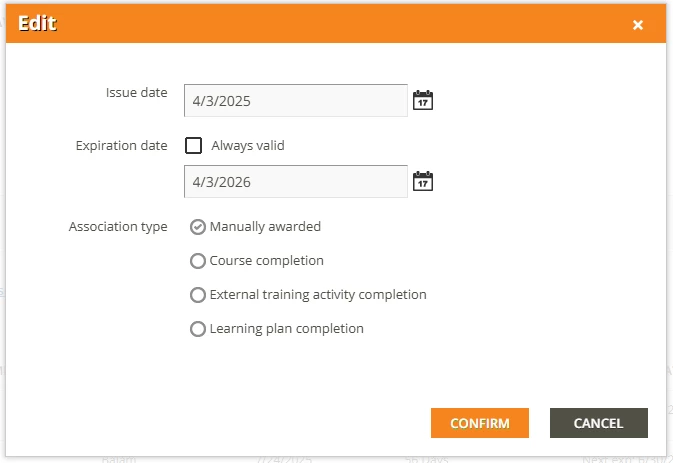
You can go into Certifications and Retraining and manually update it. Click on the “Awarded to” number next to the certificate name and then click the hamburger menu next to their name to get to the edit menu. You can then update the date.

Just as a heads up - The manager’s dashboard is run on the same reports/insights that the admin side is, which means it can take up to 24 hours to reflect on their dashboards. 


lrnlab
Hero III
Forum|alt.badge.img+10
  • Hero III
  • May 5, 2026

Note that this can happen if the user completes the course without using the RENEW button. Maybe a coaching opportunity for you.


  • Author
  • Newcomer
  • May 5, 2026

Thanks, all! Under the Certifications and Retraining app, it says the issue date was 4/3/2025 and the expiration was 4/3/2026. The user completed the course on 4/14/2026. Should I update the expiration date to 4/14? “Manually awarded” was already checked. 


truffino
Novice III
Forum|alt.badge.img
  • Novice III
  • May 5, 2026

Thanks, all! Under the Certifications and Retraining app, it says the issue date was 4/3/2025 and the expiration was 4/3/2026. The user completed the course on 4/14/2026. Should I update the expiration date to 4/14? “Manually awarded” was already checked. 


I think that is dependent on your industry. Do you need to show that they maintained their certification throughout? Then you may want to keep it as 4/3/2027 for the expiration so it shows that they maintained their expiration year over year. If you want to keep it date accurate, then I would change it to 4/14/2027 for the expiration. 


  • Author
  • Newcomer
  • May 5, 2026

Got it - so since the user already completed the course, I will just manually push out the date to 4/3/2027. Will doing this fix the issue that the manager is seeing on his “Team Members” dashboard? (He is seeing the user as having an expired certification for this course, even though he completed it on 4/14). 


truffino
Novice III
Forum|alt.badge.img
  • Novice III
  • May 5, 2026

Got it - so since the user already completed the course, I will just manually push out the date to 4/3/2027. Will doing this fix the issue that the manager is seeing on his “Team Members” dashboard? (He is seeing the user as having an expired certification for this course, even though he completed it on 4/14). 

It should, but it may also take up to 24 hours to update on their dashboards. It’s the way reporting works. You could always proxy in as the manager and take a look after you update it to see if it’s updated or not.