Best Answer

Course expiration date (validity date) in email notification

  • August 16, 2024
  • 15 replies
  • 297 views

Forum|alt.badge.img

I am creating an email notification (specifically Digest: learner has yet to complete the course) that will be triggered weekly to remind users of courses they need to complete. Some of our courses have validity dates while others do not. I am using the [expire_at] shortcode in the notification, so this remains blank for any courses without validity dates. Any suggestions on how to make it so that a course without a validity date shows something different? 


This is the text of the notification:


The following learning is due to be completed in Docebo LMS:

[items]

[course_name] expires on [expire_at]

[/items]

To start learning, log in to Docebo.


So the email notification to the user ends up looking something like this:


The following learning is due to be completed in Docebo LMS:

Safety Training Course expires on 8/17/2024 at 11:59:59 pm

Supplemental Learning Course expires on

To start learning, log in to Docebo.


Any help is appreciated!

Best answer by dklinger

Nothing other than using multiple digest emails and considering hard coding it for those courses.


15 replies

JKolodner
Helper III
Forum|alt.badge.img+6
  • Helper III
  • August 16, 2024

You have wonderful timing - we are working on the same. We have not found a solution but we’re handling it by adding text that says “(If blank, there is no due date for this course)” :


Dear [first_name], 

One or more members of your team have yet to complete the following course(s):[items] 

[first_name] [last_name] - [course_name] 

Due by [expire_at] (If blank, there is no due date for this course)

[/items]


I hope that helps!


*In the example above, we were using “Digest: Learnerhasyettocompletecourse (administrator only)”


Forum|alt.badge.img
  • Author
  • Novice III
  • August 16, 2024

I was thinking that a disclaimer like that might be the only solution for now!

Yours looks like it is something that will go to managers/supervisors, correct? We haven’t set that up yet because some managers have 20+ direct reports and would therefore receive 20+ digest emails. Is your notification consolidated with all team members on one email??


dklinger
Hero III
Forum|alt.badge.img+11
  • Hero III
  • Answer
  • August 16, 2024

Nothing other than using multiple digest emails and considering hard coding it for those courses.


dklinger
Hero III
Forum|alt.badge.img+11
  • Hero III
  • August 16, 2024

@ashleyb - the system doesnt currently support what you are asking about -  Is your notification consolidated with all team members on one email?? with the digest email yet. The Notification system is due an overhaul though and I think what you are requesting has been a very common feature request.


JKolodner
Helper III
Forum|alt.badge.img+6
  • Helper III
  • August 16, 2024

In our testing, we’ve seen that the manager gets one digest email that includes the learner/course information for everyone who reports to them who has incomplete courses. For example, I received one email that showed that my two team members had several outstanding courses each.


So it wouldn’t be 20+ emails for one manager.
 

*We were using “Digest: Learnerhasyettocompletecourse (administrator only)”


JKolodner
Helper III
Forum|alt.badge.img+6
  • Helper III
  • August 16, 2024

We have not set up “Digest: Learner has yet to complete” for learners. But we’ll be doing that next.


Forum|alt.badge.img
  • Author
  • Novice III
  • August 16, 2024

@JKolodner - we tried that and the manager got 20+ emails 😓 

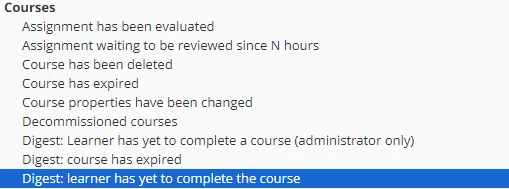
However I see two similar digest options, one for admins only.. maybe that is the one I would need to use for managers. The highlighted option below does go to the learner.


JKolodner
Helper III
Forum|alt.badge.img+6
  • Helper III
  • August 16, 2024

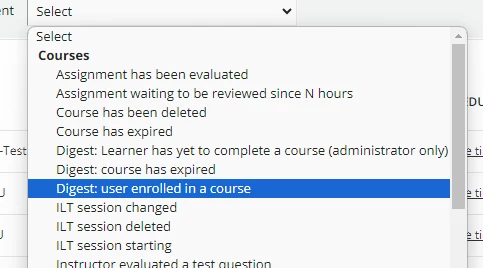
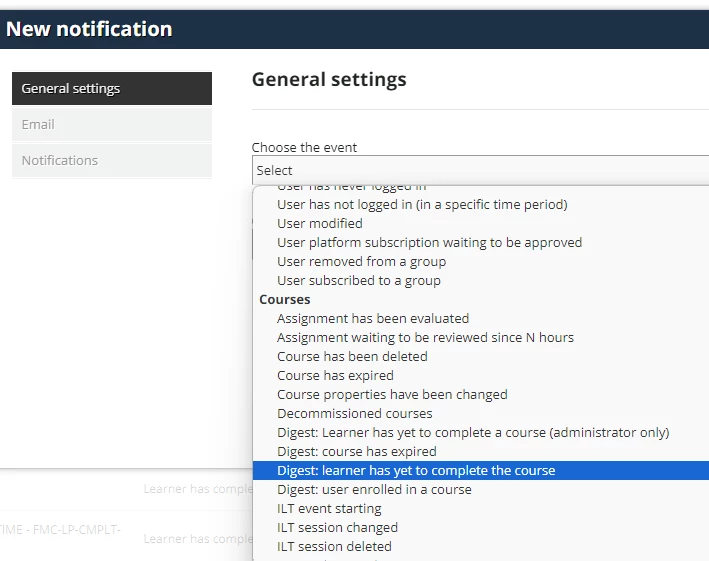
NOTE: The dropdown filter doesn’t include “Digest: Learner has yet to complete a course” for the learner, only for the admin version.


But you can create both:


dklinger
Hero III
Forum|alt.badge.img+11
  • Hero III
  • August 16, 2024

@JKolodner - I do think that a manager gets 20 emails for the twenty subordinates and not just a digest when using Digest: learner has yet to complete the course.

Can a Docebian please confirm?


Forum|alt.badge.img
  • Author
  • Novice III
  • August 16, 2024

@JKolodner I did not realize the “administrator only” digest option sent everything in one email! And you can select Managers or PUs to receive them. I just tested and it does indeed work that way. Thanks for a solution to a completely different problem! 😄


Forum|alt.badge.img
  • Author
  • Novice III
  • August 16, 2024

@JKolodner - I do think that a manager gets 20 emails for the twenty subordinates and not just a digest. When using Digest: learner has yet to complete the course.

Can a Docebian please confirm?

Yes that is correct but just tested the admin only version and it is one consolidated email. Yay for that!


dklinger
Hero III
Forum|alt.badge.img+11
  • Hero III
  • August 16, 2024

@ashleyb and @JKolodner - you are both schooling me up.

Thank you for a learning moment.


Forum|alt.badge.img
  • Author
  • Novice III
  • August 16, 2024

@dklinger It was a learning moment for me, too! I learn something new almost every day in this platform. Thanks for your replies!


JKolodner
Helper III
Forum|alt.badge.img+6
  • Helper III
  • August 16, 2024

The funny thing is that we didn’t even know there was a non-admin version of that because of the issue with the filter that I highlighted above. We only knew about the “admin only” version. (We’ve only been researching this for a few days.) Now I’m going back and creating the version for the learner and adding it to our documentation.


This is a helpful document to use (although I didn’t see anything in it about the variations on the learner version):

https://community.docebo.com/notifications-101/how-do-digest-notifications-work-3090?tid=3090&fid=101


JKolodner
Helper III
Forum|alt.badge.img+6
  • Helper III
  • August 16, 2024