


Using Custom CSS to enhance the Courses/completion Status badges

  • July 23, 2025
  • 4 replies
  • 164 views

pierre.andignac
Docebian
Forum|alt.badge.img

You’re looking to personalized the courses status badges (not started, in progress, completed)?

Below, you'll find a code snippet that you can insert into your Custom Styles 💡:

/* *********************************************** */
/* Course Status Label Colors - Card, List, Channels */
/* *********************************************** */

/* Not Started */
.ui-badge-status-success,
.ui-list-item-status-not_started .ui-badge-status-success {
background-color: #020050 !important;
color: #ffffff !important;
}

/* In Progress */
.ui-badge-status-neutral,
.ui-list-item-status-in_progress .ui-badge-status-neutral,
.ui-card-status-in_progress .ui-badge-status-neutral {
background-color: #F7681E !important;
color: #ffffff !important;
}

/* Completed */
.ui-card-header:has(+ ui-card-content span.color-accent-tertiary) .ui-badge-status-neutral,
.ui-list-item-status-completed .ui-badge-status-neutral,
.ui-card-status-completed .ui-badge-status-neutral {
background-color: #008767 !important;
color: #ffffff !important;
}

Go ahead and modify the color codes (#XXXXX) to your preference. Check out the examples below to see how the badges have been updated:
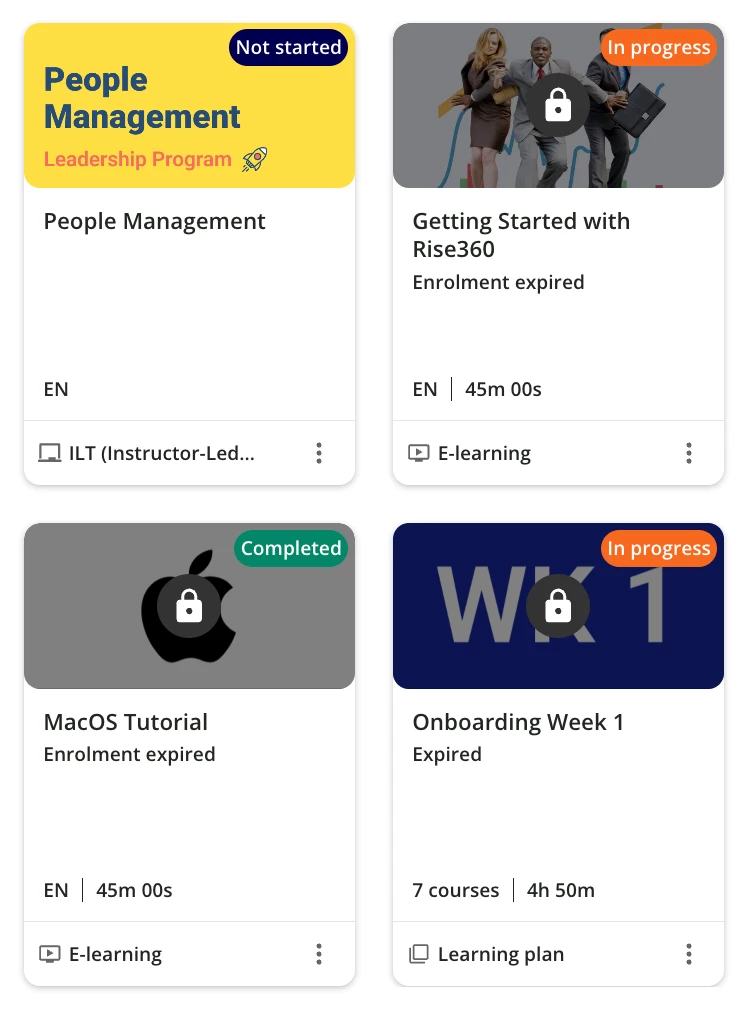
 

Hope it helps!


Similar articles:

4 replies

lrnlab
Hero III
Forum|alt.badge.img+10
  • Hero III
  • July 24, 2025

Nice, thank you.


Bouben
Influencer II
Forum|alt.badge.img
  • Influencer II
  • July 28, 2025

A must have !! Thank you Pierre


  • Novice III
  • March 10, 2026

Hey! I used your code ​@pierre.andignac , and it worked, but not totally when I applied it. The colours on the In progress and Completed status badges are the same, and seems it seems the completed badge get overwritten by the css to In progress (see image below):

I used the same code as you, only changed colours and added border.


/* In Progress */

.ui-badge-status-neutral,

.ui-list-item-status-in_progress .ui-badge-status-neutral,

.ui-card-status-in_progress .ui-badge-status-neutral {

background-color: #FAE6C6 !important;

border: solid 1px #666666;

color: #333333 !important;

}


/* Completed */

.ui-card-header:has(+ ui-card-content span.color-accent-tertiary) .ui-badge-status-neutral,

.ui-list-item-status-completed .ui-badge-status-neutral,

.ui-card-status-completed .ui-badge-status-neutral {

background-color: #DAEDDD !important;

color: #333 !important;

}

I have tried so many times to check the code or try out other code, but nothing works out. Do you know what I potentially have done wrong and how to fix it?


pierre.andignac
Docebian
Forum|alt.badge.img


Let me investigate, and get back to you in private ​@NiniG