Question

API Endpoint to Get All Catalogs A Course is Associated With

  • May 15, 2026
  • 5 replies
  • 27 views

Forum|alt.badge.img

I’m trying to build a custom reporting export via API and know how to pull all additional fields, and other course fields. I was also hoping to include a column with all the catalogs a course is associate with. Does anyone know if this end point is available and if yes, could you point me in the direction? I’ve been through the API explorer and nothing jumps out at me as accomplishing this.

5 replies

JeanetteMcVeigh
Hero III
Forum|alt.badge.img+7

If you can’t find an API that will work (sorry, that is not my area of expertise at all), you can try getting the data from a different angle. It’s not the exact approach you are looking for, but it will work, you will see the data.

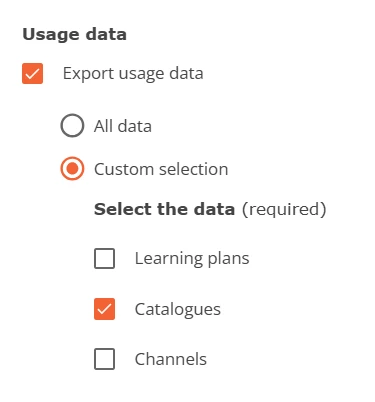
Use the ‘Export Course Data’ option in Course Management.

Select the course(s) out you want about.

Select all options you want to see, but make sure to make (at least) this selection (Usage Data) to see catalogue data.

Hope that helps.  Yes, you have to go get the data each time, so it might not be exactly what you are looking for long term, but it might help.  Good luck!


Ian
Guide II
  • Guide II
  • May 18, 2026

The endpoint is in the API Browser, under the Courses service. Search for “Returns catalogs related to the given course”

The endpoint looks like this: 

GET /course/v1/courses/{id}/catalogs

The other thing I’d note is that, when you’re trying to find a Docebo API endpoint, you can often find it by keeping your browser’s network tab open while clicking around the admin UI. So in this case, you go to edit the course, you click on the Catalogs tab, and then you’ll see that it loads an endpoint starting with catalogs?page_size... -- it’s the same endpoint as in the docs, but sometimes you can even find undocumented endpoints this way.

Though of course, proceed with caution in those cases!


Moshe.Machlav
Guide I
Forum|alt.badge.img+1

@Ian is absolutely spot on with the GET /course/v1/courses/{id}/catalogs endpoint, and his tip about using the browser's network tab is a fundamental trick for Docebo administration. ​@JeanetteMcVeigh's suggestion is also the perfect native UI workaround if you just need a quick manual data pull.

However, since you are building a custom reporting export script that pulls additional fields and dataset metrics like Completion Status, I want to wave a quick caution flag regarding API architecture.

If you loop that /course/v1/courses/{id}/catalogs endpoint for every single course in your LMS (the classic N+1 query problem), you will burn through your API rate limits extremely quickly as your course library grows.

In organizations I've worked with, when deploying automated bulk data exports with complex mappings, we typically avoid chaining hundreds of individual API calls. Instead, we pivot to one of these approaches for scale:

  1. Use the Reporting API: Build the exact report you need in the native Custom Reports builder (including your course fields and catalogs), then use the GET /report/v1/report/{report_id}/export endpoints to trigger and download the complete, pre-joined dataset in one efficient pull.

  2. Use Docebo Connect: Handle the data aggregation natively within a recipe, which manages pagination, mapping, and destination delivery much more robustly than a custom script.

For a single course check, Ian's endpoint is exactly what you need. For a full database export, pivoting to the Reporting API or Connect will save your automation from timing out.


Ian
Guide II
  • Guide II
  • May 19, 2026

Fair point re: rate limits, ​@Moshe.Machlav, I should remember to call that out more often.

But I’m not sure I understand the Reporting API approach you’re describing in this case: what custom report can reveal the catalog associations for a course? I’m also not sure how Docebo Connect gets around the rate limit question in and of itself, unless you’re using different API endpoints.

So to that end, another more scalable approach (using Docebo Connect) would be to collect:

  • all your courses (using GET /course/v1/courses),
  • all your catalogs (using GET /catalogmanagement/v1/catalogs), and then
  • for each catalog, the courses within (using GET /catalogmanagement/v1/catalogs/{id}/courses).

This last step also chains lots of individual API calls, but I’d wager that in most LMS instances, courses will outnumber catalogs by an order of magnitude. And the average catalog would be linked to more courses than the average course would be linked to catalogs. So very likely this is more efficient than looping through each course.

You could either store the output of these requests in some Data Tables or alternatively as lists within SQL Collections to transform the data as needed.


Moshe.Machlav
Guide I
Forum|alt.badge.img+1

@Ian You are completely right, and I really appreciate you catching that! I totally blanked on the fact that standard Custom Reports do not expose the catalog-to-course relationship. There really is no native report for this specific data model.

Since the standard reporting option is off the table, your suggested architecture using Docebo Connect (or a custom script) to pull catalogs first, and then their associated courses, is absolutely the right way to handle this at scale.