



Answer

Someone smarter than me - Try copying/pasting any report table from preview?

  • February 14, 2024
  • 2 replies
  • 37 views

dklinger
Hero III
Forum|alt.badge.img+11

Was trying a temporary workaround while there are some latency issues with the platform today (on Valentines Day 2024 - Happy Valentine’s Day everyone!!!).

Currently? We are trying to get a report where we know there wasnt more than a hundred learners (so the preview should cover what we need).

I tried to highlight copy and paste into excel, but the line breaks are all screw-y and information that should have been collected into columns all came along in the first row. I tried pasting it with and without formatting and it is a no go.
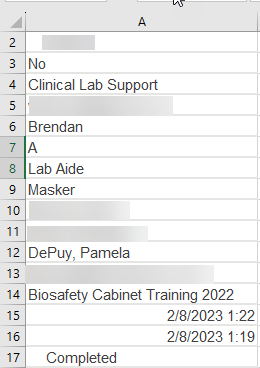
Example of output of information from the Report in Preview

Somebody has had to screen scrape a table successfully….wondering if YOU figured out how to make it work.


Best answer by dklinger

@KMallette - of course there are many columns - but I will give you a mark for the best answer.

Thank you as always for your insight.

2 replies

KMallette
Hero II
Forum|alt.badge.img+9
  • Hero II
  • February 14, 2024

@dklinger This MIGHT help, but is not a slam dunk

  1. Do your scrap, and pop it into Excel
  2. Figure out how many rows in your one column equals one record in the report, and copy those cells.
  3. Go to a new blank cell, and Paste > Transform
  4. Shampoo Rinse Repeat for the remain cells in that column.

dklinger
Hero III
Forum|alt.badge.img+11
  • Author
  • Hero III
  • Answer
  • February 20, 2024

@KMallette - of course there are many columns - but I will give you a mark for the best answer.

Thank you as always for your insight.
