Closing the Companion Beta — and what comes next
When we opened this group, we asked a simple thing: tell us what's working and what isn't. You delivered.
Over the past months, your feedback shaped how Companion looks, behaves, and communicates with learners.
The bugs you caught, the friction you named, the edge cases we hadn't considered — all of it made the launch stronger than it would have been without you.
Genuinely, thank you.
-------------------------------
What's changing with this group
We're not closing this community — we're opening it up.
This group is becoming our Companion Product Design Community, a space where we'll share roadmap updates early, walk through upcoming features before they ship, and keep asking for your input. If you were willing to give us feedback during beta, we'd love to keep that conversation going here.
What we're building next
Here's where we're focused for the rest of the quarter:
🔧 Public & Batch APIs Enable admins and IT teams to create Spaces and manage allow/block lists at scale — programmatically, without manual setup per user.
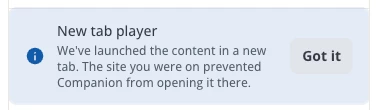
🎬 Course Player: PiP & Side Panel Mode Right now, certain websites force Companion to open the course player in a new tab because of Content Security Policy restrictions on the host site. This update removes that limitation entirely. Learners will be able to choose how they want to learn in-flow — Picture-in-Picture, a Side Panel, or a New Tab — based on their preference.
🗂️ Space Governance Controls More control for admins: list view, associations to groups and branches, richer metadata. Making Spaces easier to manage as they scale across your organisation.
📊 Analytics Dashboard Usage and engagement data for Companion — so admins can see what's happening, not just that it's installed.
🔍 Contextual Search Recommendations based on what the learner is looking at. Companion reading the page and surfacing relevant content in the moment.
More detail on each of these will come through this community as we get closer to release. If any of these spark questions or reactions, drop them in the comments — that's exactly what this space is for.
Thanks again for being part of the early journey.
The best part is still ahead.
----------------
Lastly, we’re looking for any Companion beta participants who’d be interested in sharing their experience and practical use cases with the broader community during an upcoming DU Live webinar.
It would be a casual conversation alongside a Docebo host — low lift, collaborative, and a great opportunity to showcase real-world impact.
If any of you are interested in participating please let me know.
-----------------
Kristian