Answer

Multi-language course support – MVP Overview and prototype

  • August 27, 2025
  • 5 replies
  • 153 views

Forum|alt.badge.img

Hey, Has anyone used this prototype? How does this function work with SCORM packages and articulate 360 specifically rise? I need a solution for multi language courses asap. Can anyone help? 

Best answer by Olli-Pekka Haataja

@glabs We’ve looked into this as we use Articulate 360 for content creation and to our understanding there are some limitation to this and we need to wait for some further releases.

I can speak with our course developers and let you know what are the cornerstones that we have issues with and let you know more.

5 replies

Forum|alt.badge.img+1

@glabs We’ve looked into this as we use Articulate 360 for content creation and to our understanding there are some limitation to this and we need to wait for some further releases.

I can speak with our course developers and let you know what are the cornerstones that we have issues with and let you know more.



Dominik
Novice III
  • Novice III
  • August 27, 2025

Hi ​@glabs,

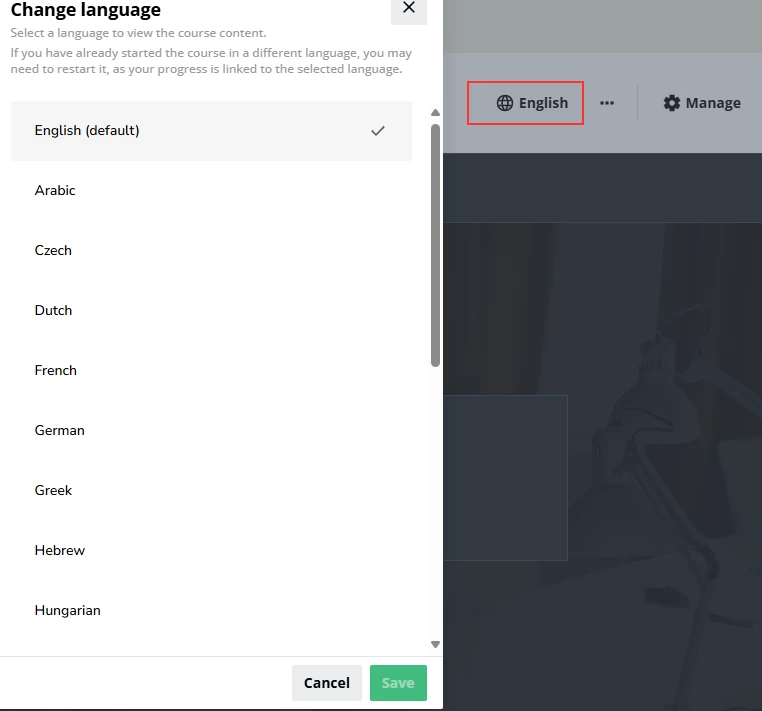
We tested the multi-language feature with Articulate courses in 20 languages in SCORM 2004 and xAPI format. It seems to work really well. I have not found any issues and it is really intuitive and easy to use. The users can select the language via a drop-down menu.

Note: It is not yet possible to add translations for course titles and descritpions. This feature will follow in the future.

Best,
Dominik


Forum|alt.badge.img
  • Author
  • Novice II
  • August 27, 2025

I will try this.. if I have difficulties is there a way you could show me how? I will try it and see if I can apply the translated SCORM packages to Docebo. How do you get the dropdown menu? 


Dominik
Novice III
  • Novice III
  • August 28, 2025

Hi ​@glabs,

The multi-language feature is for now only available in sandbox environment and will be available as of October for everyone. This is how it looks from a learner perspective.


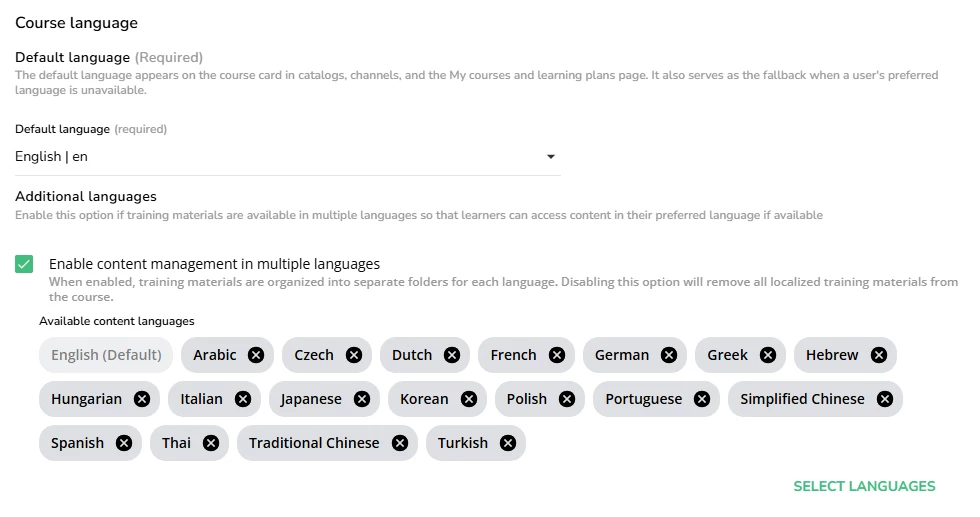
From an admin perspective you can select the language here: Properties > Course language

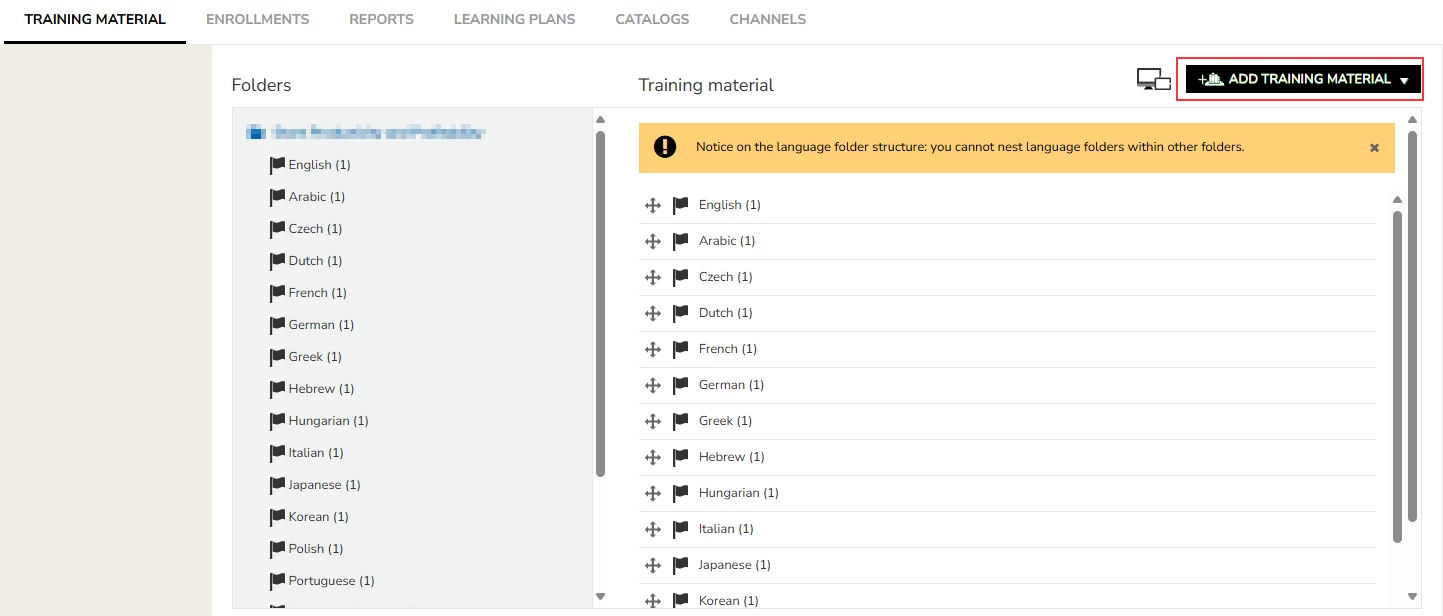
Under the “Training Material” tab you can then upload your Scorm packages as usual and move the files to the corresponding language folders, which have been automatically created by Docebo.


Hope that helps.

Best,
Dominik


Forum|alt.badge.img+1

@glabs Spoke with our developers today and the issue is not with Articulate in this matter and as we user Rise as well I don’t see no issues there.
However, the main issue with this function that it’s sort of 50/50 what the benefits are for us.
What I mean with this is that, even though we can provide language version in one course file, the course header (name of the course) is still presented in English and this will cause undesired user experience for customer who purely don’t speak English for example because we know there are these users.
Therefore, even the UI would be set to another language, the courses will be shown and searched in English.

Apparently, there will be an update to change this and according to our CSM it might be coming some point next year.

So until we get the 100% function, to us this is not useful at this stage.