


Best Answer

Power Users access to Reports / New Reports

  • Jan 11, 2023 5:37 PM UTC
  • 3 replies
  • 360 views

Hello,

I can’t seem to allow access to my Power Users into the Reports or New Reports areas from their Admin Menu. Regardless of what permissions I include or Profile modifications I make, when the PU clicks on either option from the Admin Menu they are greeted with the 403 “Forbidden” Error screen.
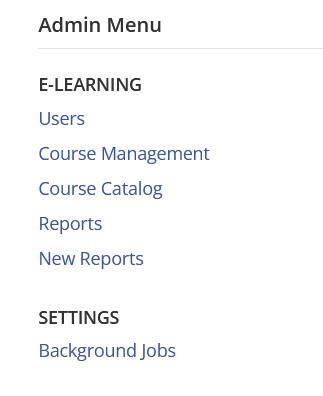
Any tips, recos would be most appreciated!

thanks

Best answer by lrnlab

hmm frustrating for sure...make sure you also give them at least view access to users and courses they need to report on.

Also, you may want to have them clear their cache, browser history etc. to clear the error...this can happen in cases where they do not log out using “sign out”.

View original

3 replies

lrnlab
Hero III
Forum|alt.badge.img+10
  • Hero III
  • Answer
  • Jan 11, 2023 5:44 PM UTC

hmm frustrating for sure...make sure you also give them at least view access to users and courses they need to report on.

Also, you may want to have them clear their cache, browser history etc. to clear the error...this can happen in cases where they do not log out using “sign out”.


  • Author
  • Novice III
  • Jan 11, 2023 5:49 PM UTC

hmm frustrating for sure...make sure you also give them at least view access to users and courses they need to report on.

Also, you may want to have them clear their cache, browser history etc. to clear the error...this can happen in cases where they do not log out using “sign out”.

Thanks Irnlab, it was indeed an issue with clearing cache! 


lrnlab
Hero III
Forum|alt.badge.img+10
  • Hero III
  • Jan 11, 2023 5:50 PM UTC

glad it was an easy fix!

